007AJ Real Estate Leads
Run a local “What’s my home worth?” site and sell every request to agents
Sellers check what their home is worth and buyers share their budget and timing. Matching local agents see the request and its score, and pay you for the contact details. You set the prices; the theme handles the rest.
Open the live demo Try a sample account
The demo is set in the made-up town of Maple Hollow. Checkout is switched off on this preview.

Five ways the site earns
Pay per request
Set a price for seller, buyer and pre-approval requests, and a different one per area if you like. Shared requests go to up to three agents (you choose the number).
Exclusive requests
An agent can pay a higher price to be the only one who gets a request.
Monthly plans
Two monthly plans with included requests each month, extra requests from the wallet, and a featured profile on the higher plan.
Territory partners
Rent one request type in one area, a city or a group of ZIP codes, for 30 days: that agent sees new requests first, for a head start you set in hours.
Featured profiles
Agents pay to sit at the top of the directory and matching area pages for 30 days.
Example: 40 requests a month, each sold to two agents at a typical request price, with five agents on a monthly plan, adds up quickly. Your results depend on your market, prices and effort.
What you get
A “What’s my home worth?” form for sellers
Sellers enter the address, property type, bedrooms, bathrooms, condition and timeline, and see a value range on the spot from a simple built-in estimator based on typical prices in each area. A valuation service of your choice can be connected later from the settings.
A buyer form with pre-approval and timing
Buyers pick the area, price range, pre-approval status, timeline and whether it is their first home. They can ask for a mortgage pre-approval call in the same step, which creates a separate referral for mortgage advisors.
A landing page for every area
Add a town with its postal or ZIP code beginnings and a typical home price, and sellers, buyers and pre-approval each get their own page for it, with structured data, a local FAQ and a sitemap entry.
An agent portal that sells
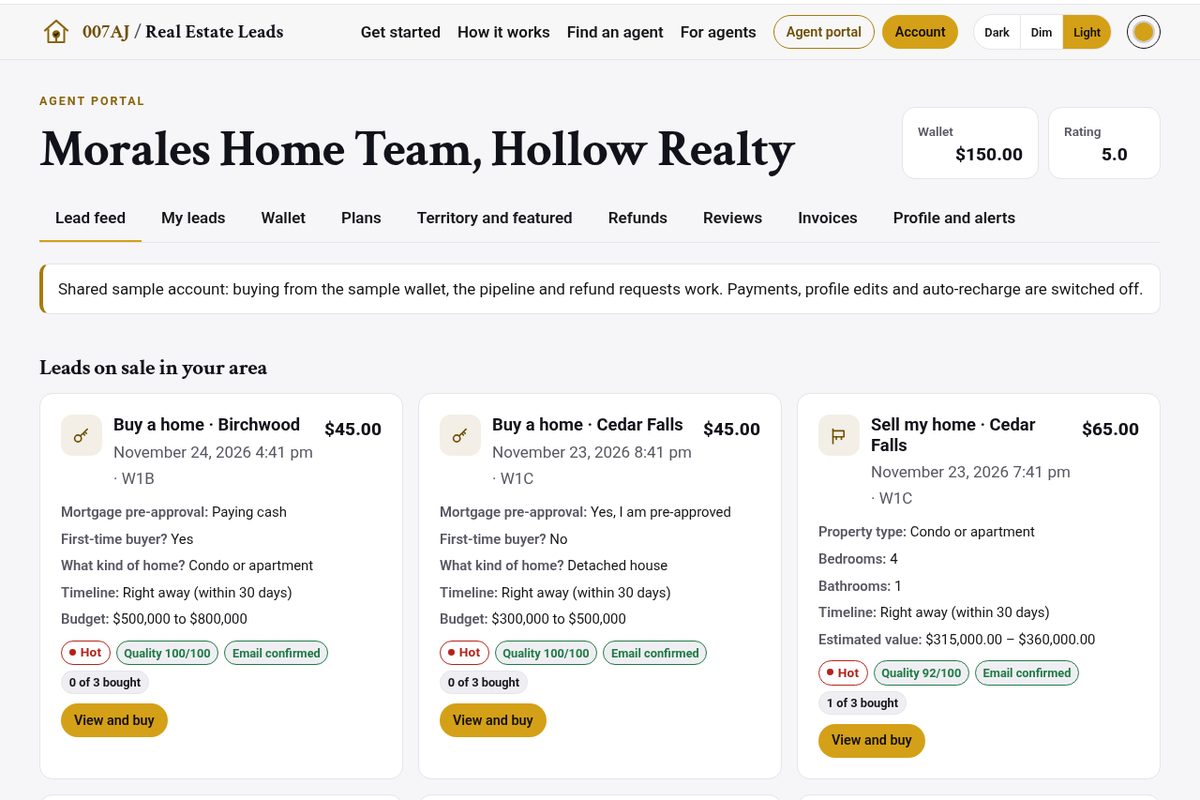
Agents and mortgage advisors choose the request types and areas they serve, see each request with a Hot, Warm or Cool score and the contact details hidden, and pay for the ones they want. A pipeline from new to closed keeps them coming back.
Wallets, auto top-ups and invoices
Agents prepay a wallet by card or wallet checkout. Purchases come out in cents with no rounding, low-balance emails nudge a top-up, and a saved card can top up on its own. Every payment gets a printable invoice.
Fair refunds, handled in one queue
A bad phone number or a fake request? Agents ask for a credit inside your refund window, you approve or decline from one screen, and the credit lands back in their wallet or plan.
Quality control on every request
Email confirmation, a lead score that weighs timeline and pre-approval, duplicate and disposable-email checks, rate limits, a hidden spam trap and timing checks. Routing rules can hold, re-price or cap how many agents get a request.
Agents see the request before they pay
- Matched by request type and by postal code beginnings or distance
- Email alerts the moment a matching request arrives
- Optional automatic claiming with a weekly cap
- Public profile with verified reviews and replies
- Pipeline from new to closed, with commission earned
Your dashboard
Analytics by request type and area
Requests, confirmations, sales, agents per request, revenue, refunds and closings, with a visit-to-request funnel and spreadsheet exports.
Pricing and routing
Base prices per request type, local prices per area, territory prices and agent limits, and simple if-this-then-that rules.
Sell to agents kit
Pitch emails, a call script, a pricing sheet and a flyer for agents, filled in with your town and prices.
A free guide for sellers and home shoppers
A designed guide for home sellers and shoppers on pricing, choosing an agent, pre-approval and offers, given away through the built-in newsletter.
Questions
- Do I need to be a real estate agent?
- The theme charges agents per request or per month, not a share of any commission, and the site says clearly that it is not a brokerage or lender. Rules on selling real estate and mortgage leads and on referral fees differ by country, state and province, so check yours before you launch.
- How do I find my first agents?
- The dashboard includes a “Sell to agents” kit: six pitch emails, a phone script with answers to common worries, a live pricing sheet, a printable flyer and a step-by-step plan for your first sales.
- What about privacy?
- Buyers and sellers tick a clear consent box for calls, texts and email. Their details are stored encrypted, shown only to the agents who pay for that request, erased after the retention period you choose, and included in the standard export and erase tools.
- Can I try it without creating an account?
- Yes. The Try page signs you in as a sample seller and home shopper, an agent who pays per request, an agent on a monthly plan or a mortgage advisor. Sample people and businesses are made up and cannot reach the dashboard or pay.
- Is everything in one theme?
- Yes. Lead forms, the home value estimate, portal, payments, analytics, newsletter, search tools, email delivery settings and backups all travel with the theme. No separate store or form add-ons are needed.
See it working
Check the value of a sample home, then sign in as an agent and claim the request.