
Track Bids, Job Costs and Progress Invoices on Your Own Computer, With No Subscription
Contractor Job & Bid Tracker Pro by 007AJ is an offline Windows 10 and Windows 11 desktop program for handymen, renovators and small builders in Canada and the US: clients and job sites, a job pipeline, bids with sections and versions, job costing (budget vs actual), change orders, progress invoices with holdback you set, deposits, milestone and time-and-materials invoices, payments, statements, a crew schedule and time clock, punch lists, a job log with photos, and reports. Records stay on your own computer. It does not take card payments and is not accounting software.
You pay once. There is no subscription, no monthly fees, no online account, and no internet needed (the internet is used only if you choose to send email from your own email account). The installer is digitally signed by the publisher, Anthony Bertucci, so Windows shows a verified publisher.
Instant download for Windows 10 and Windows 11. You get the signed installer, which you can install on your PC or run portable from a USB stick.
The promise
Pay once. No subscription. No internet needed.
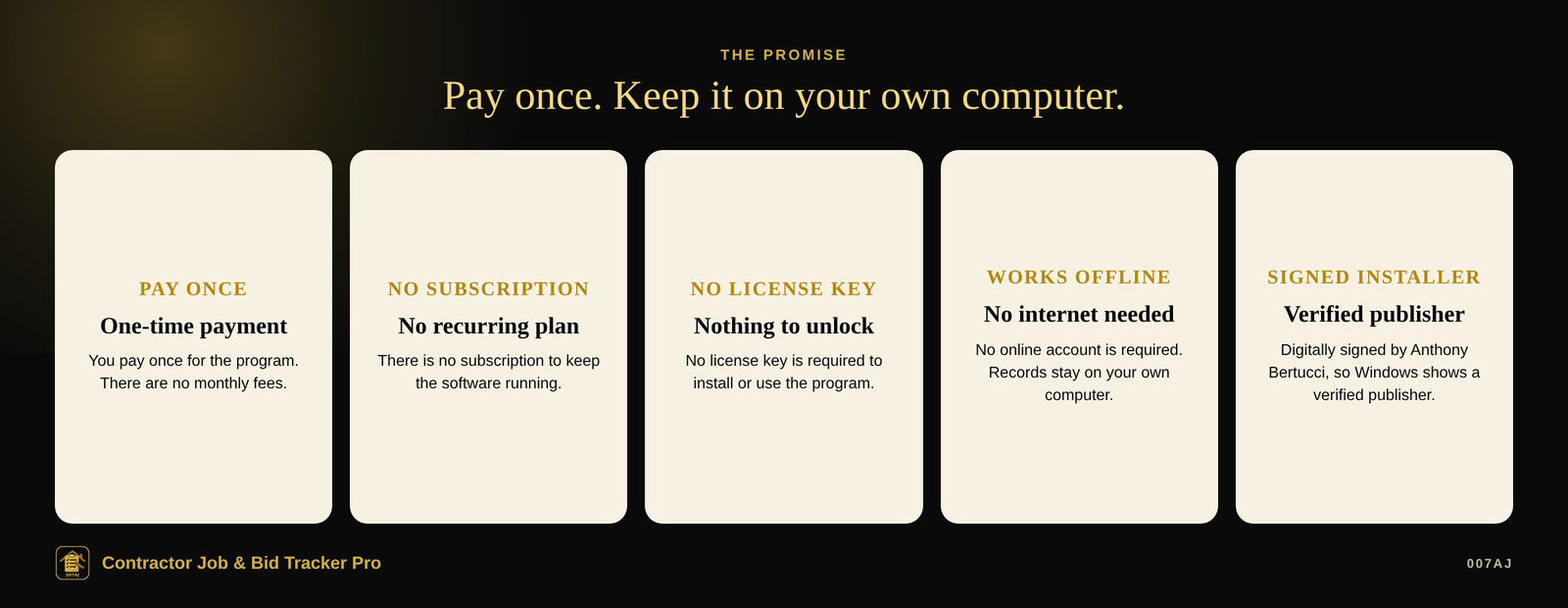
Pay once
You pay once for the program. There is no subscription and no monthly fees.
No internet needed
The program works offline. No online account is required. The internet is used only if you choose to send email from your own email account. Your records stay on your own computer.
Signed installer
The installer is digitally signed by the publisher, Anthony Bertucci, so Windows shows a verified publisher.
Main features
Bids, job costing, progress invoices and crew — on one computer
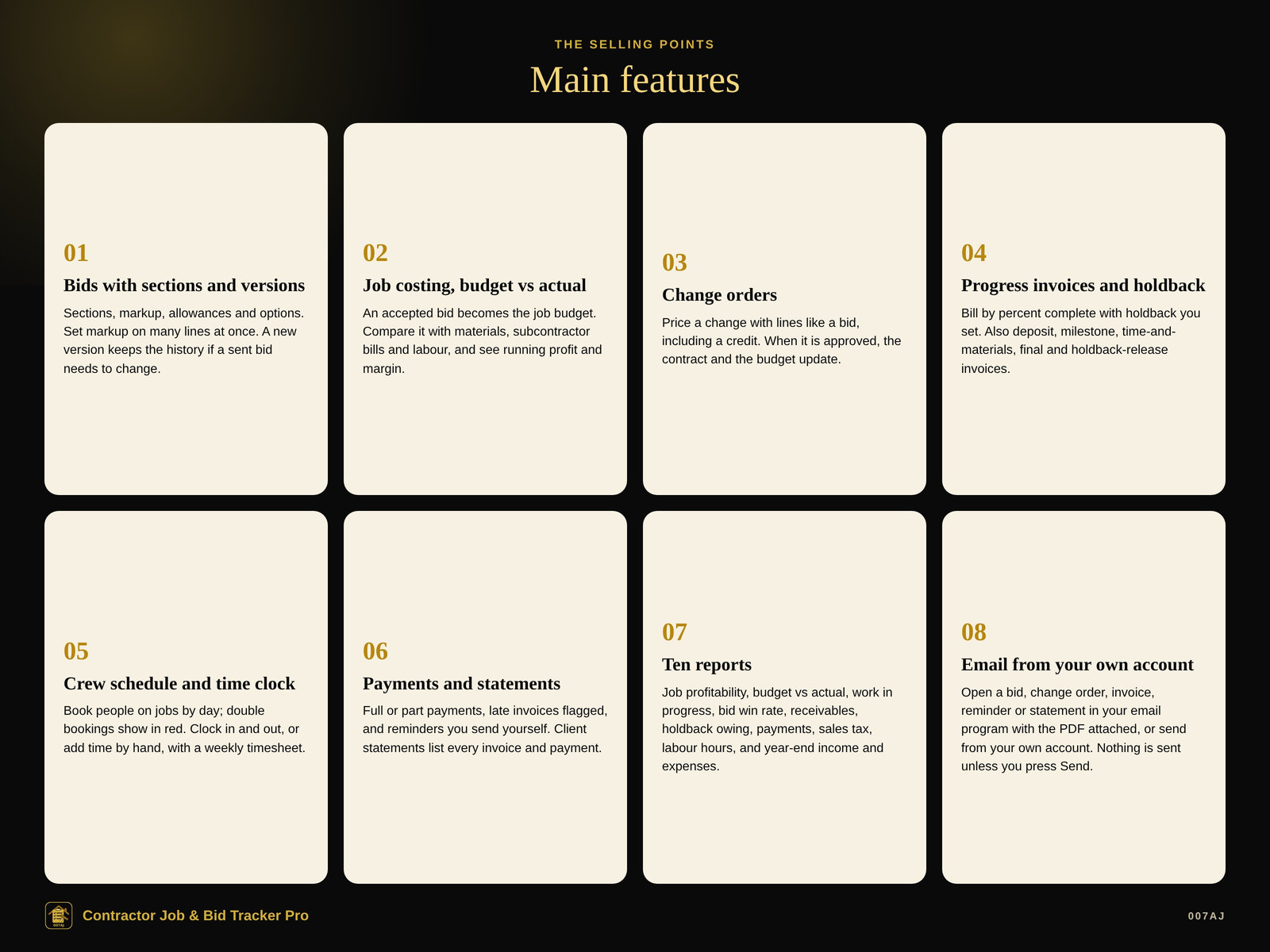
Bids with sections and versions
Start blank or from a template. Add sections and lines for labour, materials, subcontract, equipment or other, each with quantity, unit cost and markup. Mark a line as an allowance or an option. Set one markup, or the markup that hits a target margin, on many lines at once. Choose what the client sees: every line, a price per section, or the total only. If a sent bid needs to change, a new version keeps the history.
Job costing, budget vs actual
An accepted bid becomes the job budget. Record purchases, subcontractor bills and equipment rentals, and labour from time entries at each worker’s cost rate. Each job shows budget vs actual, a forecast, and running profit and margin. Phases near or over budget are flagged, and the dashboard warns you.
Change orders
Describe the change and price it with lines like a bid (use a negative line for a credit). Print, save a PDF or email it for signature. When the client approves, the contract goes up or down and the budget is updated; the change becomes its own line on progress invoices.
Progress invoices and holdback
A progress invoice lets you type the percent complete (or the dollar amount) for each phase; the program works out this period’s amount, the holdback kept and the tax. Also: deposit invoices, time-and-materials invoices, milestone invoices, a final invoice, and a holdback-release invoice. Holdback is only the math you set.
Crew schedule and time clock
Book people on jobs by day; double bookings are shown in red. Clock in and out, or add time by hand, with a weekly timesheet. Tasks and a punch list per job, and a dated job log with photos.
Payments and statements
Full or part payments, with date, method and a reference. Late invoices are flagged; send a friendly reminder from the invoice. Client statements list every invoice and payment with the balance.
Ten reports
Job profitability, budget vs actual, work in progress (over/under billing), bid win rate and pipeline, receivables aging, holdback owing, payments, sales tax, labour hours, and year-end income and expenses. Print, PDF, Excel or CSV.
Email from your own account
Open a bid, change order, invoice, reminder or statement in your email program (Outlook, Mail…) with the message filled in and attach the PDF there, or send directly from your own email account (SMTP). Nothing is ever sent unless you press Send, and nothing is ever sent automatically.
A look inside
Screenshots from the built-in sample business, with made-up names
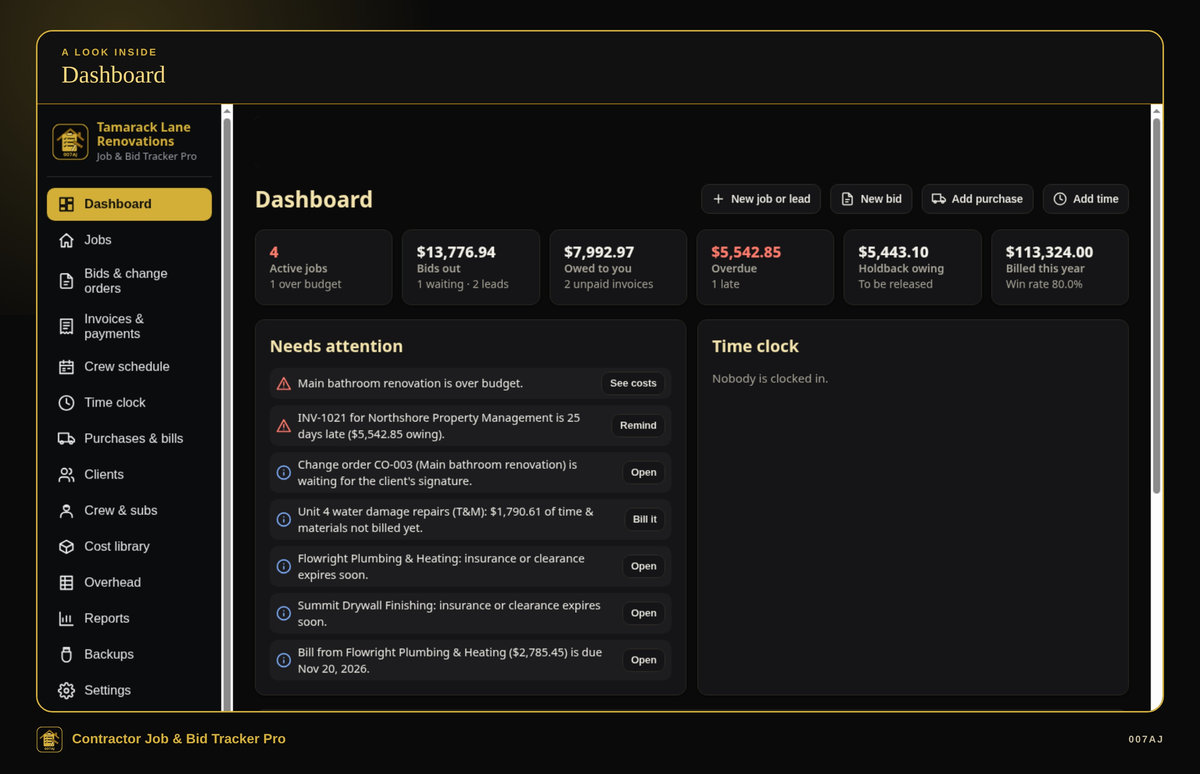
Dashboard. Active jobs, bids out, amounts owing and late, holdback still held, and a needs-attention list.
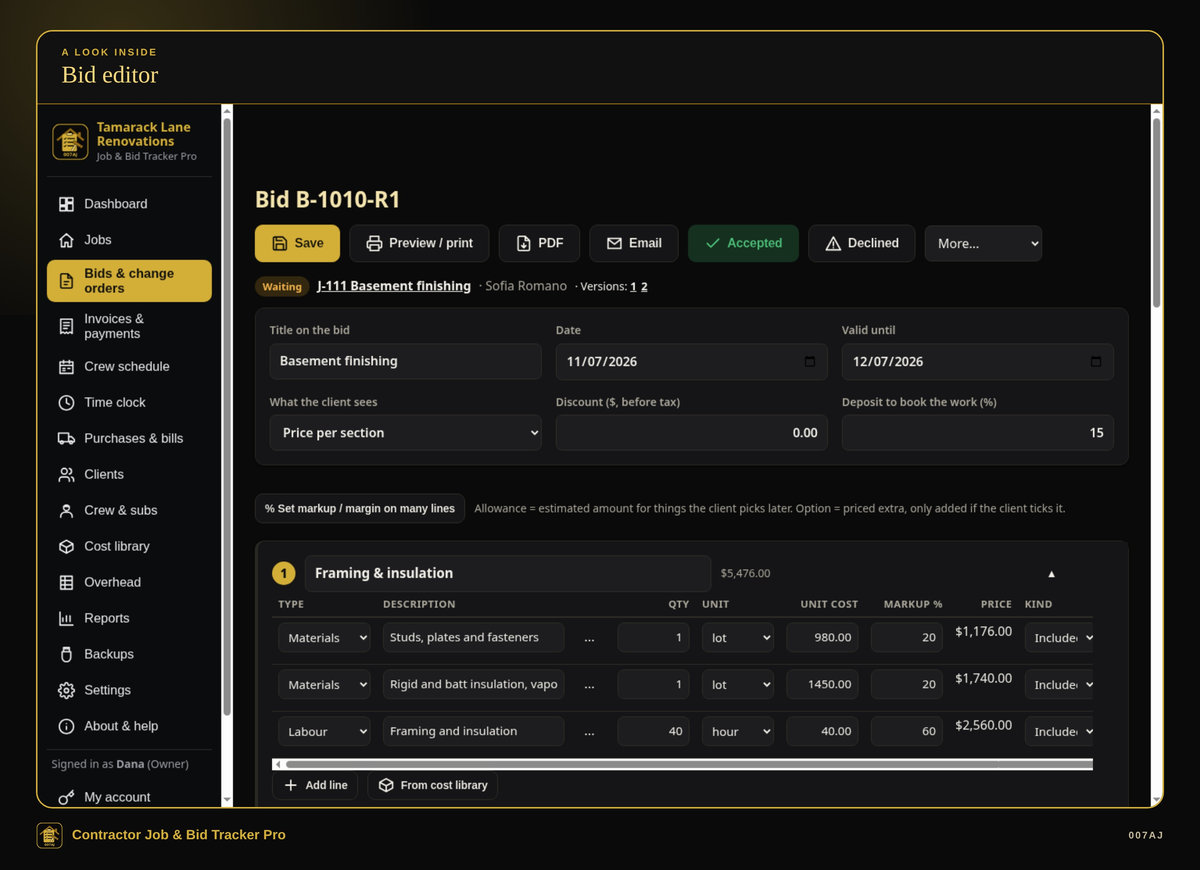
Bid editor. A bid with sections, unit cost, markup, allowances and options, and a deposit. Print, save a PDF, or email it, with a signature line for acceptance.
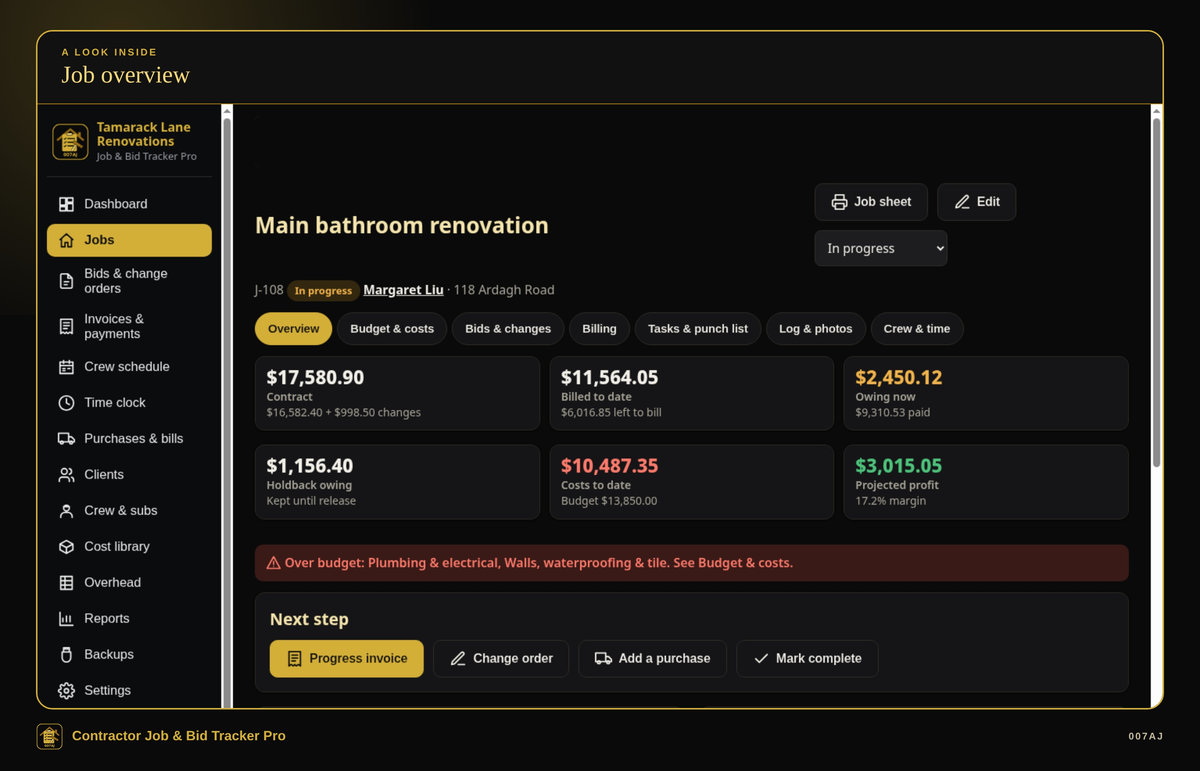
Job overview. Contract, billed, owing, holdback kept, costs vs budget, and projected profit, with an over-budget warning and next-step buttons.
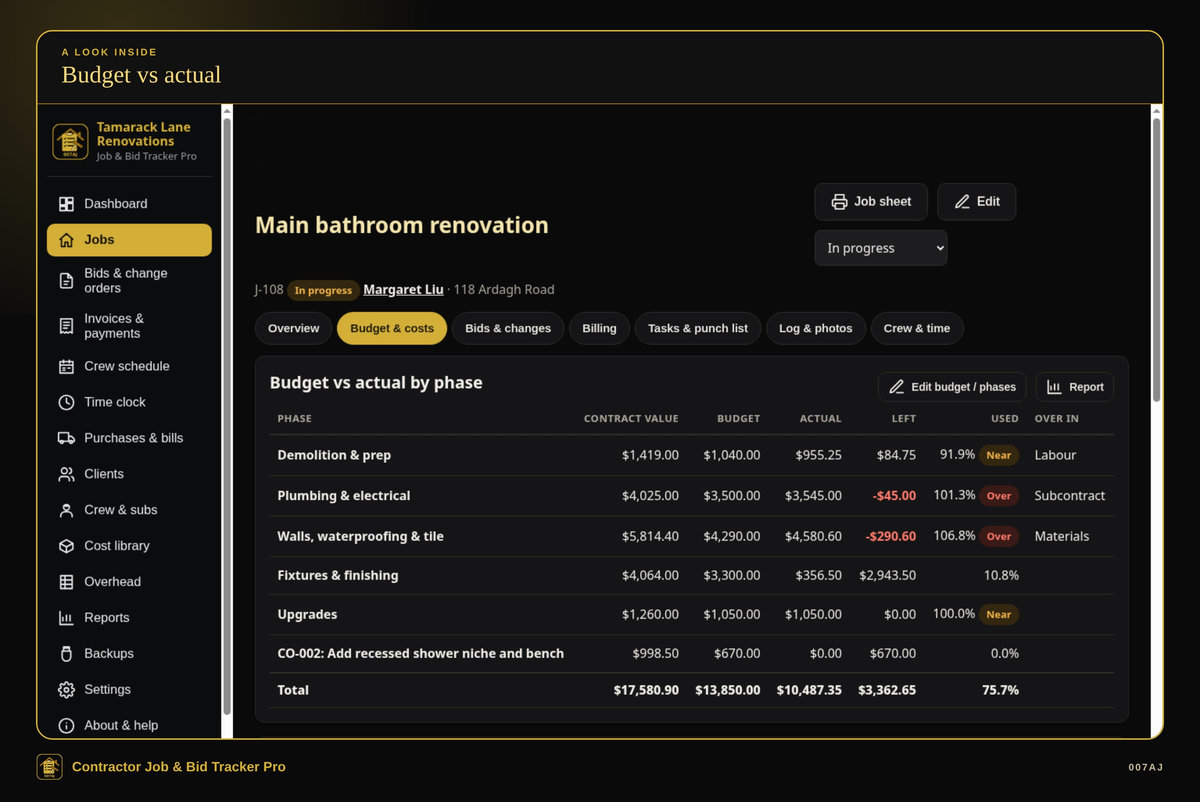
Budget vs actual. Budget versus actual by phase, with near and over flags, and a change-order line on the budget.
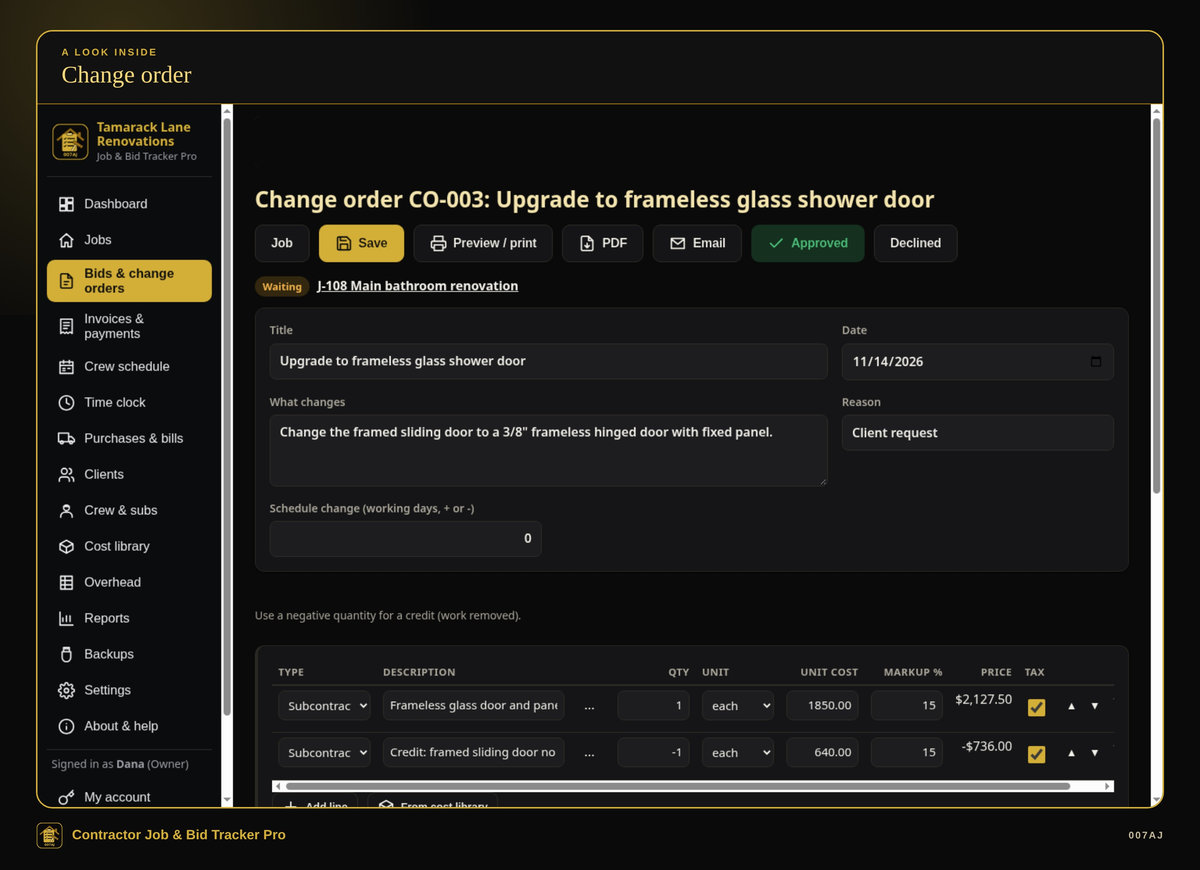
Change order. A change priced with lines, including a credit, waiting for signature.
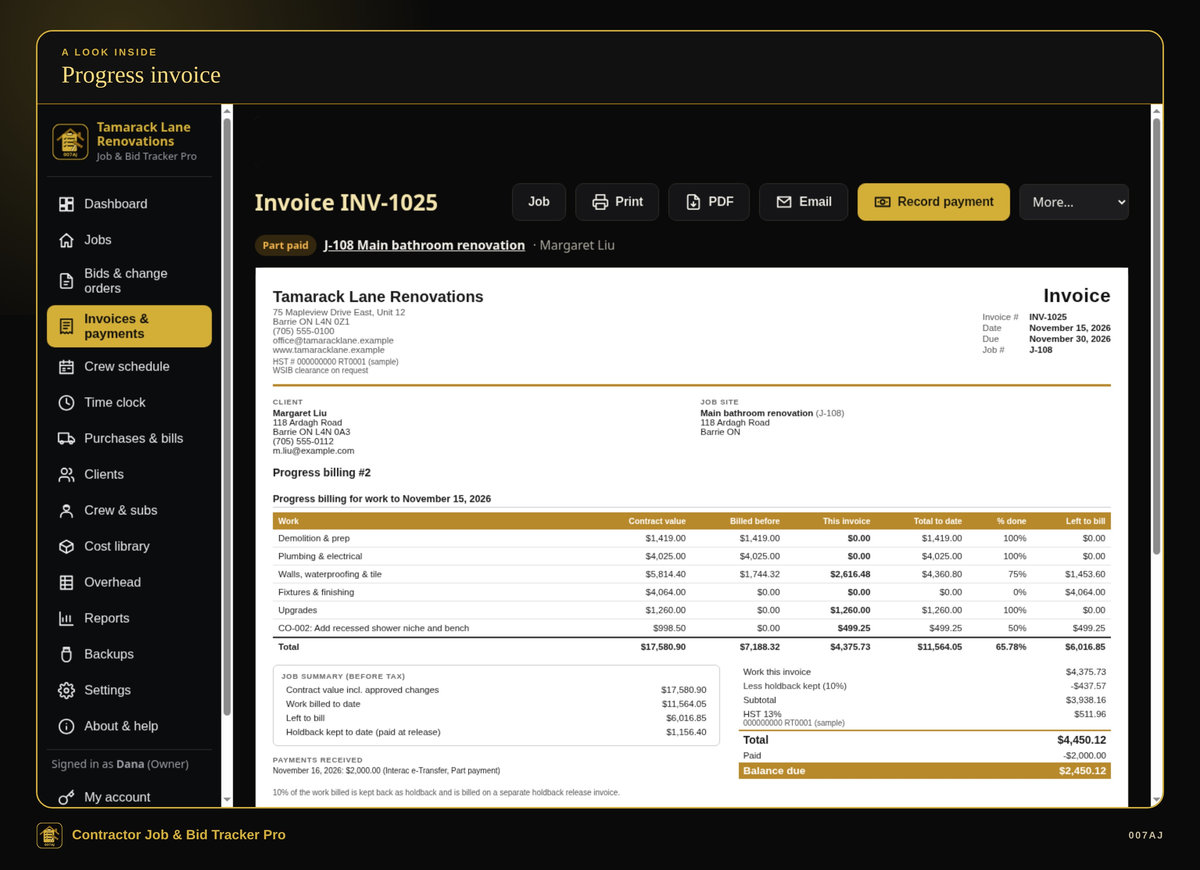
Progress invoice. A schedule of values with holdback you set, a part payment and the balance due.
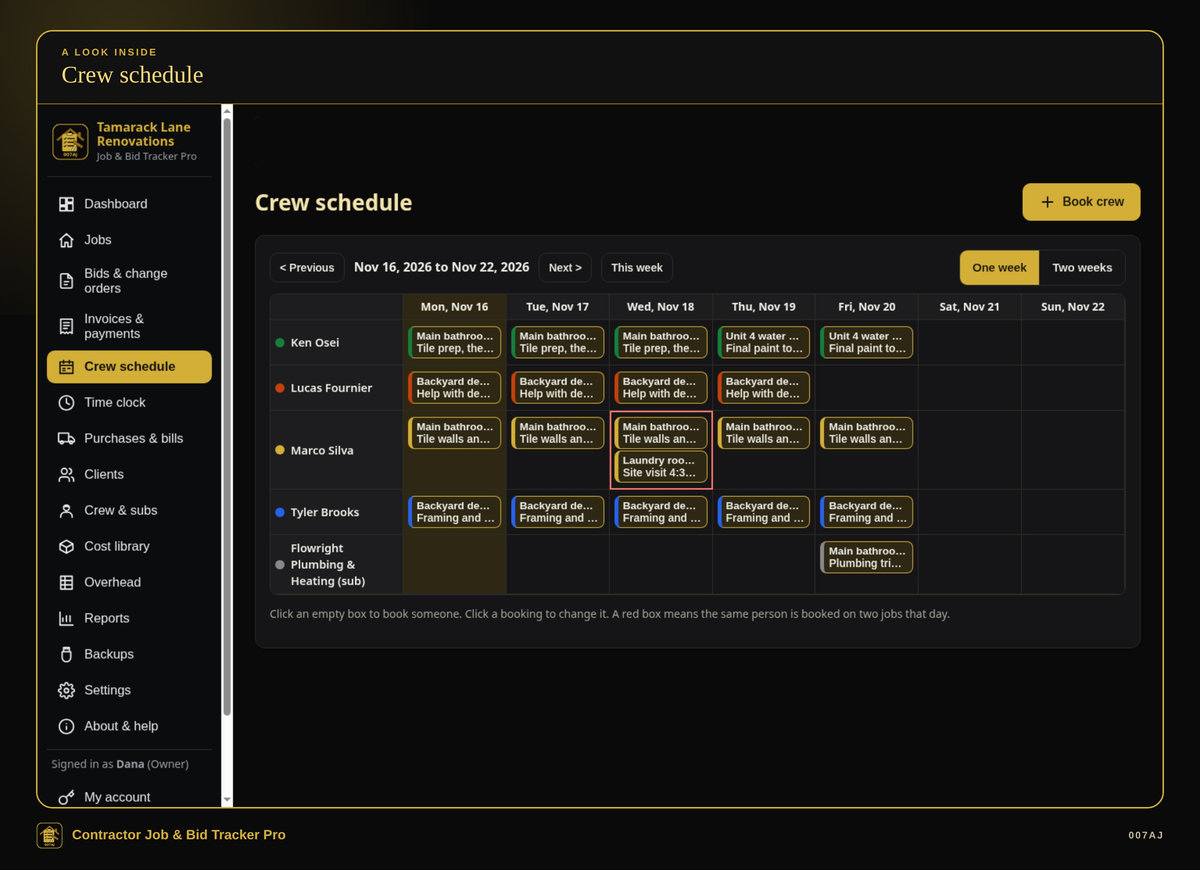
Crew schedule. A week’s bookings, including a subcontractor, with a red box where one person is booked on two jobs the same day.
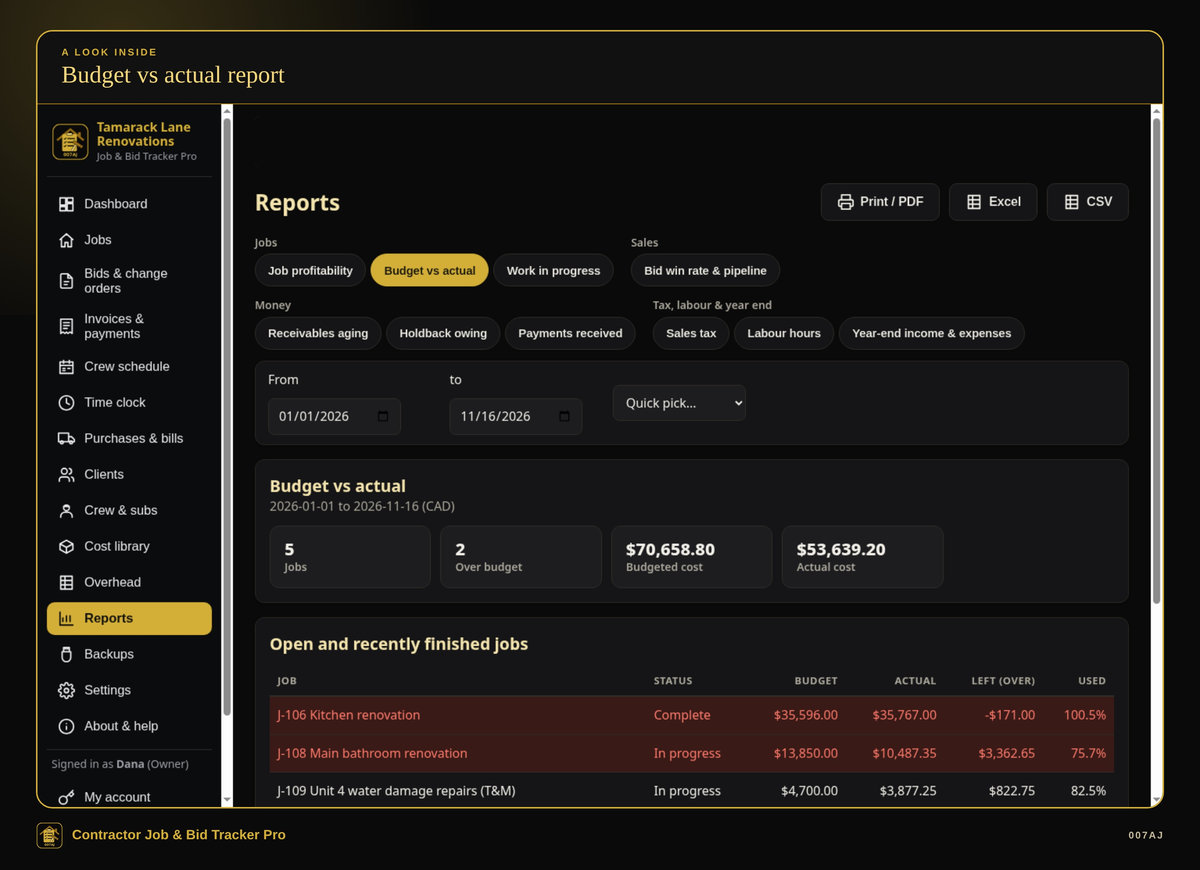
Budget vs actual report. One of ten reports, with jobs over budget highlighted.
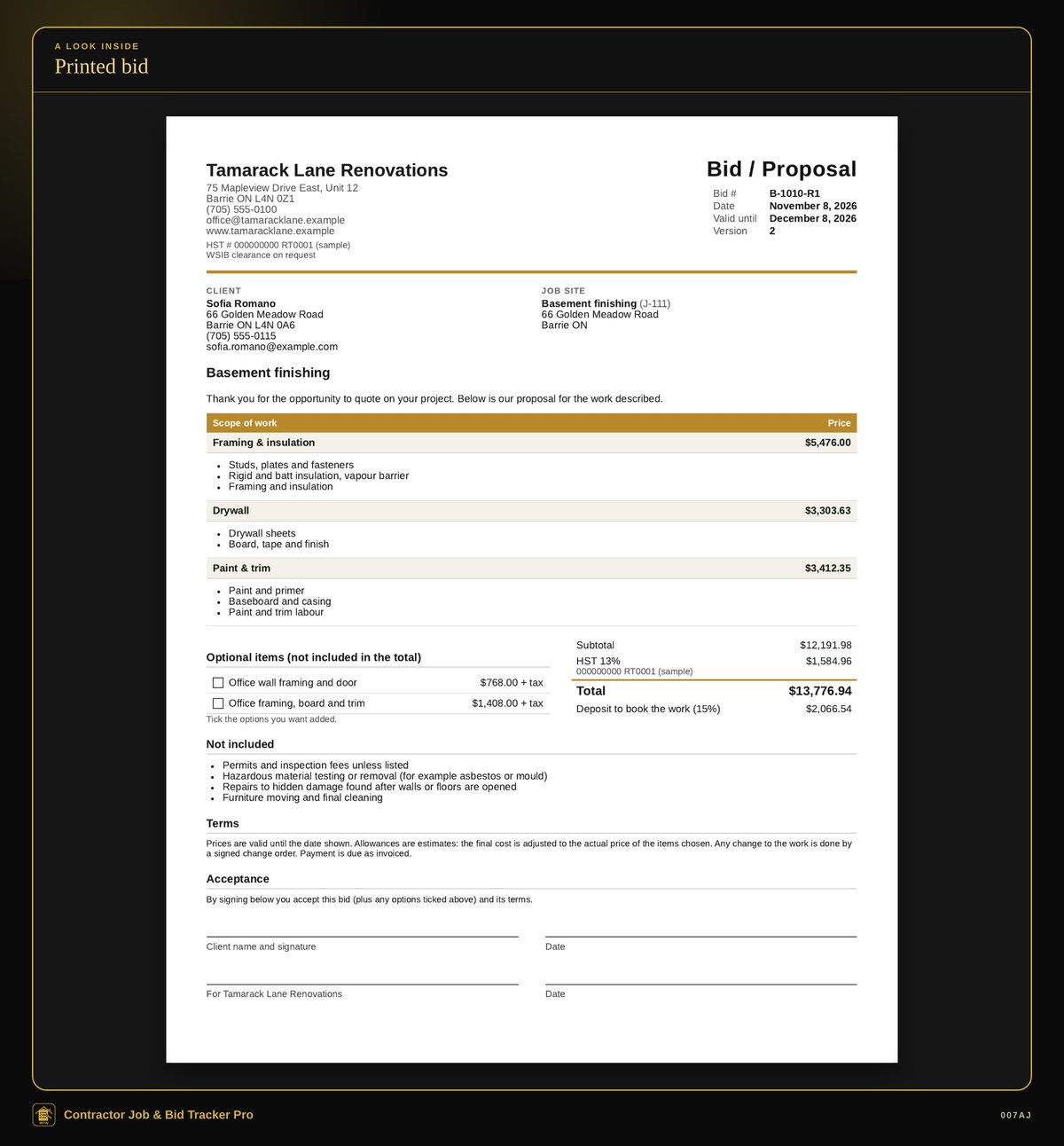
Printed bid. A printed bid priced per section, with optional items, a deposit and signature lines, with your colour and logo, on Letter or A4.
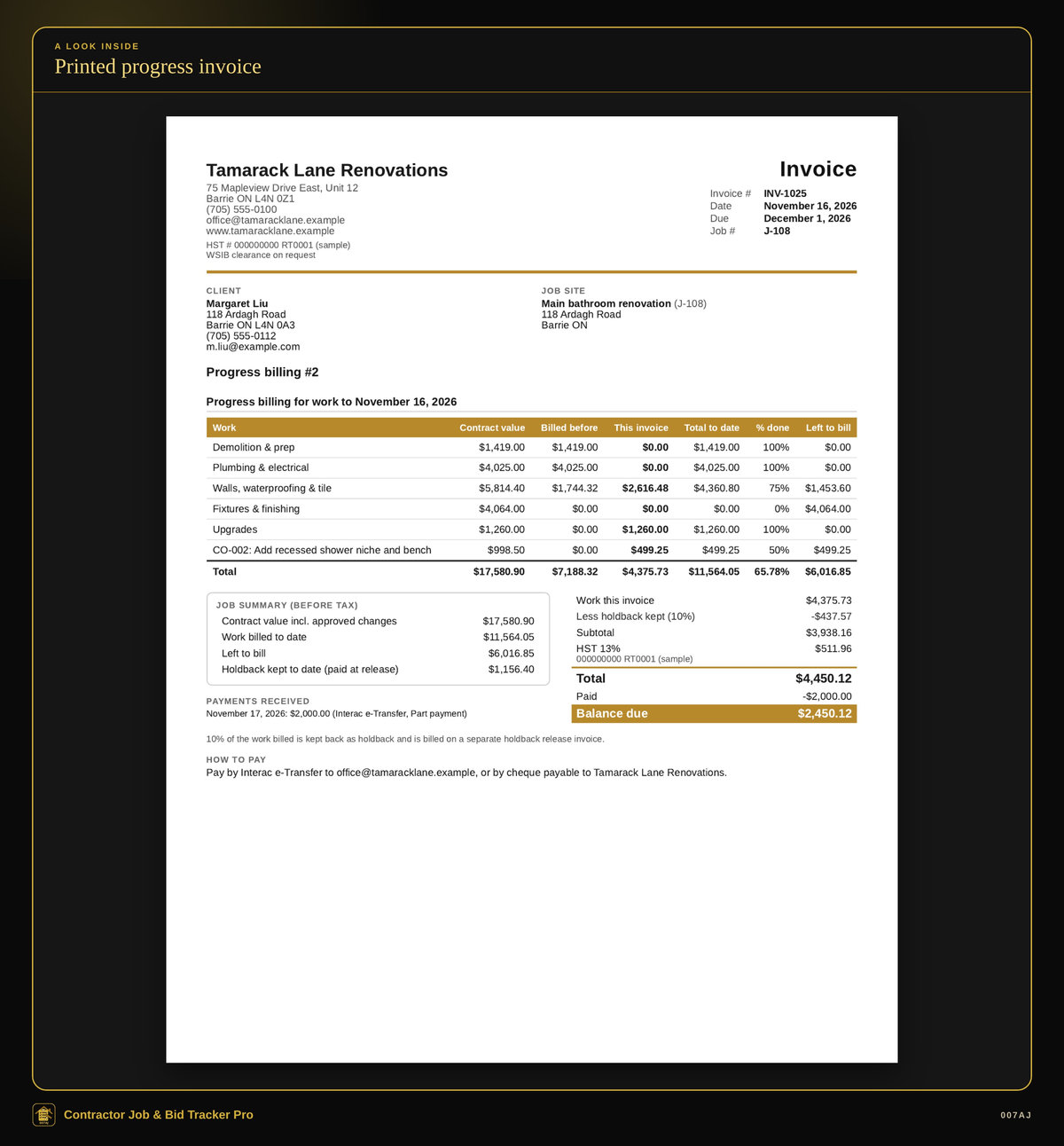
Printed progress invoice. A printed progress invoice with a schedule of values, holdback, tax and a part payment.
Core features
The day-to-day tools a contractor needs in one program
Clients and job sites
Each job belongs to a client and can have its own site address, with lockbox and site contact notes.
Job pipeline
Lead, Bidding, Bid sent, Won, In progress, On hold, Complete, Closed, or Lost (with a reason, so you can see why bids are lost). Choose fixed-price (bid) or time-and-materials billing, and the holdback % for that job. The job page has tabs for overview, budget & costs, bids & changes, billing, tasks, log & photos, and crew & time. A Next step box suggests what to do.
Bids
Start blank or from a template. Add sections (phases such as Demolition, Framing, Finishing) and lines for labour, materials, subcontract, equipment or other, each with quantity, unit cost and markup. Mark a line as an allowance (an estimate for things the client picks later) or an option (only charged if the client ticks it). Set one markup, or the markup that hits a target margin, on many lines at once. Live totals show your cost, profit, margin, tax, total and deposit. Choose what the client sees: every line, a price per section, or the total only. Print, save a PDF, or email, with a signature line for acceptance. If a sent bid needs to change, a new version keeps the history.
Cost library and bid templates
A cost library of usual costs (unit cost and markup) so you can add several lines to a bid at once. Bid templates for jobs you do often (for example bathroom, deck, basement, kitchen); save any bid as a template.
Winning the job
Mark the bid accepted and tick any options the client chose. Each section becomes a phase: its price is the phase value (schedule of values) and its costs become the phase budget by cost type. You can still adjust phases later.
Job costing
Purchases, subcontractor bills and equipment rentals for a job and phase, with tax and a receipt photo or PDF. Unpaid bills show their due date. Labour comes from time entries at each worker’s cost rate (wage plus payroll costs). Each job shows budget vs actual, a forecast, and running profit and margin. Phases near or over budget are flagged, and the dashboard warns you.
Change orders
Describe the change and price it with lines like a bid (use a negative line for a credit). Print, save a PDF or email it for signature. When the client approves, the contract goes up or down and the budget is updated; the change becomes its own line on progress invoices.
Invoicing
A progress invoice lets you type the percent complete (or the dollar amount) for each phase; the program works out this period’s amount, the holdback kept and the tax. Also: deposit invoices (applied on later invoices), time-and-materials invoices (tick unbilled time and purchases, with markup), milestone invoices, a final invoice, and a holdback-release invoice. Print or save a PDF, with your colour and logo, on Letter or A4 paper.
Holdback
Set a default percent for new jobs and a percent on each job. Choose whether tax is charged on the holdback when the work is billed or when the holdback is released. The program only does this math. A holdback owing report shows what is still being held.
Payments and statements
Full or part payments, with date, method (e-Transfer, cheque, cash, card, bank transfer / EFT, ACH / wire, financing or other) and a reference. Late invoices are flagged; send a friendly reminder from the invoice. Client statements list every invoice and payment with the balance.
Taxes and currencies
Pick a Canadian province (HST, GST, PST, QST or RST) or enter a US sales tax rate. Up to five taxes; a tax can be compound. CAD or USD, or another 3-letter currency code. Each client can have their own currency. Number and date formats for Canada (English or French), the US, the UK, Australia, Ireland and New Zealand. Reports show one currency at a time. Tax presets are a convenience, not tax advice.
Open a bid, change order, invoice, reminder or statement in your email program (Outlook, Mail…) with the message filled in and attach the PDF there, or send directly from your own email account (SMTP). Nothing is ever sent unless you press Send, and nothing is ever sent automatically.
Crew, schedule and time
Workers with cost and billing rates; subcontractors with insurance and clearance expiry dates (reminders on the dashboard). Crew schedule: book people on jobs by day; double bookings are shown in red. Time clock: clock in and out, or add time by hand. A weekly timesheet shows hours by person and job. Tasks and a punch list per job, and a dated job log with photos. Staff sign-ins do not see prices, rates or profits.
Overhead, suppliers and reports
Overhead and suppliers, plus ten reports: job profitability, budget vs actual, work in progress (over/under billing), bid win rate and pipeline, receivables aging, holdback owing, payments, sales tax, labour hours, and year-end income and expenses. Print, PDF, Excel or CSV.
Dashboard
Active jobs, bids out, what you are owed, what is late, holdback owing, billed this year, jobs over budget, unbilled time and materials, change orders waiting, insurance or clearance expiries, and bills due.
Everyday quality
Backups, a sample business you can explore first, and a PDF user guide
PIN or password sign-ins
Owner, manager and staff sign-ins with a PIN or password. Managers can do the office work (jobs, bids, billing, reports) but not settings or users. Staff can enter time, purchases, tasks and photos, and never see prices, rates or profits.
Backups and restore
Automatic daily backups (and every time the program closes), a Backup to a USB stick or folder, and restore.
Comfortable to use
Light and dark mode (gold on black by default), a larger text option, and keyboard shortcuts.
Sample business, then start fresh
A sample business (“Tamarack Lane Renovations”, all made up, a Barrie, Ontario renovation company with about a year of jobs, bids, change orders, costs, progress invoices with holdback, crew time and photos) lets you try everything first, then “Start fresh” for the real business.
Install, or run portable from a USB stick
The program installs in the usual way, or it can run portable from a USB stick with the data kept on the stick.
PDF user guide
A 14-page PDF user guide with step-by-step pictures is included.
Who it is for — and who it is not for
Built for handymen, renovators and small builders in Canada and the US
Who it is for
Handymen, renovators and small builders in Canada and the US who still write bids and track jobs in Word or spreadsheets, or are tired of paying monthly for contractor software. These are two separate 007AJ programs: Invoice & Estimate Maker Pro is a general invoicing tool for estimates, invoices, credit notes, recurring invoices, expenses and simple time tracking. Contractor Job & Bid Tracker Pro is built around a construction job — an accepted bid becomes the job budget, with job costing, change orders, progress billing and crew tracking. A tradesperson who only needs to send invoices and estimates may want Invoice & Estimate Maker Pro. A handyman or builder who needs those job tools wants this program.
Who it is not for
It is not a cash register, not a way to take card payments, and not a full bookkeeping or payroll package. It does not connect to a card terminal. It runs on one PC and does not share data over a network between PCs. It is not for Mac, Linux, Chromebook, phones or tablets.
Requirements
Windows 10 or Windows 11, 64-bit, on one PC (no network sharing between PCs). About 400 MB of free disk space. A screen of 1366×768 or larger. Optional: a printer; your own email account if you want to send mail directly from the program.
It does not take card payments and does not connect to a card terminal. It is not for Mac, Linux, Chromebook, phones or tablets.
How you receive it
A digital download, or a branded USB stick if you buy on eBay
Digital download
On 007aj.dev, Gumroad and Codester, you receive the signed Windows installer as a download.
Branded USB on eBay
The eBay version ships as a branded 007AJ USB stick. The stick includes the signed installer, a START-HERE note, and the PDF user guide.
Either way, you can install the program on your PC, or run it portable from a USB stick with the data kept on the stick.
Support
For help, email admin@007aj.com. If you bought on eBay, please message us through eBay.
A record-keeping tool
Contractor Job & Bid Tracker Pro is a record-keeping tool for bids, job costs and invoices. It is not tax, legal or accounting advice, and it is not tax filing software. It does not file taxes with the CRA or the IRS, and it does not do bookkeeping or payroll. Tax presets are a convenience, not tax advice; check rates and numbers with an accountant.
Holdback (also called retainage) is only the math you set: a default percent for new jobs, a percent on each job, and whether tax is charged when the work is billed or when the holdback is released. Holdback and related rules differ by province, state and contract; check with a lawyer or accountant. The program does not give legal advice.
Questions
Does it work offline?
Yes. No online account is required, and your records stay on your own computer. The internet is used only if you choose to send email from your own email account.
Is there a subscription?
No. You pay once. There is no subscription and no monthly fees.
What computers does it run on?
Windows 10 or Windows 11, 64-bit, on one PC. It does not share data over a network between PCs. It is not for Mac, Linux, Chromebook, phones or tablets.
How do I receive it?
If you buy the digital download on 007aj.dev, Gumroad or Codester, you receive the signed Windows installer as a download. If you buy on eBay, it ships as a branded 007AJ USB stick with the signed installer, a START-HERE note, and the PDF user guide.
Can I look around before adding my own data?
Yes. There is a sample business with made-up jobs, bids, costs and invoices, then “Start fresh” for the real business.
Does it take card payments?
No. You can record that a client paid by card (or e-Transfer, cheque, cash and other methods), but the program does not take card payments and does not connect to a card terminal.
Is this accounting or tax software?
No. It is a record-keeping tool for bids, job costs and invoices, not tax, legal or accounting advice, and not tax filing software. It does not file taxes or do bookkeeping or payroll. Tax presets are a convenience; check rates and numbers with an accountant.
What does the holdback feature do?
It is only the math you set: a percent on the job, and whether tax is charged when the work is billed or when the holdback is released. It is not legal advice. Holdback and related rules differ by province, state and contract; check with a lawyer or accountant.
Are bids or invoices emailed automatically?
No. Nothing is ever sent unless you press Send, and nothing is ever sent automatically.
Where do I get help?
Email admin@007aj.com. If you bought on eBay, please message us through eBay.
Pay once. Works offline. Built for handymen and builders.
Contractor Job & Bid Tracker Pro by 007AJ is a Windows 10 and Windows 11 program that keeps your bids, job costs and invoices on your own computer. Version 1.0.0. No subscription, no online account, and no internet needed, except if you choose to send email from your own account.
Support: email admin@007aj.com · If you bought on eBay, please message us through eBay
Contractor Job & Bid Tracker Pro is published by 007AJ (007aj.dev).
Not affiliated with Microsoft, Gumroad or Codester. Windows is a trademark of Microsoft Corporation.