
Run Your Catering From First Call to Final Invoice on Your Own Computer, With No Subscription
Catering & Party Order Manager Pro by 007AJ is an offline Windows 10 and Windows 11 desktop program for restaurants that cater and for small caterers. Take the inquiry, build a priced proposal, book the date with a deposit schedule, give the kitchen and crew clear paperwork with no prices on it, then send the final invoice. Clients, menus, guest counts, dietary needs, events, staff, rentals, deposits, payments and profit stay together in one place, on your own computer. It is not a till or point-of-sale system, an online ordering website, a payment processor or payroll software.
You pay once. There is no subscription, no monthly fees, no online account, and no internet needed. The installer is digitally signed by the publisher, Anthony Bertucci, so Windows shows a verified publisher.
Try every feature free for 14 days from first run. After the trial, you can still view, search, print and save PDFs of every document, run and export every report, and make backups. Adding or changing records, import, restore and Start fresh are turned off until you enter a one-time licence key, offline, on the Licence page (the owner sign-in does this). Your records are never locked away.
Instant download for Windows 10 and Windows 11. You get the signed Windows installer.
The promise
Pay once. No subscription. No internet needed. A 14-day trial, then a one-time licence key.
Pay once
You pay once for the program. There is no subscription and no monthly fees. The Microsoft Store download is free, with a 14-day trial; a one-time licence key is bought on this page.
A 14-day trial, then a licence key
Everything in the program works for 14 days from first run. After that, you can still view, search, print, save PDFs, run reports and make backups. Adding or changing records waits until a licence key is entered. The owner enters the key offline on the Licence page. No internet is needed to activate it.
No internet needed
The program works offline. No online account is required. Your records stay on your own computer. The program never goes online and sends nothing.
Signed installer
The installer is digitally signed by the publisher, Anthony Bertucci, so Windows shows a verified publisher.
Main features
Inquiries, proposals, events, BEOs, kitchen sheets, pack lists, deposits and reports — on one computer
Inquiries and follow-up
Record the date, guest count, event type, budget, dietary needs, lead source and next follow-up while you are still on the phone. Track every inquiry on a list or a board, from new to proposal sent, booked, completed or lost, with the reason when one is lost.
Clients and venues
Contacts, billing details, tax-exempt details, dietary notes, event history and lifetime spend for each client, with a warning when a client may already exist. Venues keep access and load-in notes, parking, kitchen facilities, room capacity and delivery zone, and your own private rooms count as venues too.
Menu library and recipes
Price by the person, piece, dozen, half or full tray, gallon or flat rate, with servings, cost, descriptions, kitchen names and optional photos. Build cost from simple recipes with yields. Dietary tags and an editable allergen list (the US major nine are included), plus reheat instructions and hold times.
Packages, rentals and staffing rules
Food, beverage and bar packages with minimum guest counts and “choose 2 mains, 3 sides” style choices. Rentals and equipment you own or rent in, with replacement charges. Staff roles with cost and bill rates, minimum hours and rules such as one server per 25 guests.
Proposal builder
The guest count sets the quantities: per-person items scale, trays round up and staffing follows your rules. Children can have their own price, and any quantity can be overridden. Offer up to three options (good, better, best), start from a saved template or copy a past event, and keep every revision. Print or save the proposal and agreement as a PDF with your logo, your terms and signature lines.
Live margin panel
While you build, the owner and manager see food, labour and rental cost, profit, margin and food cost % against your target. The owner can hide costs from managers. Staff never see prices or costs.
Calendar and conflict warnings
Month, week, day and list views with daily guest totals. Warnings when the kitchen is over its daily capacity, staff are booked twice, owned equipment runs short, or a private room is double-booked. Each event has a timeline, a guaranteed-count deadline, and cancel or postpone.
BEOs for the kitchen, the crew and the client
Each booked event gets a banquet event order with the timeline, setup, menu with quantities, dietary counts and allergy alerts, bar, rentals, staff and notes. Print kitchen and crew copies with no prices, and a client copy with prices. A “changed since last printed” warning tells you when to reprint.
Kitchen production
One prep sheet totals every item across the day’s events, grouped by station and scaled by recipe yield. The shopping list groups ingredients by supplier, with optional on-hand amounts taken off. Print item labels with allergens, reheat instructions, and made-on and use-by dates.
Pack lists and delivery
Pack lists come from the event’s rentals and your templates for each service style, with Packed, Loaded and Returned ticks. Missing or broken items can be added to the final invoice. The delivery sheet lists each stop with its time window, contact, driver, vehicle and departure and arrival temperatures that you type in.
Staffing, not payroll
Assign staff to events with call times, print staff sheets and a weekly schedule, track food-handler certificate expiry, enter actual hours for labour cost, and export hours as CSV for your payroll.
Deposits, invoices and payments
An editable deposit schedule, deposit requests, a final invoice that picks up the final guest count and extras, receipts, refunds, credit notes, overdue balances and client statements. Record payments you already took by cash, cheque, card on your own terminal or transfer. The program does not process payments.
Twelve reports
Event profit (estimate against actual), sales by month, service style, lead source and client, upcoming events, lead conversion, deposits, A/R aging, payments, sales tax, top menu items and packages, staff hours, rental losses and a client list. Every report prints, saves as PDF and exports to Excel or CSV.
Import and export
Bring clients and menu items in from a CSV file, with a preview before anything changes. Export lists to Excel or CSV, events to an .ics calendar file, and invoices and payments to a CSV for your accountant. Copy the email text and save the PDF, then send it from your own email program.
A look inside
Screenshots from the built-in sample business, with made-up names
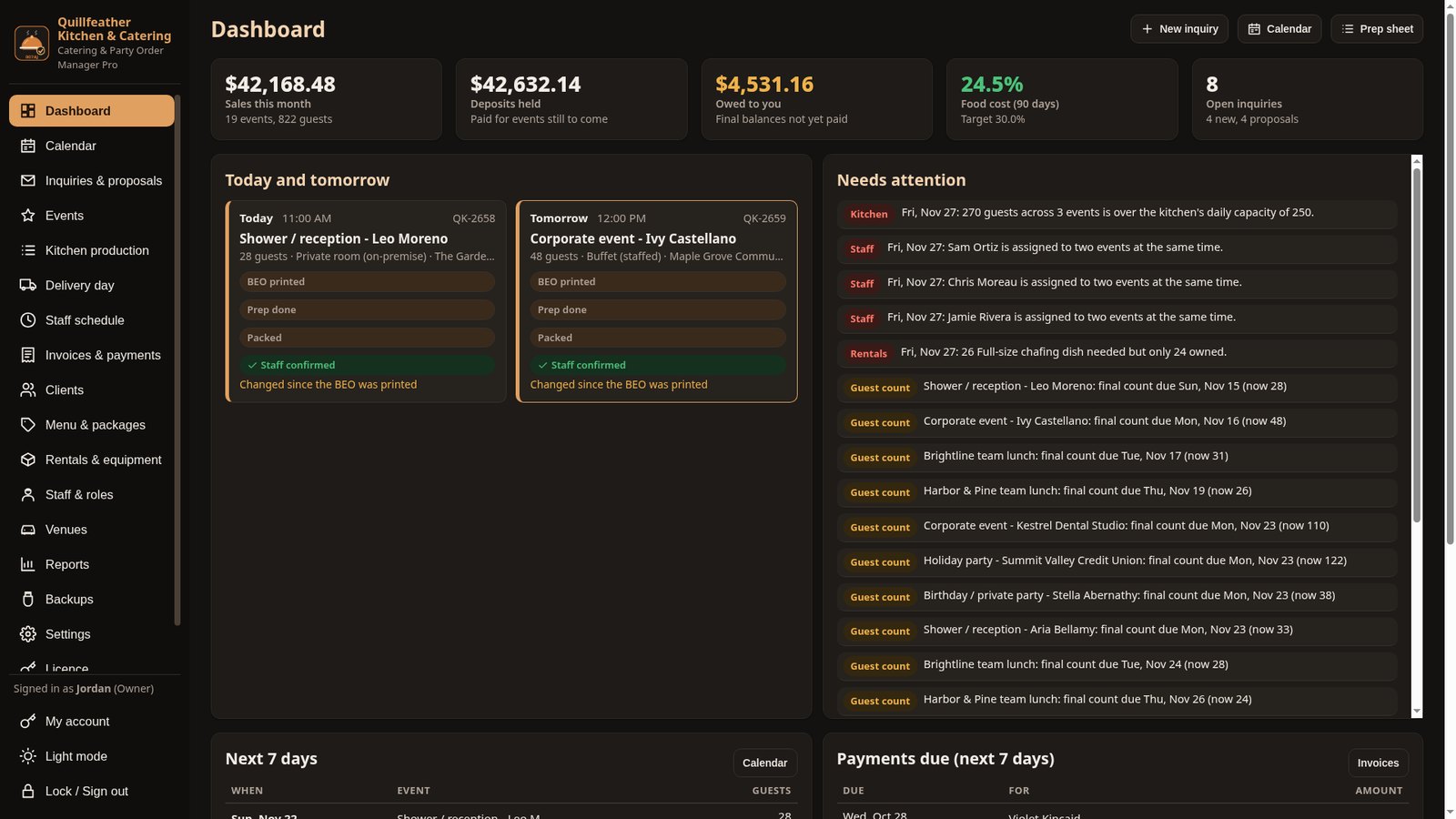
Dashboard. Today’s and tomorrow’s events with the ready checklist, conflicts and counts due, and this month’s sales (sample business; made-up names).
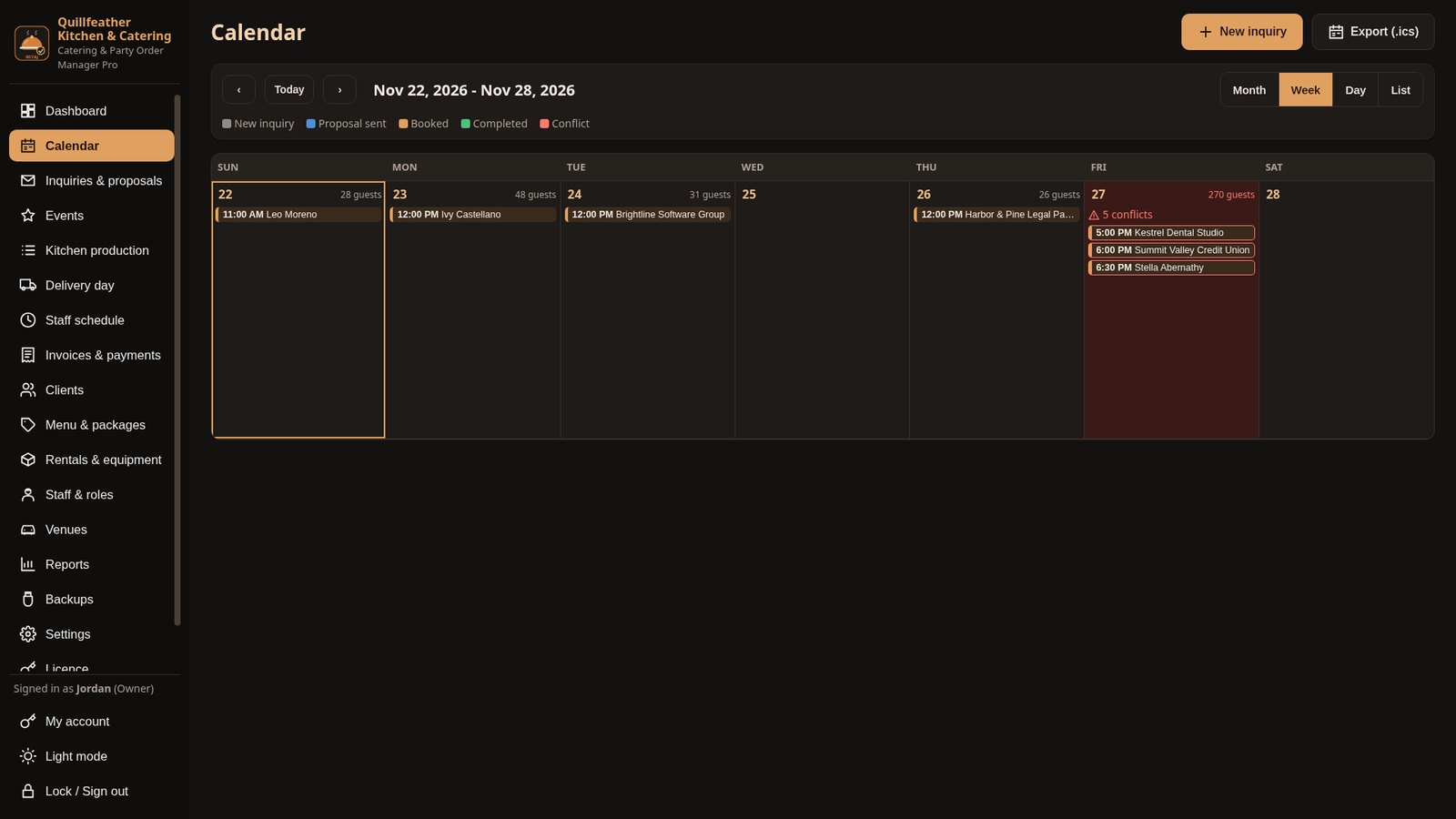
Calendar. A busy day with three events and conflict warnings for kitchen capacity, staff and equipment (sample business).
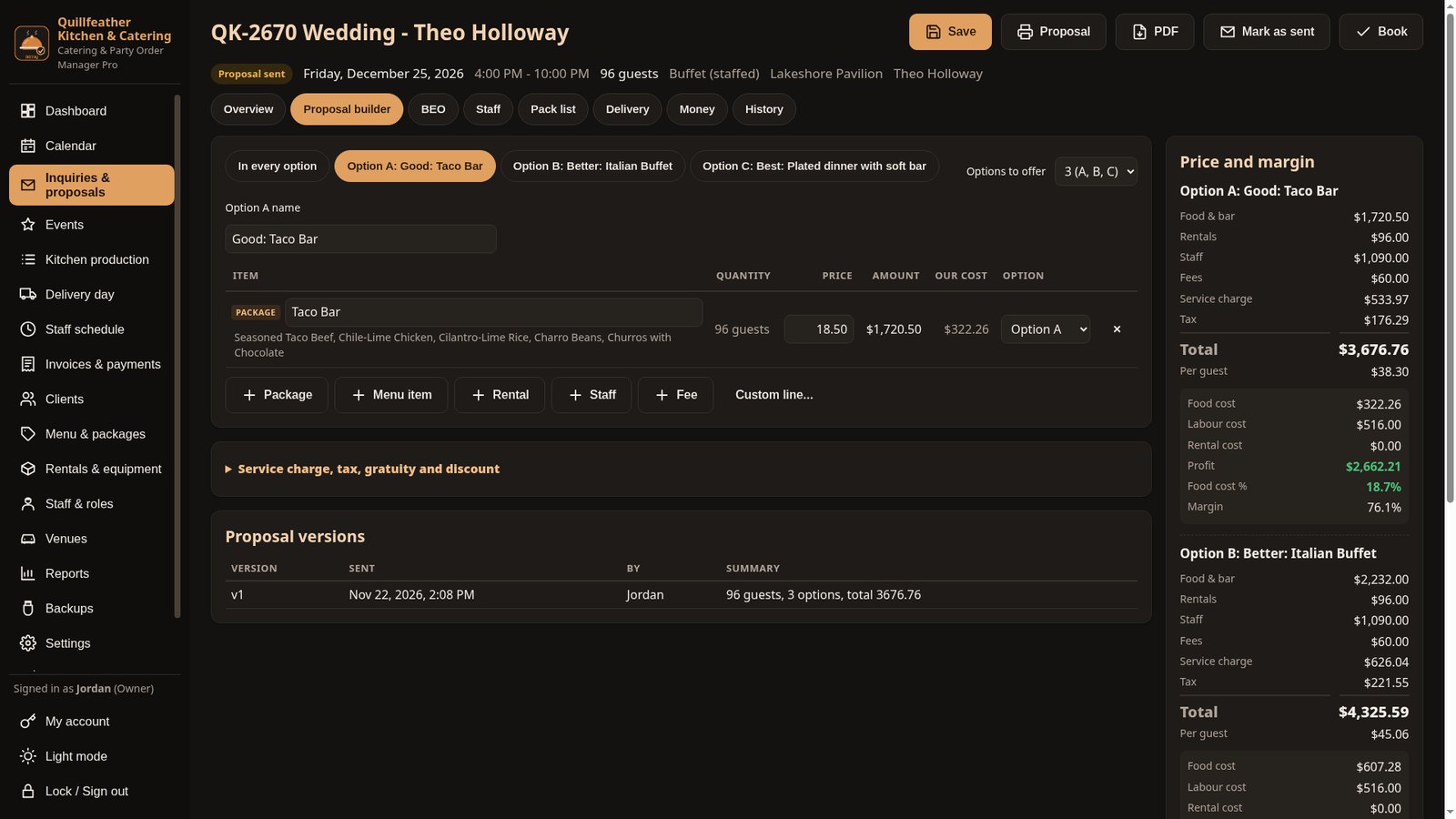
Proposal builder. Three options with the live price and margin panel and food cost % against the target (sample business).
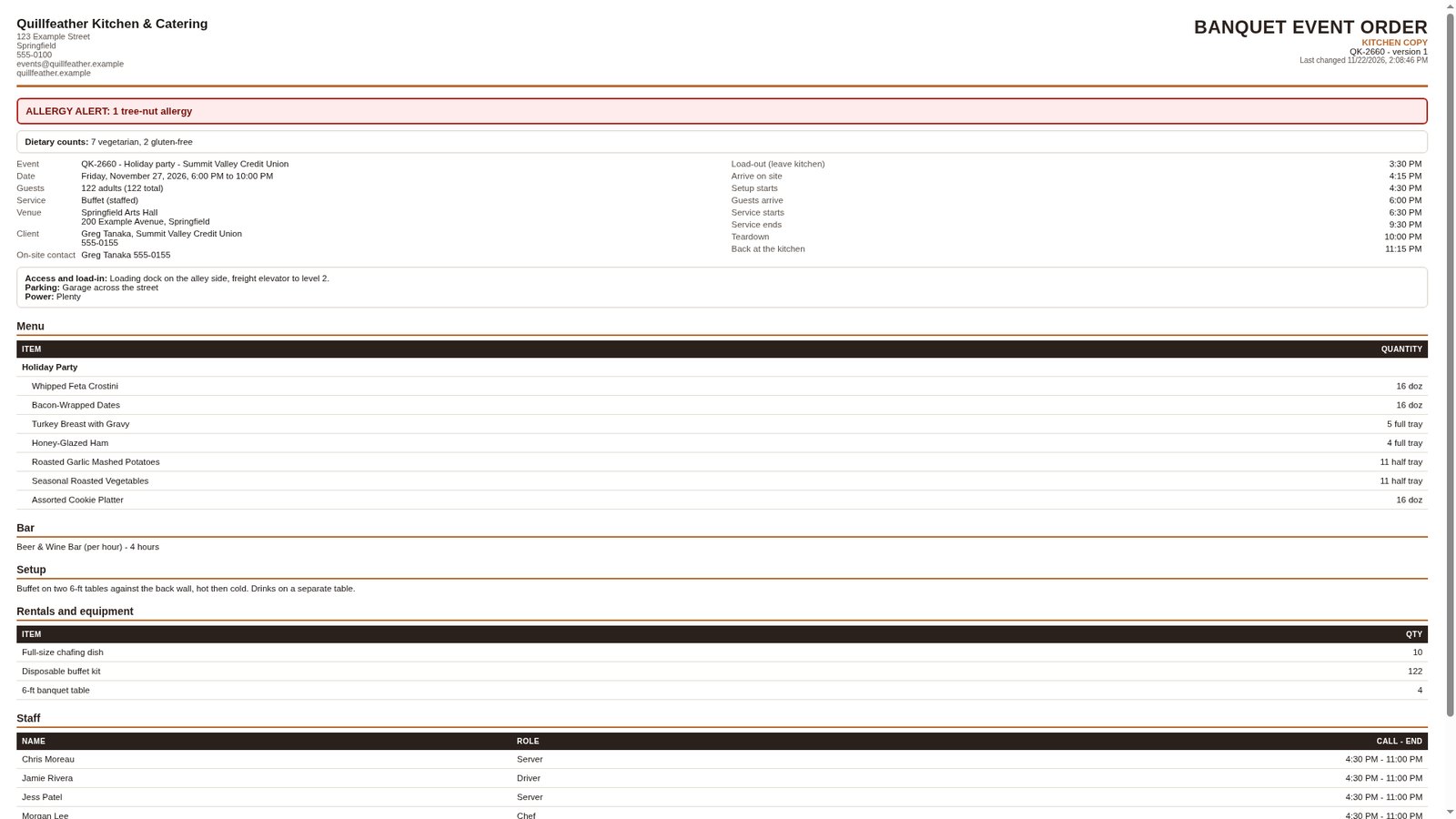
BEO, kitchen copy. Timeline, menu with quantities, allergy alert, rentals and staff, with no prices (sample business).
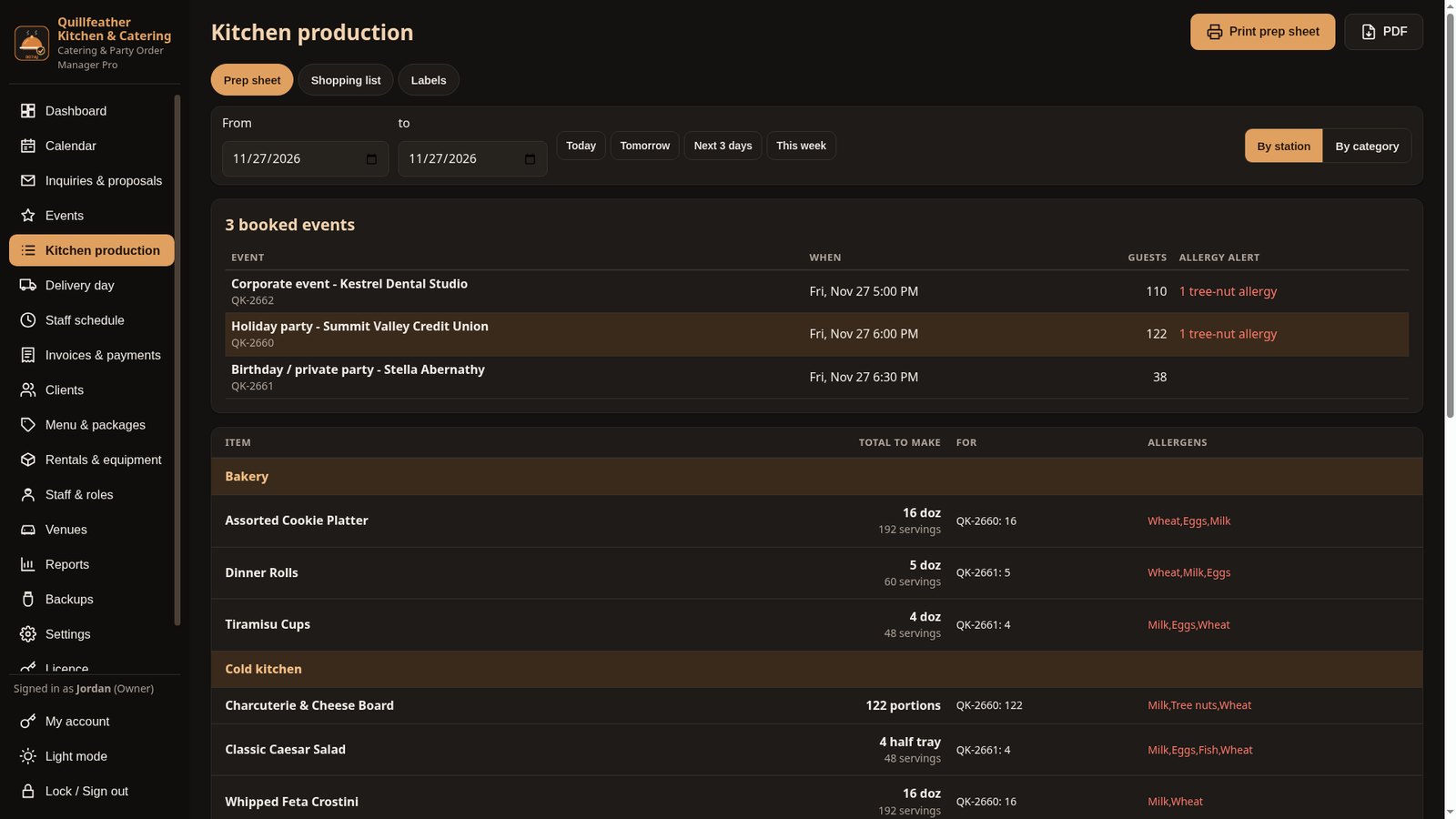
Prep sheet. Everything to make for the day’s events, totalled and grouped by station (sample business).
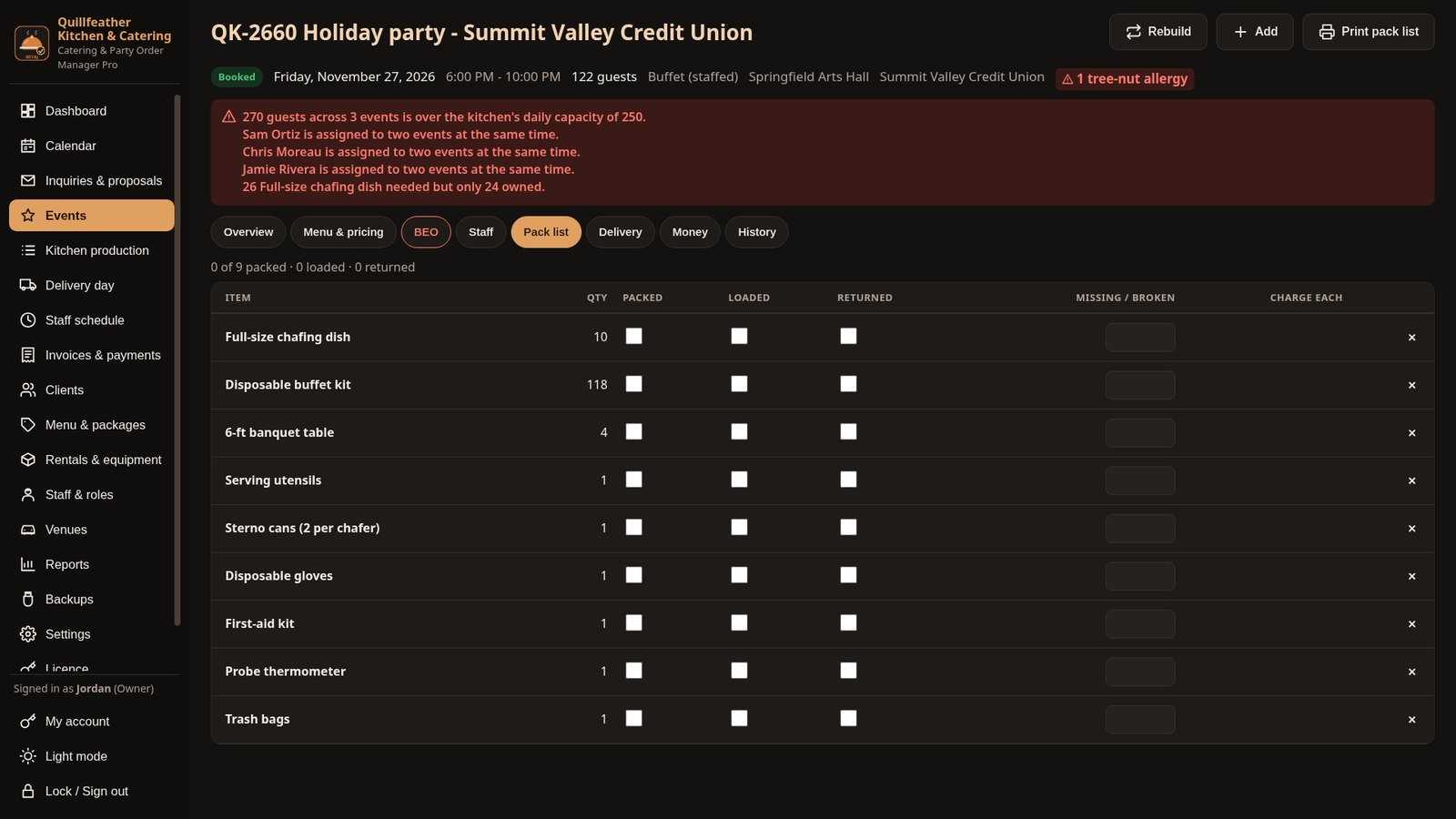
Pack list. Packed, Loaded and Returned ticks, with missing or broken items and replacement charges (sample business).
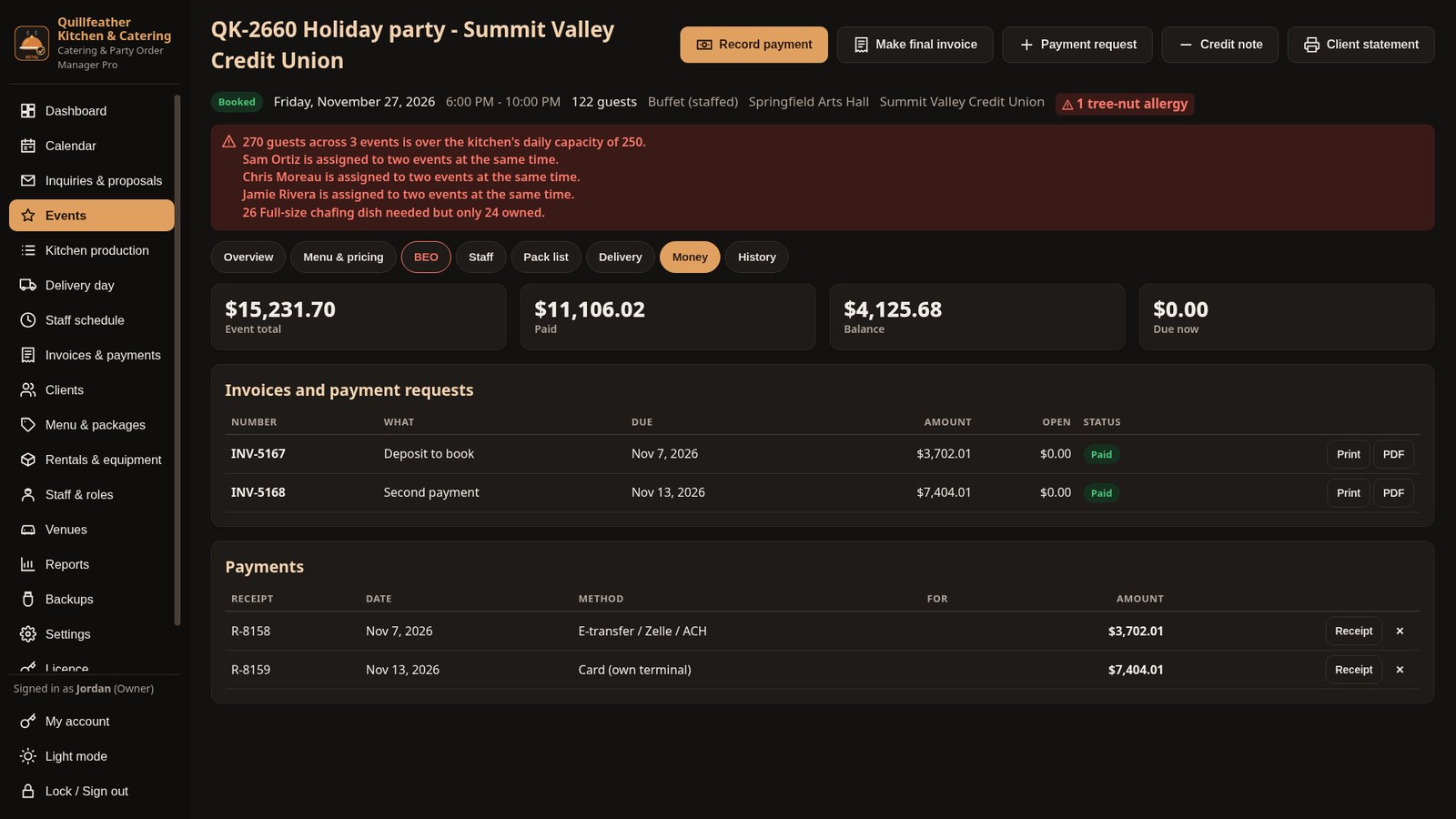
Money. Deposit requests, payments, the balance and the final invoice for an event (sample business).
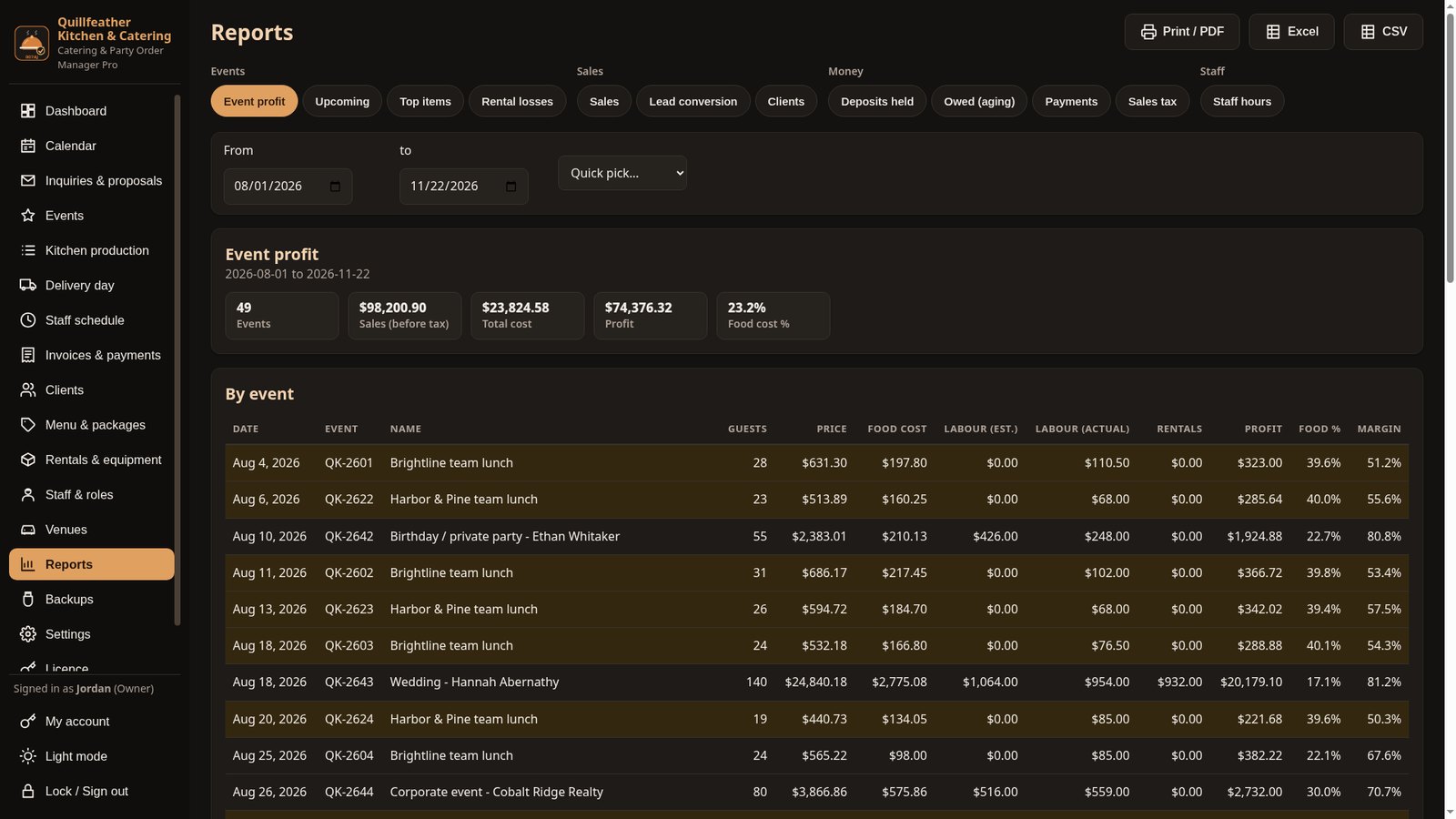
Event profit report. Price, food, labour and rental cost, profit and food cost % per event, ready to print, save as PDF or export (sample business).
Everyday quality
Owner, manager and staff sign-ins
Sign in with a PIN or password. Managers handle inquiries, proposals, events, invoices and reports. Staff see the calendar, kitchen and crew BEOs, prep sheets, pack lists and delivery sheets, with no prices or costs. A visible Switch user button, an optional inactivity lock, and an owner-only log of who changed guest counts, prices, payments and deletions.
Backups built in
Automatic daily backups and a backup every time the program closes (the last 30 are kept), Backup now, Backup to USB or a folder, a second backup folder that gets a copy of every backup, and an owner-only restore with a preview.
Easy on the eyes
Dark mode (copper on charcoal) and light mode, a larger text option and keyboard shortcuts.
Try it on a sample business first
“Quillfeather Kitchen & Catering” is made up, with 60 menu items, packages, 25 rentals, staff, venues, 40 clients and four months of events plus upcoming bookings. Explore everything, then choose Start fresh for your real business.
Simple to install
Installs for your Windows user with no administrator password, and uninstalls from Windows Settings like any other app.
Who it is for — and who it is not for
Who it is for
Independent restaurants taking party trays, private-room bookings, office lunches and holiday parties; small full-service and drop-off caterers; bakeries and delis; food trucks that do events; and small banquet halls with in-house food. It fits best when one to three people handle the office side and you run up to about 40 events a month, and you are using paper order books, Word BEOs or spreadsheets today, or are tired of paying monthly for catering software.
Who it is not for
It is not a till or point-of-sale system, not an online ordering website, not a payment processor, not an e-signature service and not payroll software. It runs on one PC and does not share data over a network between PCs or sync to the cloud. It is not for Mac, Linux, Chromebook, phones or tablets.
Requirements
Windows 10 or 11, 64-bit, one PC (no network sharing between PCs), about 400 MB of free space, and a screen of 1366 × 768 or bigger (1024 × 700 works). Optional: a printer and label sheets.
How you receive it
- Download it free from the Microsoft Store and use everything for 14 days, then buy a licence key on this page.
- Or buy the licence key on this page and download the signed Windows installer straight away. The key is emailed to you and shown on your receipt page.
Support
Email admin@007aj.dev. eBay buyers, please message us through eBay.
A record-keeping tool
Catering & Party Order Manager Pro keeps your catering records and paperwork. Dietary tags, allergen flags and temperatures are what you enter; it is not a food-safety or allergen certification, and you remain responsible for checking menus and labels. Taxes are worked out from the rates you set; it is not tax or accounting advice. It does not take card payments, run online ordering or collect e-signatures.
Questions
Is this a subscription?
No. You pay once for a licence key. There are no monthly fees and no online account.
What happens after the 14-day trial?
Your records stay readable. You can still view and search everything, print or save PDFs of every document, run and export every report, export the calendar, and make backups. Adding and changing records waits until the owner enters a licence key.
Can my kitchen staff see prices?
No. Staff sign-ins see the calendar, the kitchen and crew BEOs, prep sheets, pack lists and delivery sheets, but no prices, costs or billing. The owner decides whether managers see costs and margins.
Can it take payments or online orders?
No. You record payments you already took (cash, cheque, card on your own terminal, or transfer). There is no online ordering, no card processing and no e-signature. Proposals and agreements print with signature lines.
Does it work on more than one computer?
It runs on one PC and keeps its data on that PC. It does not share data over a network or sync to the cloud. Backups can go to a USB drive or a second folder.
How do I enter a licence key?
Open Catering & Party Order Manager Pro and sign in as the owner. Click Licence in the left menu, paste the whole key (it starts with CPO1-) and click Activate. No internet is needed. If you move to a new computer, restore your backup there and enter the same key.
What computers does it run on?
Windows 10 or Windows 11, 64-bit, on one PC. It is not for Mac, Linux, Chromebook, phones or tablets.
Can I look around before adding my own data?
Yes. Choose “Explore the demo” on first start to load a made-up restaurant and catering business with events in every stage, then choose Start fresh for your real business.
Where do I get help?
Email admin@007aj.dev.
Pay once. Works offline. Built for restaurants that cater, caterers, bakeries and delis.
Catering & Party Order Manager Pro by 007AJ is a Windows 10 and Windows 11 program that keeps your catering records on your own computer. Built with input from several local restaurants. Version 1.0.0. No subscription, no online account, and no internet needed. A 14-day trial, then a one-time licence key.
Support: email admin@007aj.dev
Catering & Party Order Manager Pro is published by 007AJ (007aj.dev).
Not affiliated with Microsoft. Windows is a trademark of Microsoft Corporation.