
Keep Track of Your Stock on Your Own Computer, With No Subscription
Inventory & Stock Manager Pro by 007AJ is an offline Windows 10 and Windows 11 desktop program for keeping track of stock: items with SKU, barcode, photos and shelf or bin locations; stock in every location (warehouse, shop, van, second branch); stock in, out, transfers and adjustments with reasons and a full history; scanning with any USB barcode scanner; barcode and QR labels; suppliers and purchase orders with receiving; a reorder list; full and cycle stock counts; lots and expiry dates; and reports. Records stay on your own computer. It is not accounting or point-of-sale software.
You pay once. There is no subscription, no monthly fees, no online account, and no internet needed. The installer is digitally signed by the publisher, Anthony Bertucci, so Windows shows a verified publisher.
Try every feature free for 14 days from first run. After the trial, viewing, look-ups, printing, PDF/Excel/CSV reports, labels and backups still work. Adding or changing records, import, restore and Start fresh are turned off until you enter a one-time licence key, offline, on the Licence page (the owner sign-in does this). Your records are never locked away.
Instant download for Windows 10 and Windows 11. You get the signed Windows installer.
The promise
Pay once. No subscription. No internet needed. A 14-day trial, then a one-time licence key.
Pay once
You pay once for the program. There is no subscription and no monthly fees. The Microsoft Store download is free, with a 14-day trial; a one-time licence key is bought on this page.
A 14-day trial, then a licence key
Everything in the program works for 14 days from first run. After that, you can still view, look up, print, run reports, print labels and make backups. Adding or changing records, import, restore and Start fresh wait until a licence key is entered. The key is entered offline on the Licence page, while signed in as the owner. No internet is needed to activate it.
No internet needed
The program works offline. No online account is required. Your records stay on your own computer. The program never goes online and sends nothing.
Signed installer
The installer is digitally signed by the publisher, Anthony Bertucci, so Windows shows a verified publisher.
Main features
Items, stock in every location, scanning, purchase orders, counts, lots and reports — on one computer
Items with SKU, barcode, photos and a bin in each location
Name, SKU (made for you if left blank), barcode (UPC/EAN or your own), category, unit (each, box, pack, case, kg, m, roll and more), cost, selling price and margin, main supplier and the supplier’s part number, reorder point and reorder quantity, photos, and a bin or shelf in each location.
Stock in every location
Keep stock in a warehouse, a shop counter, a service van or a second branch. Record stock in, stock out, transfers between locations and adjustments with a reason (damaged, expired, lost, theft, found, correction) and a reference such as an invoice or job number. Every change is kept in the movement history with who and when. Stock cannot go below zero unless you allow it.
Quick scan
Plug in any USB or Bluetooth barcode scanner that types like a keyboard. Look up an item, or scan a list for stock in, stock out or a transfer, then save it all at once. It beeps on a match, and an unknown barcode can become a new item on the spot.
Barcode and QR labels
30, 10 or 4 labels per sheet on Letter or A4, Code 128 or UPC/EAN barcodes or QR codes, with or without the price and bin, any number of copies, and “start at label” for half-used sheets.
Suppliers and purchase orders
Purchase orders go from draft to ordered, partly received and received (or cancelled). Print or save the order as a PDF. Late orders are flagged. Receive what actually arrived; the rest stays on order, and the average cost updates.
Low-stock alerts and a reorder list
Items at or below their reorder point are flagged. The reorder list suggests quantities and makes one draft purchase order per supplier in one click.
Stock counts
Full counts of a location, or quick cycle counts of one category or of the items not counted for the longest time. Print a count sheet that hides the expected numbers, or count with a scanner. See the differences and their value before you press Finish.
Lots and expiry dates
For food, chemicals, adhesives, batteries or medicine, track lot numbers and use-by dates. The oldest-expiring stock is used first automatically, and an “expiring soon” list shows what to sell or write off.
Reports you can print or export
Stock valuation (at cost and at selling price), stock movement, low stock, dead stock, top movers, expiring lots, purchases by supplier and count variance. Every report prints, saves as PDF and exports to Excel or CSV.
Import from a spreadsheet
Bring your items in from a CSV file, with a preview before anything changes and an option to update prices and costs for items you already have.
Dashboard
Stock value, items low or out, open purchase orders, lots expiring, the last 8 weeks in and out, and the latest movements.
A look inside
Screenshots from the built-in sample business, with made-up names
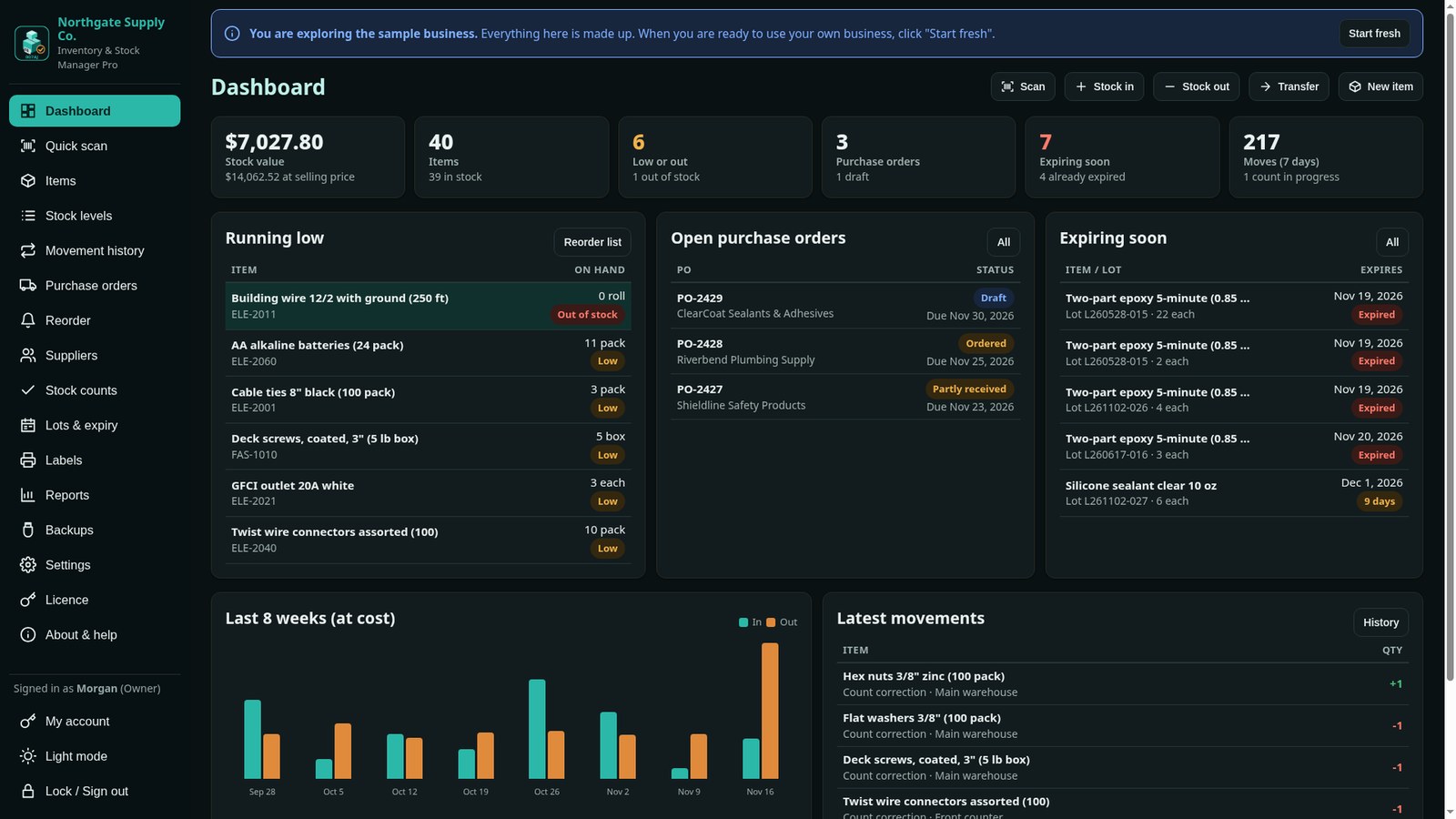
Dashboard. Stock value, items running low, open purchase orders, lots expiring soon and the latest movements (sample business; made-up names).
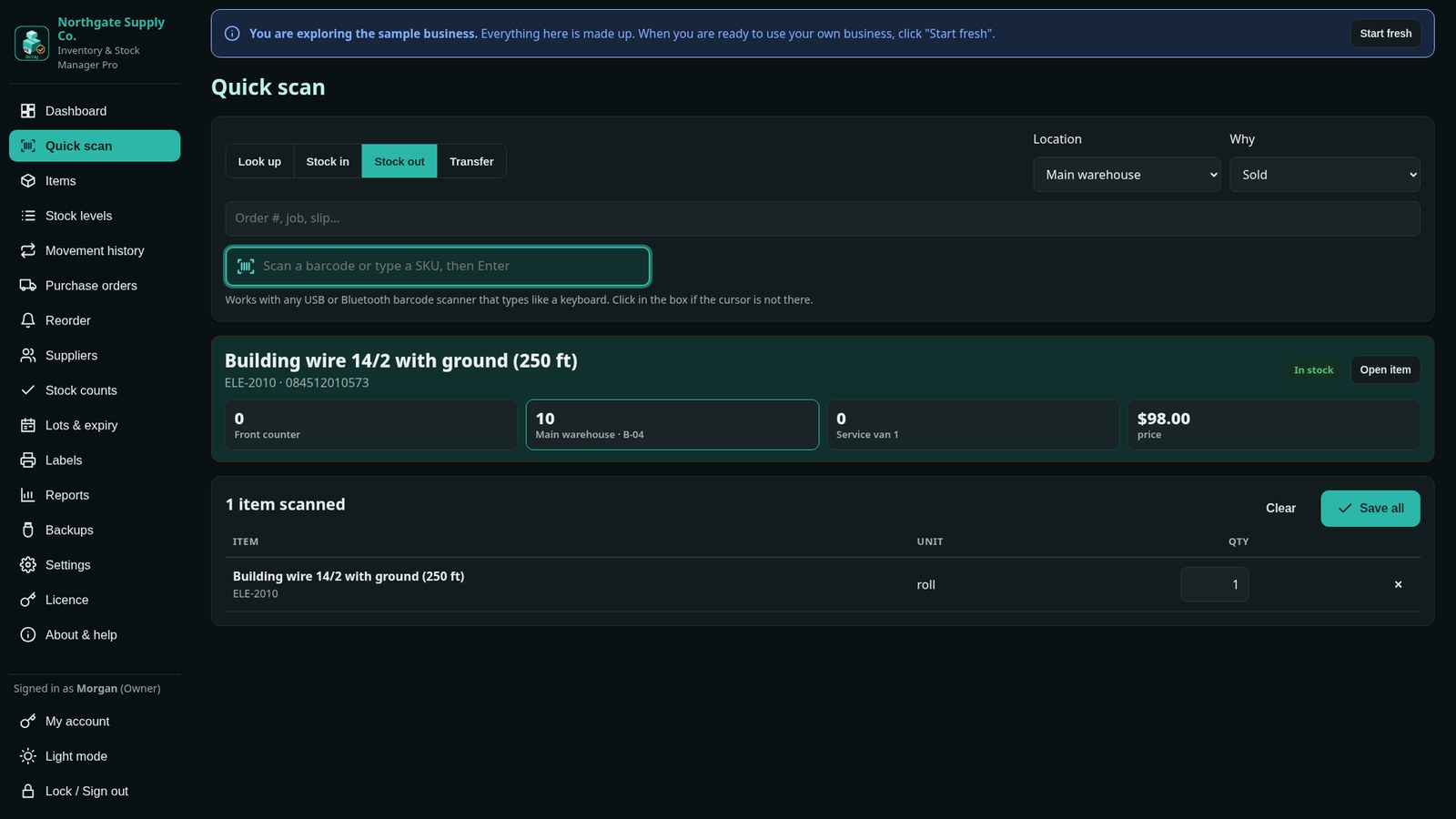
Quick scan. Scan a list with a USB barcode scanner for stock in, stock out or a transfer, then save it all at once (sample business).
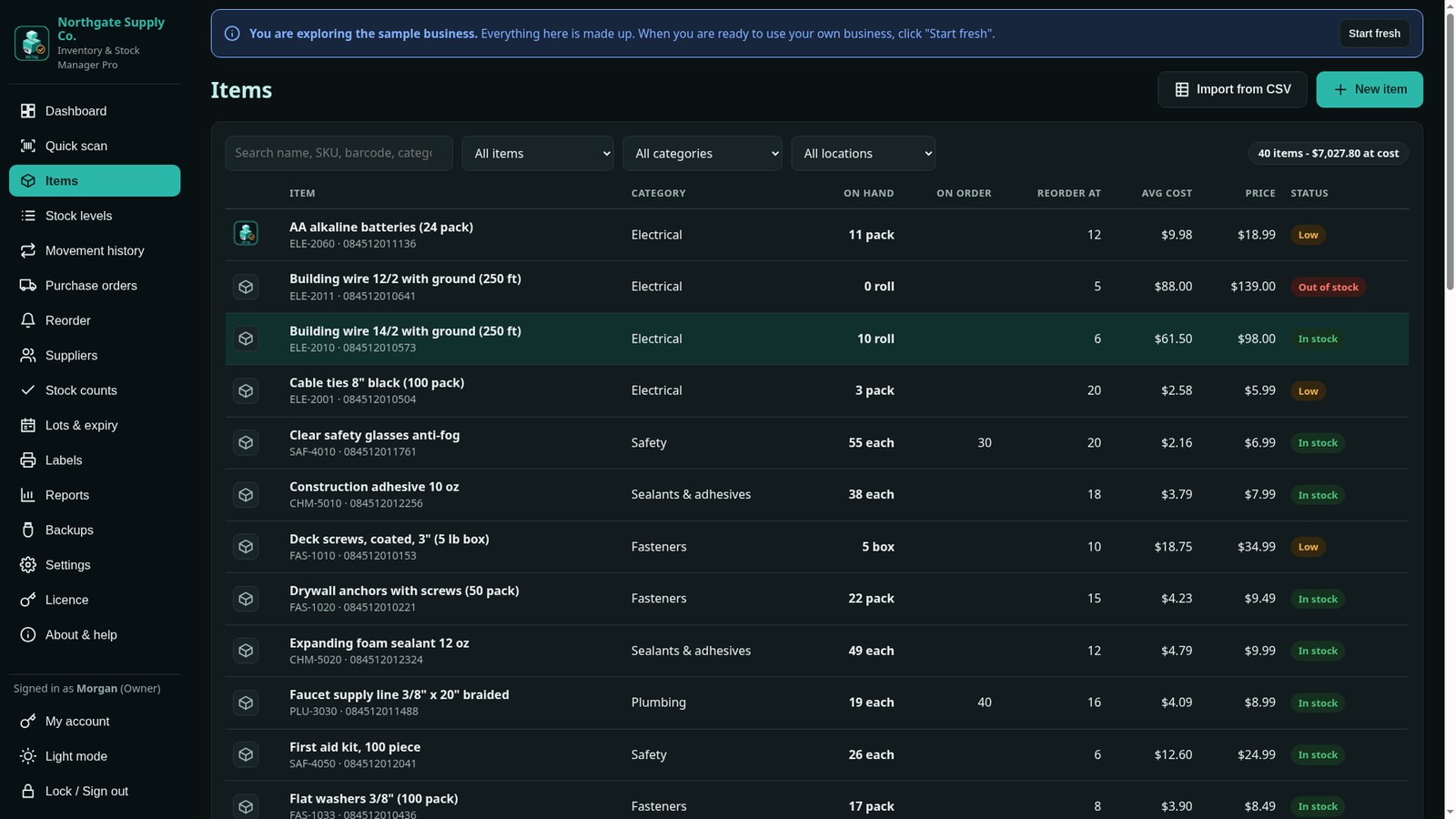
Items. Every item with SKU, category, stock on hand, value and status (sample business).
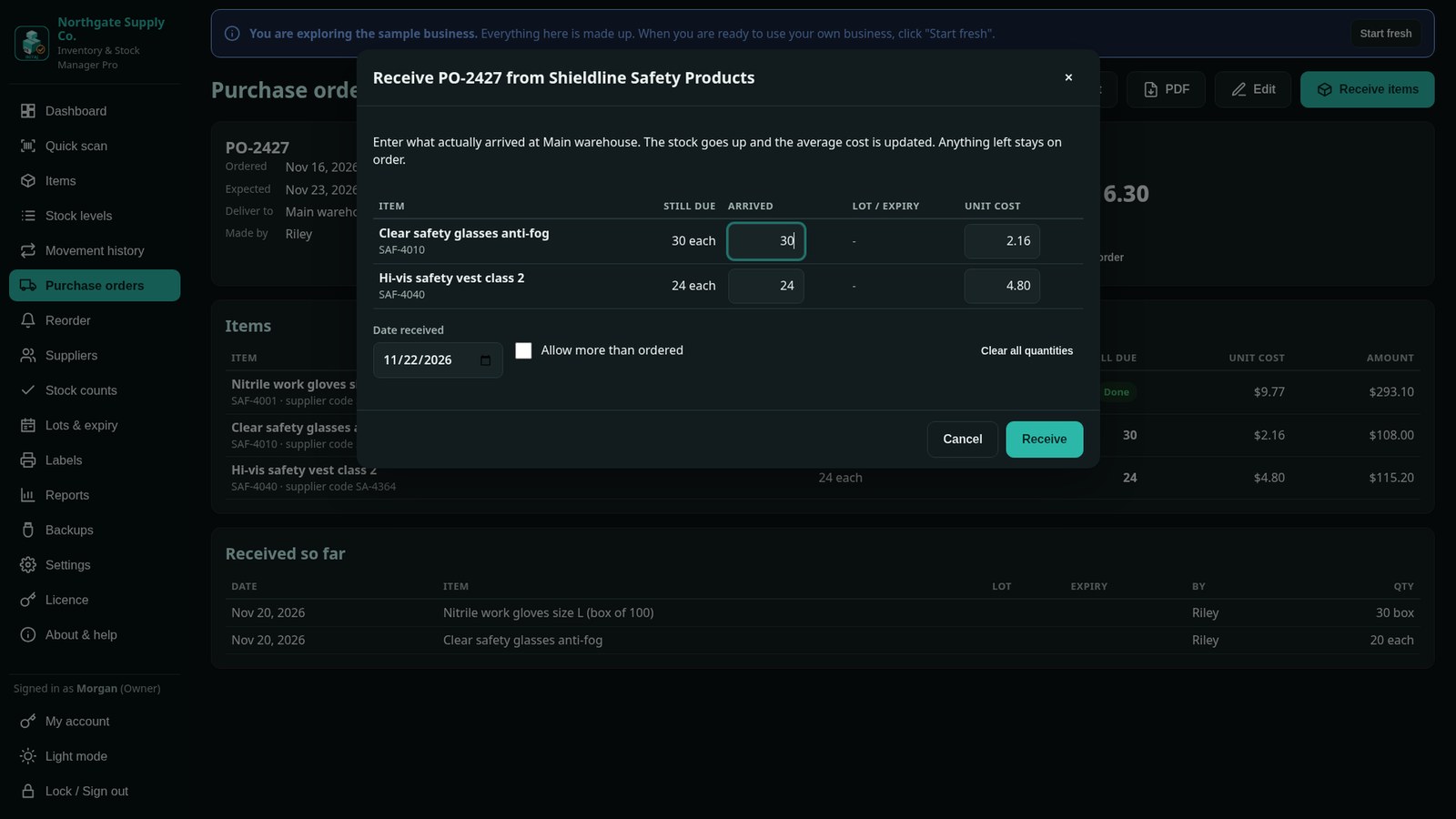
Receiving. Enter what actually arrived on a purchase order; the rest stays on order and the average cost updates (sample business).
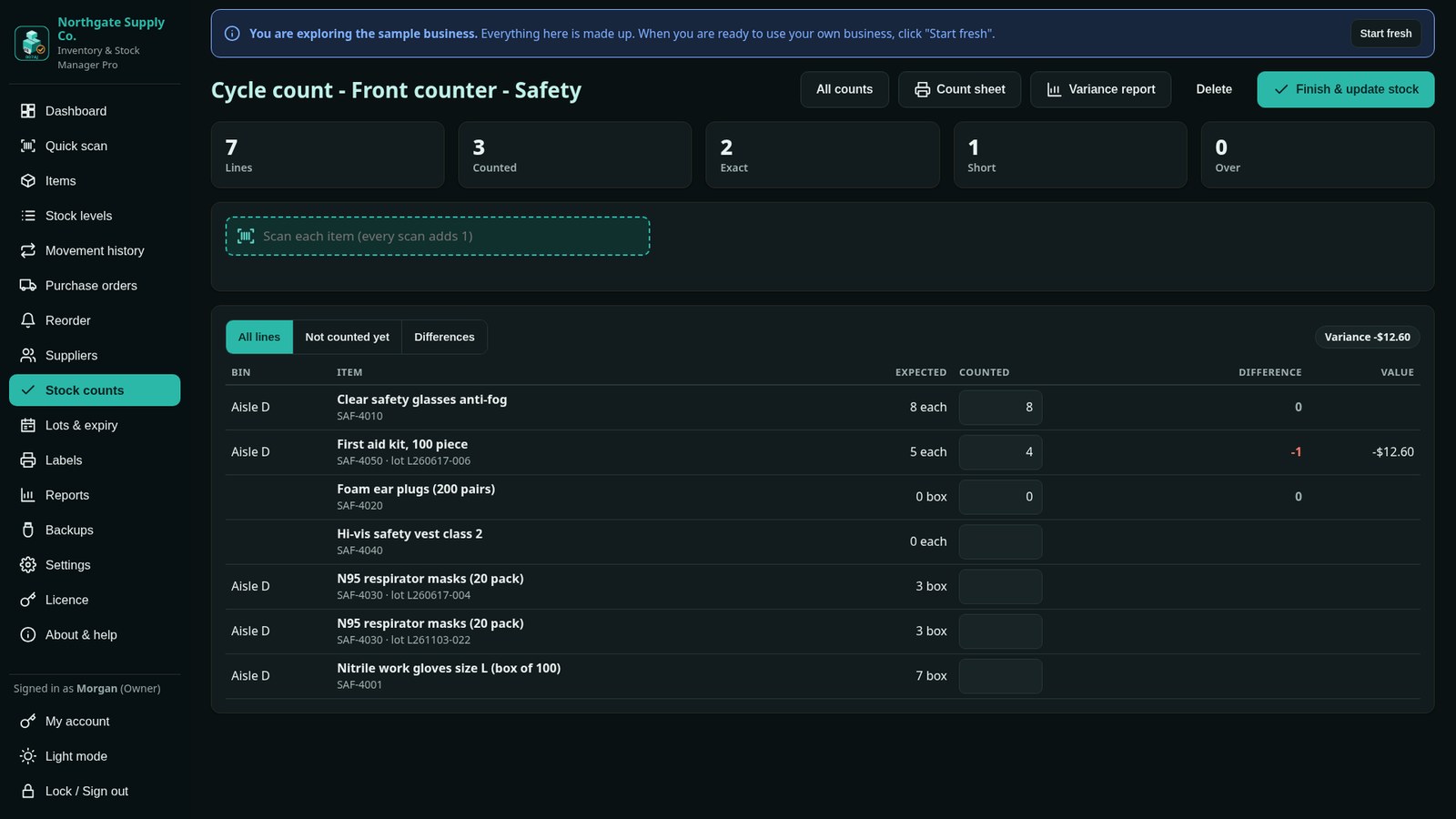
Stock count. A cycle count with expected and counted quantities and the value of any difference before you finish (sample business).
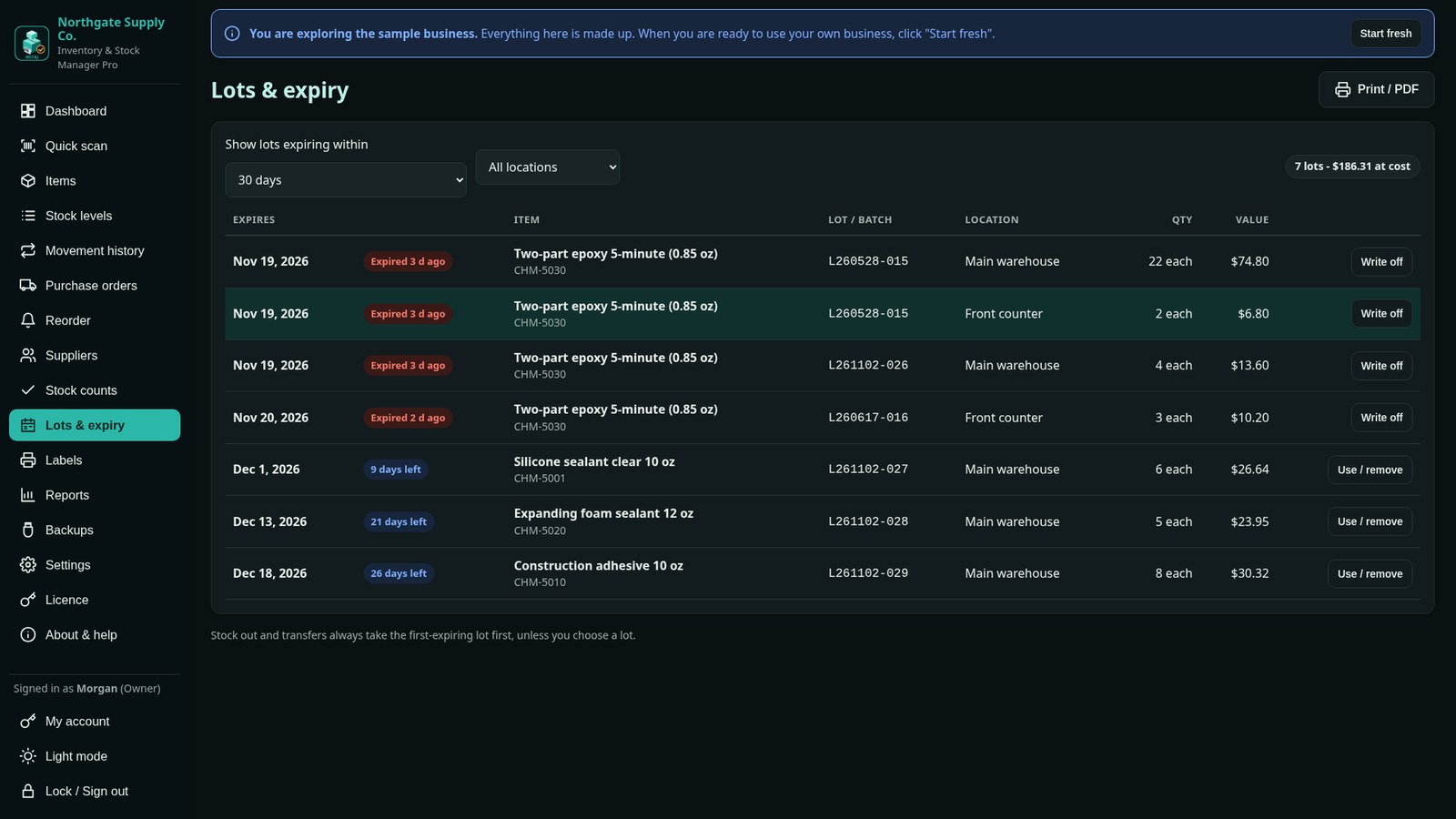
Lots and expiry. Lots expiring soon or already expired, so you know what to sell or write off (sample business).
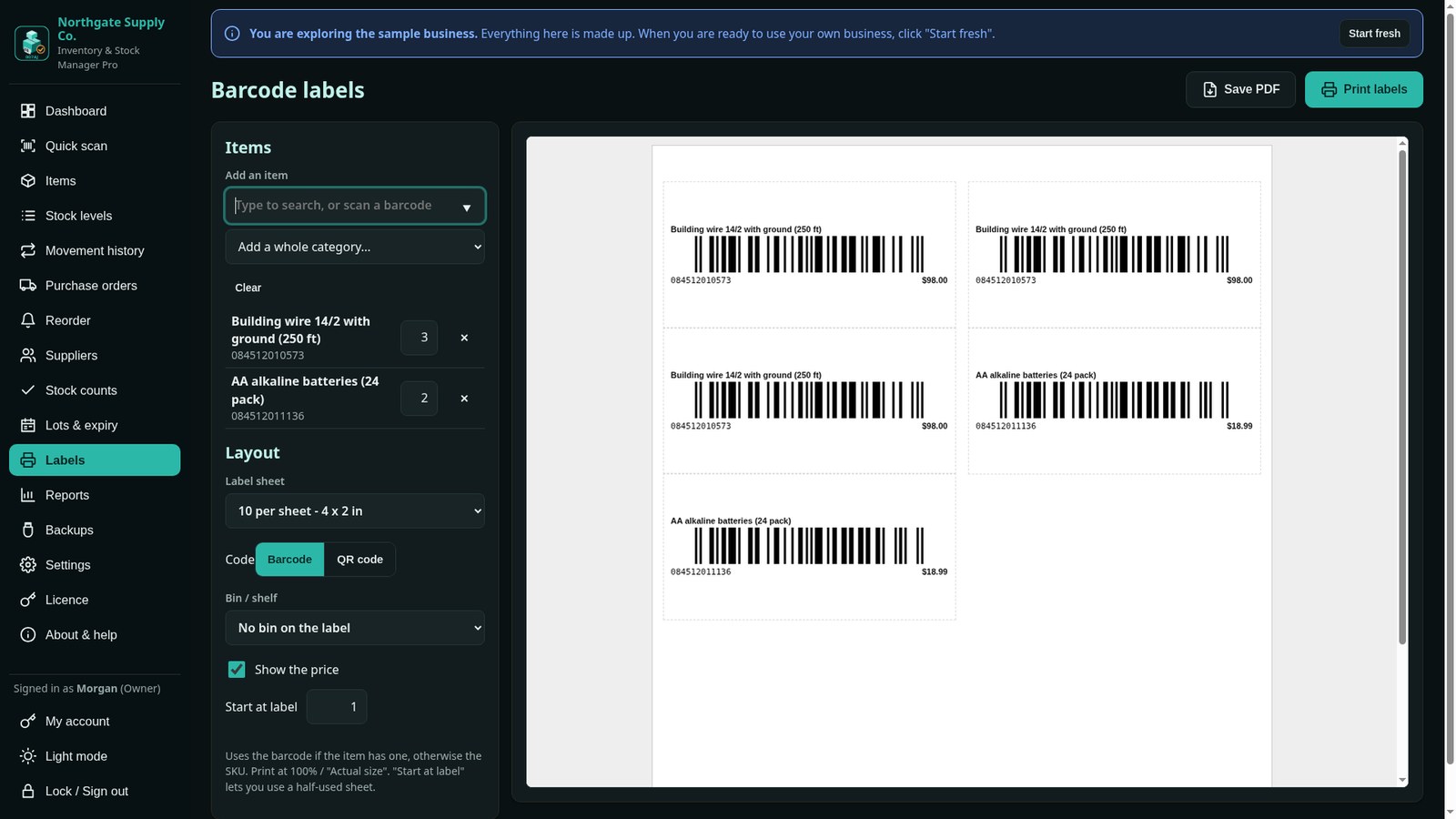
Barcode labels. Print barcode or QR labels on standard label sheets, Letter or A4 (sample business).
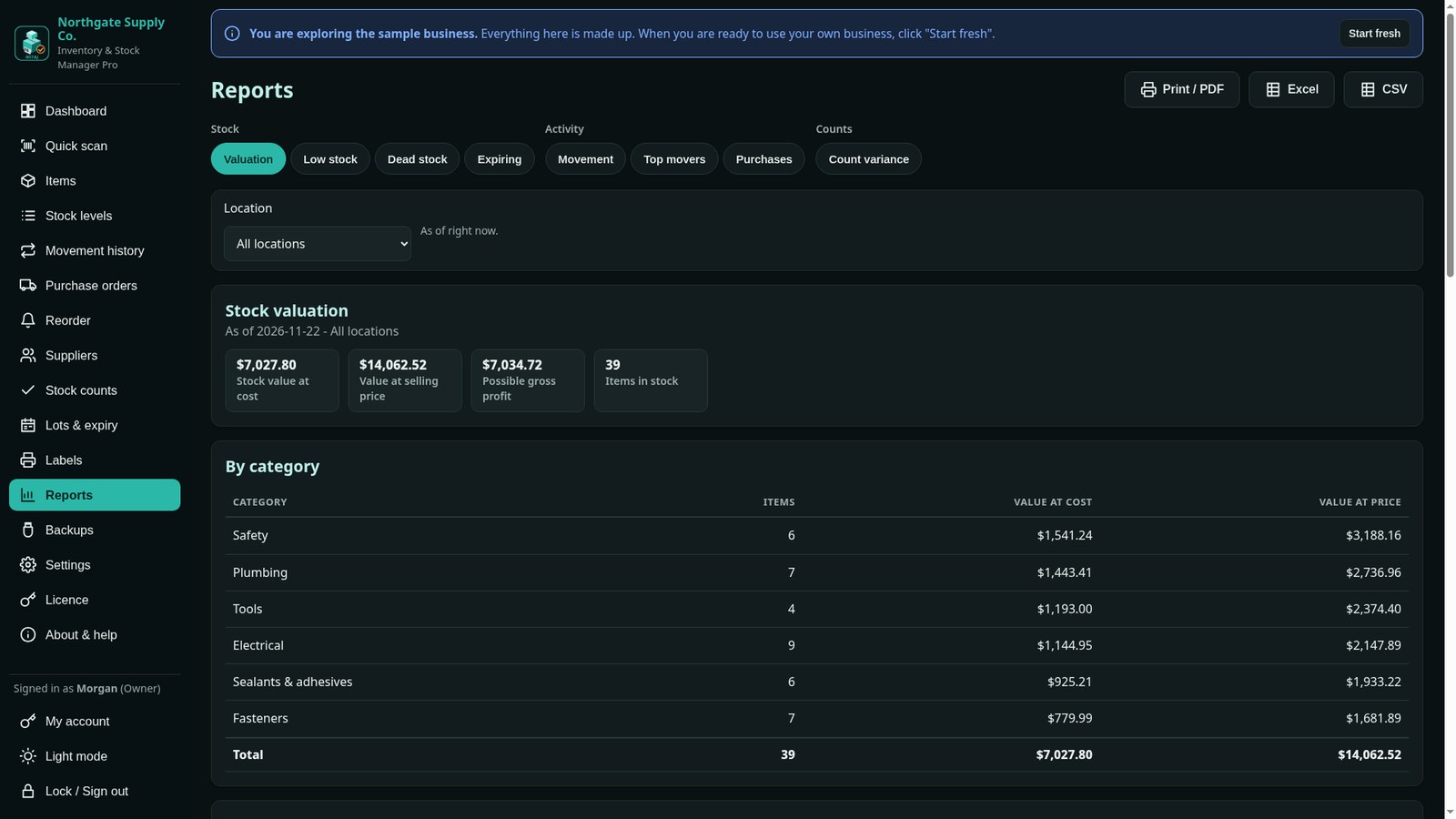
Stock valuation. Value at cost and at selling price by category, ready to print, save as PDF or export to Excel or CSV (sample business).
Core features
The day-to-day stock records a small shop needs in one program
Items
Name, SKU, barcode, category, unit, cost, selling price and margin, main supplier and part number, reorder point and quantity, photos, and a bin or shelf in each location.
Stock in every location
Stock in, stock out, transfers and adjustments with a reason and a reference. Movement history with who, when, why and the reference.
Quick scan
Any USB or Bluetooth barcode scanner that types like a keyboard. Look up an item, or scan a list for stock in, out or a transfer and save it all at once. An unknown barcode can become a new item on the spot.
Barcode and QR labels
30, 10 or 4 per sheet on Letter or A4, Code 128, UPC/EAN or QR, with or without the price and bin, and “start at label” for half-used sheets.
Suppliers and purchase orders
Draft, ordered, partly received and received (or cancelled). Print or save as PDF. Late orders are flagged. Receive what actually arrived; the rest stays on order, and the average cost updates.
Low stock and the reorder list
Suggested quantities, and one draft purchase order per supplier in one click.
Stock counts
Full counts of a location, or cycle counts of one category or of the items not counted for the longest time. Print a count sheet that hides the expected numbers, or count with a scanner. See the differences and their value before you press Finish.
Lots and expiry
Lot numbers and use-by dates. The oldest-expiring stock is used first automatically, with an “expiring soon” list.
Reports
Stock valuation, stock movement, low stock, dead stock, top movers, expiring lots, purchases by supplier and count variance. Print, PDF, Excel or CSV.
Import
Items from a CSV spreadsheet, with a preview before anything changes.
Dashboard
Stock value, items low or out, open purchase orders, lots expiring, the last 8 weeks in and out, and the latest movements.
Everyday quality
Backups, and a sample business you can explore first.
PIN or password sign-ins
Owner, manager and staff sign-ins with a PIN or password. Managers do items, ordering, counts, labels and reports. Staff look up items and record stock in, out and transfers. Only the owner can enter or remove a licence key.
Backups and restore
Automatic daily backups (and every time the program closes), one-click Backup to USB, a second backup folder that gets a copy of every backup, and restore.
Comfortable to use
Dark and light mode, a larger text option, and keyboard shortcuts.
Sample business, then start fresh
A sample business (“Northgate Supply Co.”, all made up, with 40 items, 3 locations and four months of history) lets you try everything first, then “Start fresh” for the real business.
Simple to install
The program installs just for the current Windows user. No administrator password is needed.
Who it is for — and who it is not for
Built for small shops and workshops sharing one computer
Who it is for
Small shops, parts counters, workshops, trades with stock in vans, small warehouses, makers and online sellers who keep stock in spreadsheets or on paper, and anyone tired of paying monthly for inventory software.
Who it is not for
It is not a till or point-of-sale system, not an online store connector, and not accounting software. It runs on one PC and does not share data over a network between PCs. It is not for Mac, Linux, Chromebook, phones or tablets.
Requirements
Windows 10 or Windows 11, 64-bit, on one PC (no network sharing between PCs). About 400 MB of free disk space. A screen of 1366×768 or larger (1024×700 works). Optional: a USB or Bluetooth barcode scanner that types like a keyboard, a printer, and label sheets.
It is not for Mac, Linux, Chromebook, phones or tablets.
How you receive it
A signed Windows installer
What you get
You get the signed Windows installer.
A free Store download, and a licence key on this page
The Microsoft Store listing is a free download of the signed installer, with a 14-day trial. The one-time licence key is bought on this page and entered offline on the Licence page.
Support
For help, email admin@007aj.dev.
A stock-keeping tool
Inventory & Stock Manager Pro is a stock-keeping tool. It is not point-of-sale software, not an online store connector, and not accounting software. It does not take card payments and it does not share data between PCs on a network.
Questions
Does it work offline?
Yes. No internet is needed, and no online account is required. Your records stay on your own computer. The program never goes online and sends nothing. No internet is needed to enter a licence key.
Is there a subscription?
No. You pay once. There is no subscription and no monthly fees. The Microsoft Store download is free, with a 14-day trial. A one-time licence key is bought on this page.
What happens when the 14-day trial ends?
Viewing, look-ups, printing, PDF/Excel/CSV reports, labels and backups still work. Adding or changing records, import, restore and Start fresh are turned off until a licence key is entered. Your records are never locked away.
How do I enter a licence key?
Open Inventory & Stock Manager Pro and sign in as the owner. Click Licence in the left menu, paste the whole key (it starts with ISM1-) and click Activate. No internet is needed. If you move to a new computer, restore your backup there and enter the same key.
What computers does it run on?
Windows 10 or Windows 11, 64-bit, on one PC. It does not share data over a network between PCs. It is not for Mac, Linux, Chromebook, phones or tablets.
How do I receive it?
You can download it free from the Microsoft Store and use everything for 14 days, then buy a licence key here. Or buy the key on this page and download the signed Windows installer. The key is emailed to you and shown on your receipt page.
Can I look around before adding my own data?
Yes. There is a sample business with made-up items, locations, suppliers and history, then “Start fresh” for the real business.
Is this a cash register or accounting software?
No. It is a stock-keeping tool. It is not a till or point-of-sale system, not an online store connector, and not accounting software. It does not take card payments.
Where do I get help?
Email admin@007aj.dev.
Pay once. Works offline. Built for small shops, workshops and anyone tired of paying monthly for inventory software.
Inventory & Stock Manager Pro by 007AJ is a Windows 10 and Windows 11 program that keeps your stock records on your own computer. Version 1.0.0. No subscription, no online account, and no internet needed. A 14-day trial, then a one-time licence key.
Support: email admin@007aj.dev
Inventory & Stock Manager Pro is published by 007AJ (007aj.dev).
Not affiliated with Microsoft. Windows is a trademark of Microsoft Corporation.