
Run Your Hair Salon, Barbershop or Beauty Studio on Your Own Computer: Appointments, Clients, Checkout and Commissions, With No Subscription
Salon, Beauty & Barber Manager Pro by 007AJ is an offline Windows 10 and Windows 11 desktop program for hair salons, barbershops and beauty studios. Book appointments by stylist, keep a walk-in queue, keep each client’s history, colour formulas, allergies, patch tests and photos, check out with tips, gift cards, packages and loyalty points, and work out each stylist’s commission or chair rent. The book, clients, services, stylists, sales, pay, stock and reminder lists stay together in one place, on your own computer. It is not a card processor, an online booking website, a client phone app, a text or email sender, or payroll software.
You pay once. There is no subscription, no monthly fees, no online account, and no internet needed. The installer is digitally signed by the publisher, Anthony Bertucci, so Windows shows a verified publisher.
Try every feature free for 14 days from first run. After the trial, you can still sign in, view and search everything, print or save PDFs of every document (receipts, day sheets, pay statements, client cards, consent forms, gift certificates, and reminder and outreach lists), run and export every report, export lists and make backups. Adding or changing records, import, restore and Start fresh are turned off until you enter a one-time licence key, offline, on the Licence page (the owner sign-in does this). Your records are never locked away.
Instant download for Windows 10 and Windows 11. You get the signed Windows installer.
The promise
Pay once. No subscription. No internet needed. A 14-day trial, then a one-time licence key.
Pay once
You pay once for the program. There is no subscription and no monthly fees. The Microsoft Store download is free, with a 14-day trial; a one-time licence key is bought on this page.
A 14-day trial, then a licence key
Everything in the program works for 14 days from first run. After that, you can still view, search, print, save PDFs, run reports and make backups. Adding or changing records waits until a licence key is entered. The owner enters the key offline on the Licence page. No internet is needed to activate it.
No internet needed
The program works offline. No online account is required. Your records stay on your own computer, and nothing is sent anywhere.
Signed installer
The installer is digitally signed by the publisher, Anthony Bertucci, so Windows shows a verified publisher.
Main features
Appointments, clients, formulas, checkout, commissions, stock and reports — on one computer
Appointment book
See the day with a column for each stylist, or the whole week. Each service has its own time, clean-up buffer and processing time. Drag an appointment to move it or give it to another stylist. The book warns about double-booking (and asks before booking anyway), closed hours, time off, blocked time, missing skills, overdue patch tests and a client already booked elsewhere. Statuses run from Booked to Checked out, and you can print a day sheet.
Walk-in queue
See who is waiting and for how long, the service, and a chosen or next available stylist. Start puts them in the chair and on the book.
Repeating appointments
Book a visit every 1 to 12 weeks for a set number of times. Weeks when the stylist is busy or off are skipped and listed. Cancel the rest of a series in one click.
Deposits and policies
Record deposits with how they were paid and count them at checkout. Set your own late-cancel window and fees, and no-show fees (a deposit can be kept against the fee). Cancellations on the salon’s side are never charged. Each client has a missed-appointment count.
Clients
Contact details with text and email consent, pronouns, birthday, preferred stylist, how they found you, tags, preferences and notes, plus every visit, sale, package, gift card and loyalty point. Archive old clients when you are done.
Formulas and safety
Keep dated colour formulas and technical notes by stylist, shown again when booking and checking out. Flag allergies on the book and the day sheet, record patch-test dates with reminders when a service needs one, print colour, chemical, waxing and lash consent forms, and keep before and after photos and scans.
Services and prices
Categories, times, buffers, prices or “from” prices, product cost, rebook timing and tax per service. Different prices and times per stylist level (for example Junior, Stylist, Senior, Master), plus add-ons and prepaid packages.
Stylists
Working hours by day, time off, blocked time, skills and a colour for each stylist. Pay by a flat commission, a tiered commission, or booth or chair rent.
Checkout
Services and retail on one ticket, change the stylist per line, discounts and promo codes (a percentage or an amount, with end dates and use limits), tips for each stylist with quick 15/18/20/25% buttons, split payments by cash, the salon’s own card terminal, cheque, bank transfer, gift card or points, change due, full-page or 80 mm receipts, void with a reason, and an offer to book the next visit. You record payments you already took. The program does not process cards.
Gift cards, packages and loyalty
Numbered gift cards with balances, history, optional expiry and printable certificates. Packages are used up visit by visit. Points are earned on spend and redeemed at checkout.
Commissions and pay
Flat or tiered service commission (each band at its own rate, or the top band reached pays on everything), optional product-cost deduction, retail commission, tips, booth or chair rent, payouts recorded against what is owed, and printable pay-period statements.
Retail and back-bar stock
Brand, size, SKU, price, cost and reorder levels. Retail comes off stock at checkout. Record deliveries, back-bar use, damage, returns and stock counts, with a full stock history, a reorder list and alerts.
Reminders and rebooking
Lists of tomorrow’s appointments, clients due to rebook, lapsed clients and birthdays, each with a ready message to copy into the salon’s own phone or email. Print or copy a phone list. Nothing is sent automatically.
Nineteen reports
Sales, payments, services, retail, tax, discounts, gift cards, packages, by stylist, commissions, tips, book filled, back-bar use, rebooking, retention, new clients, lapsed clients, no-shows and cancels, and the client list. Every report prints, saves as PDF and exports to Excel or CSV.
Import and export
Bring clients in from a CSV file using the template, including allergies and a colour formula, with a preview and a duplicate check before anything changes. Export lists to CSV.
A look inside
Screenshots from the built-in sample salon, with made-up names
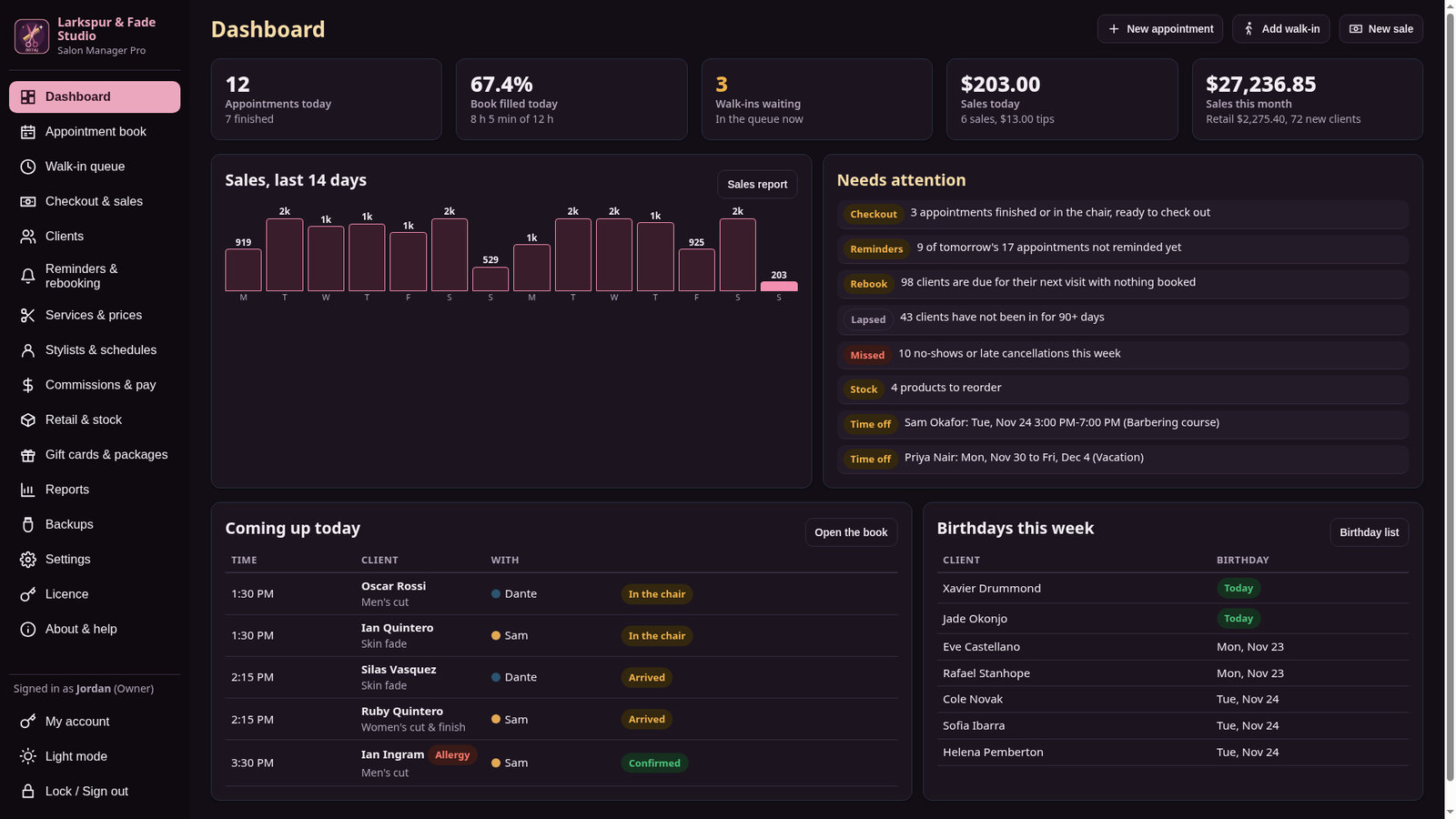
Dashboard. Today’s appointments, how full the book is, sales, and the reminders, rebookings and reorders that need attention (sample salon).
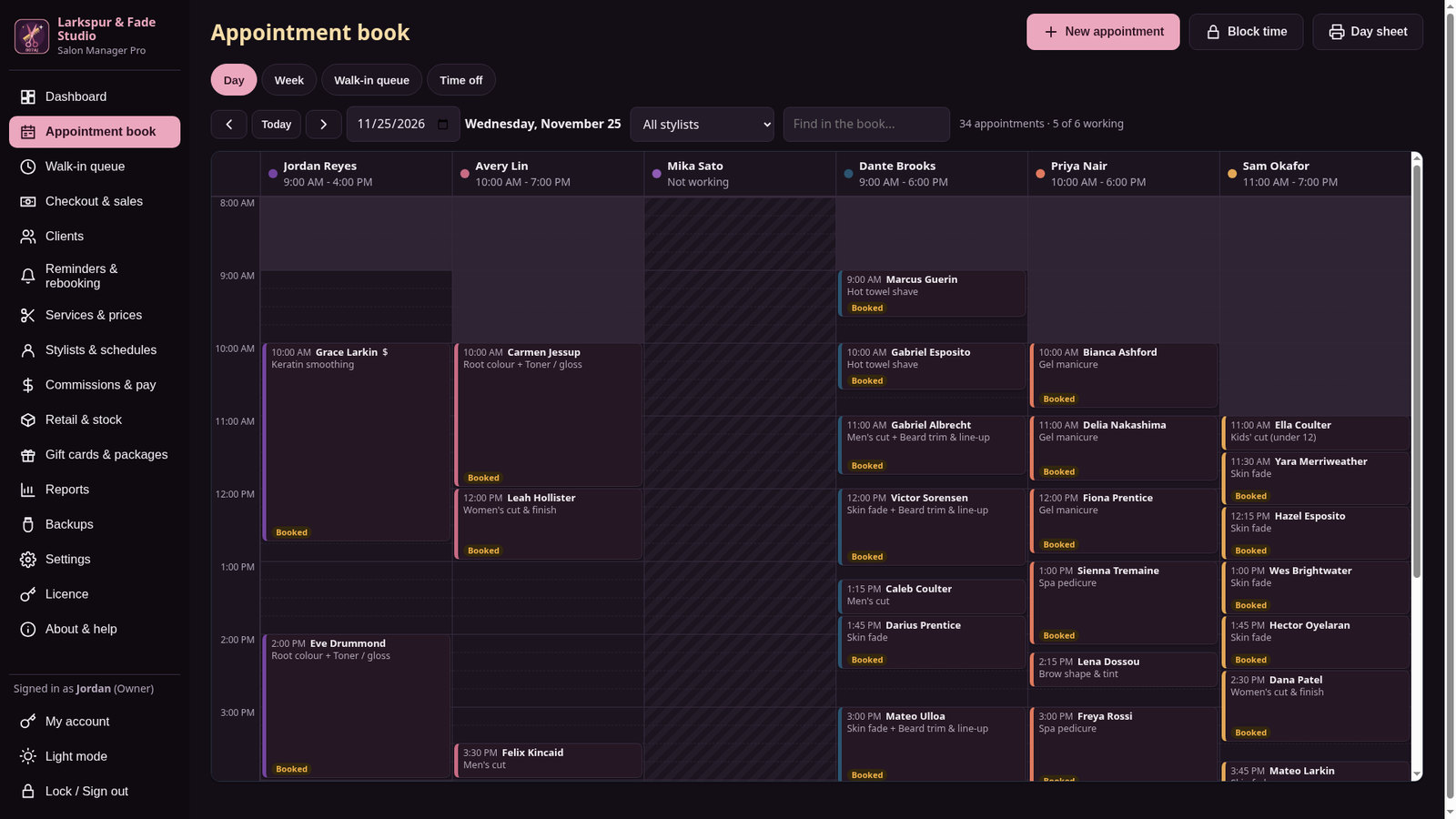
Appointment book. A column for each stylist, with working hours, buffers, statuses and drag-to-move (sample salon).
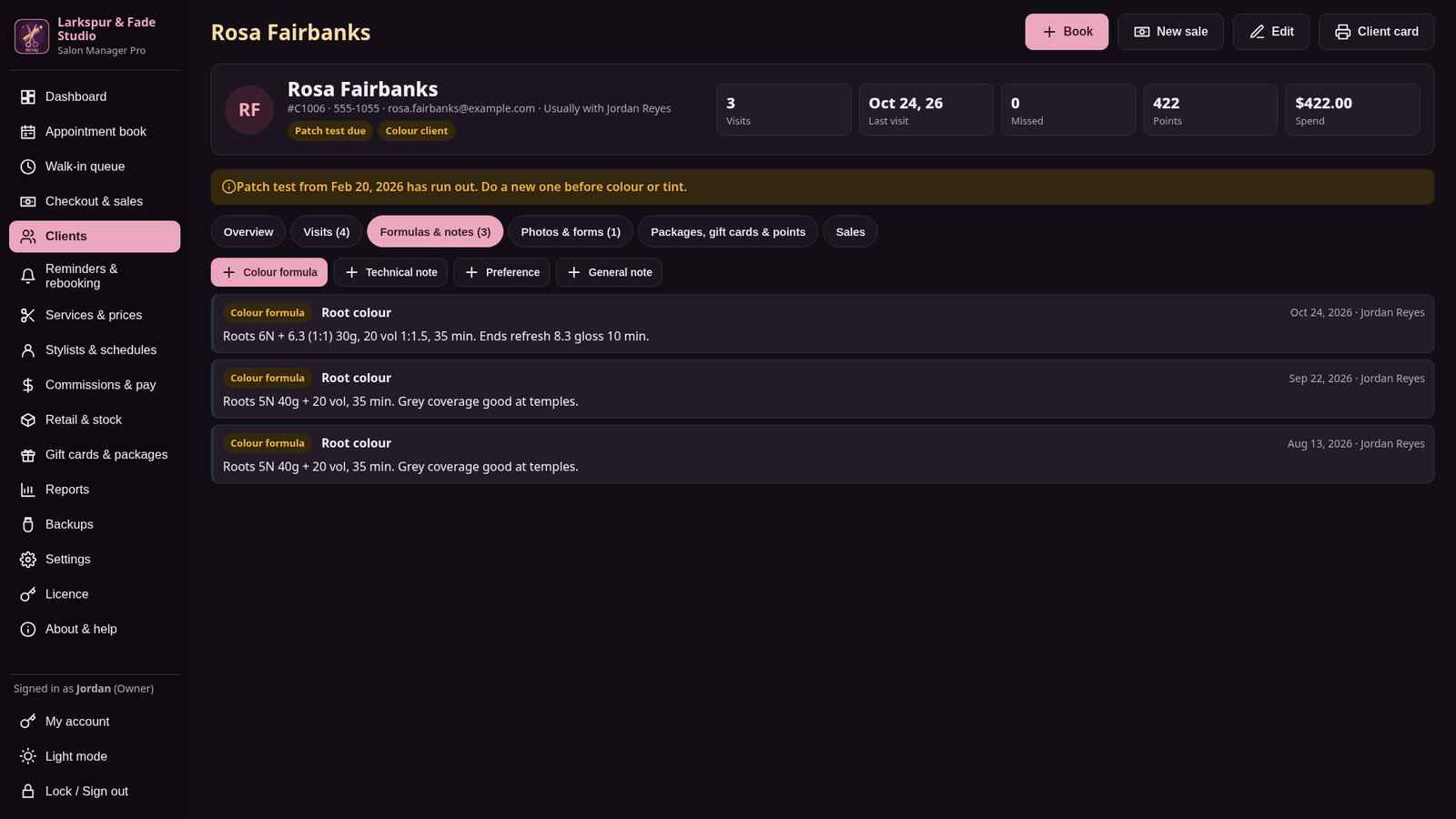
Client formulas. Visit history, dated colour formulas, allergies and patch tests in one place (sample salon).
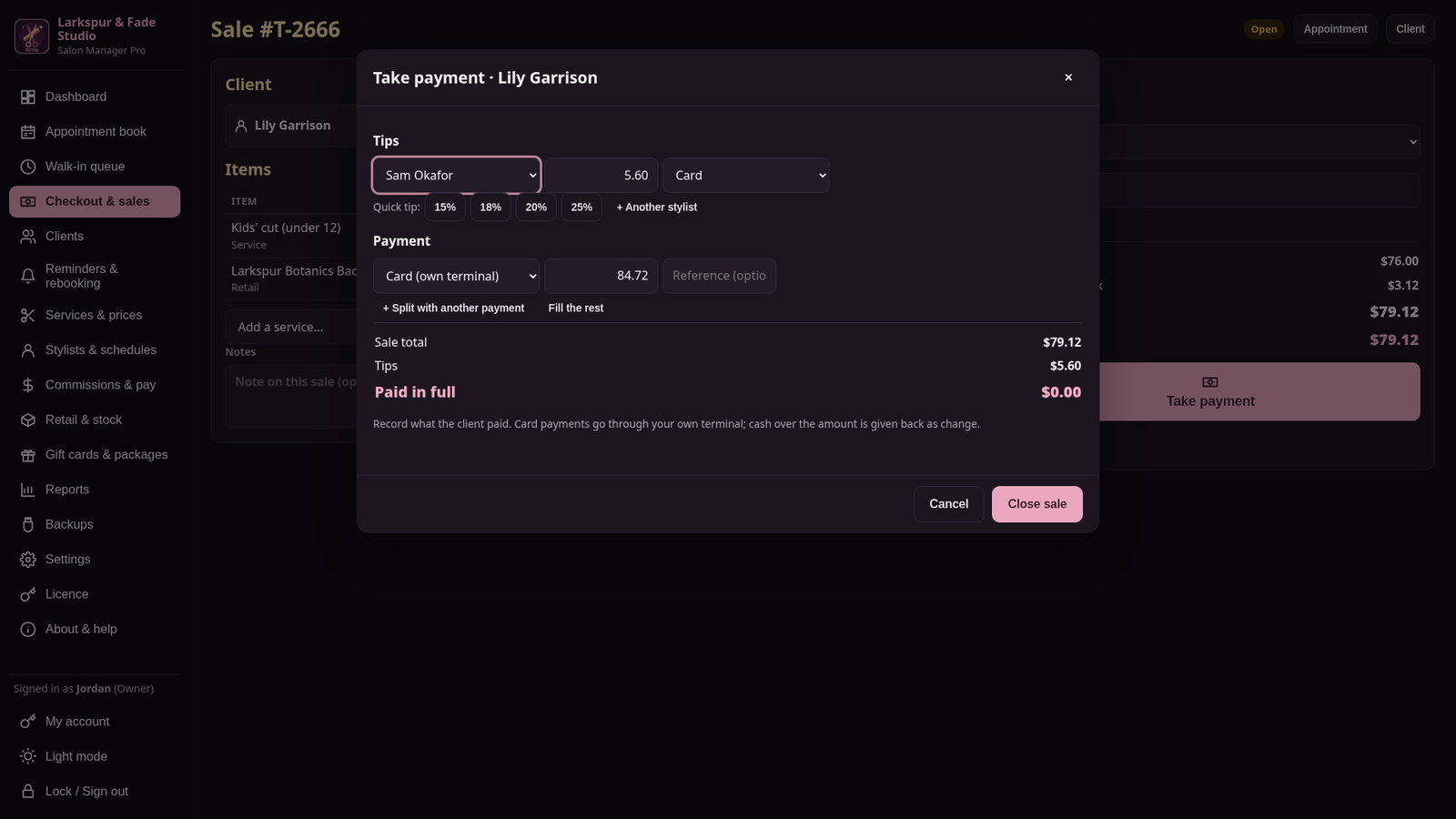
Checkout. Services and retail on one ticket, tips split per stylist and split payments (sample salon).
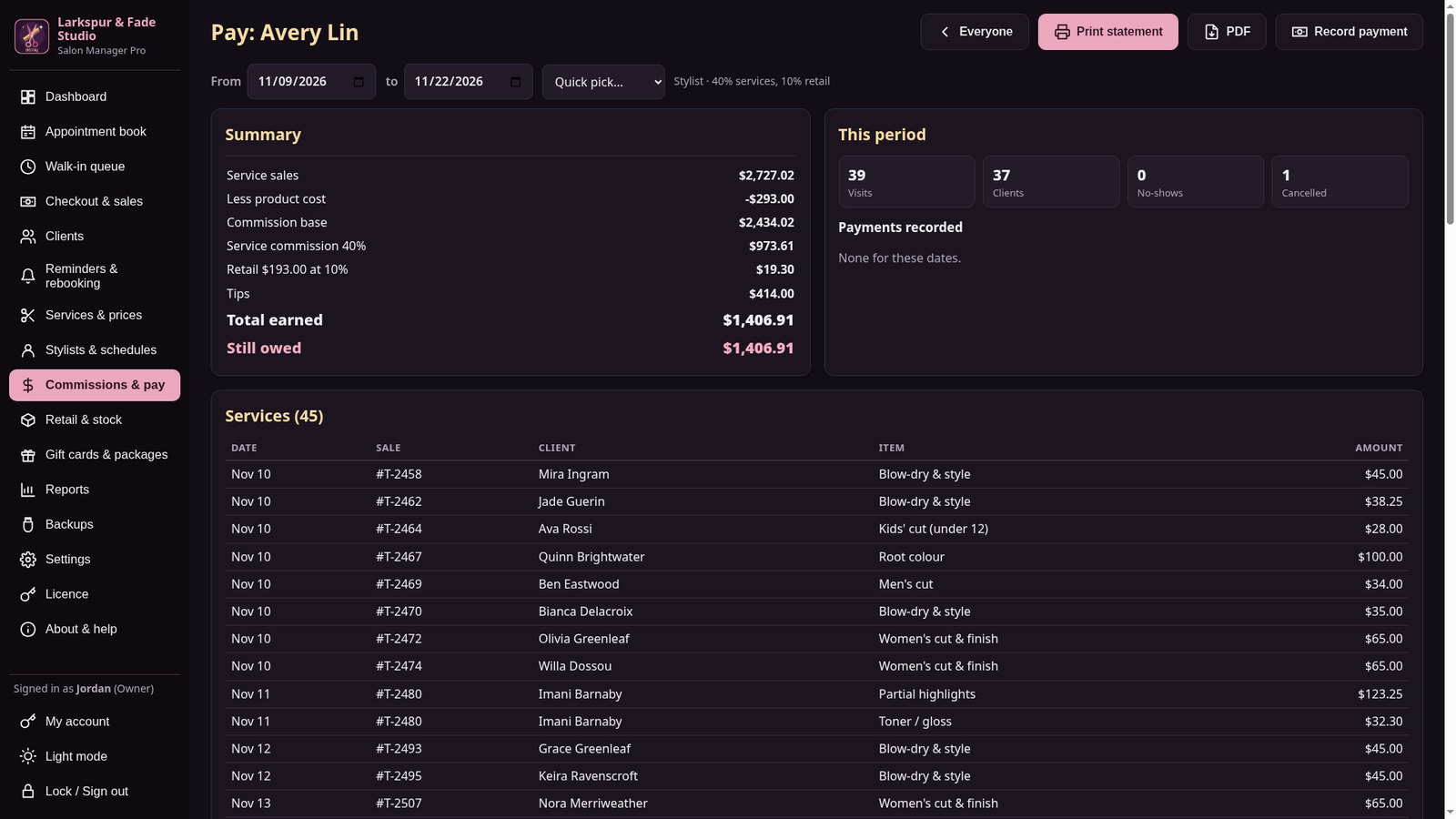
Commission statement. Service and retail commission, product cost, tips and the balance to pay (sample salon).
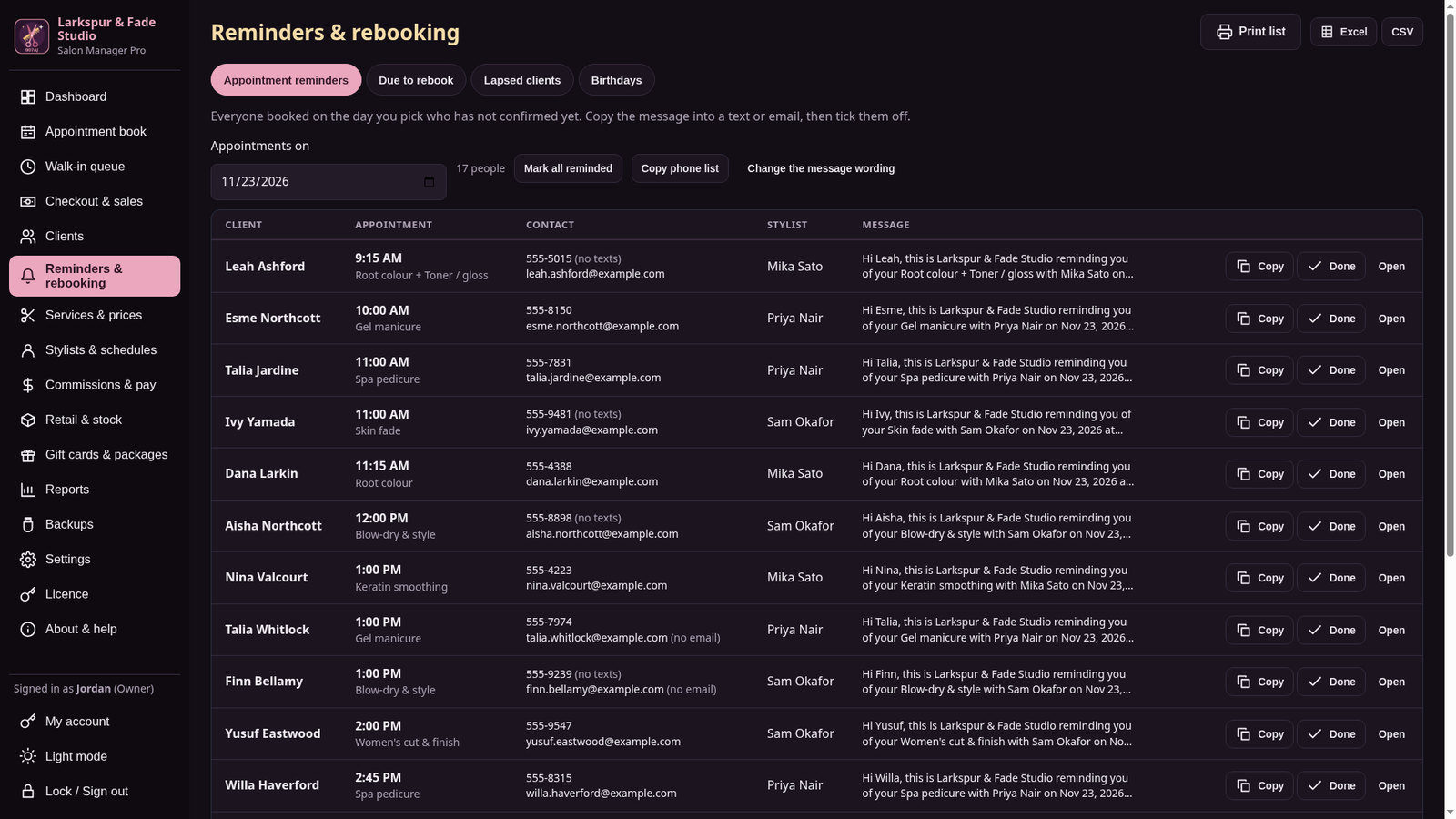
Reminders and rebooking. Ready-made messages to copy, with nothing sent automatically (sample salon).
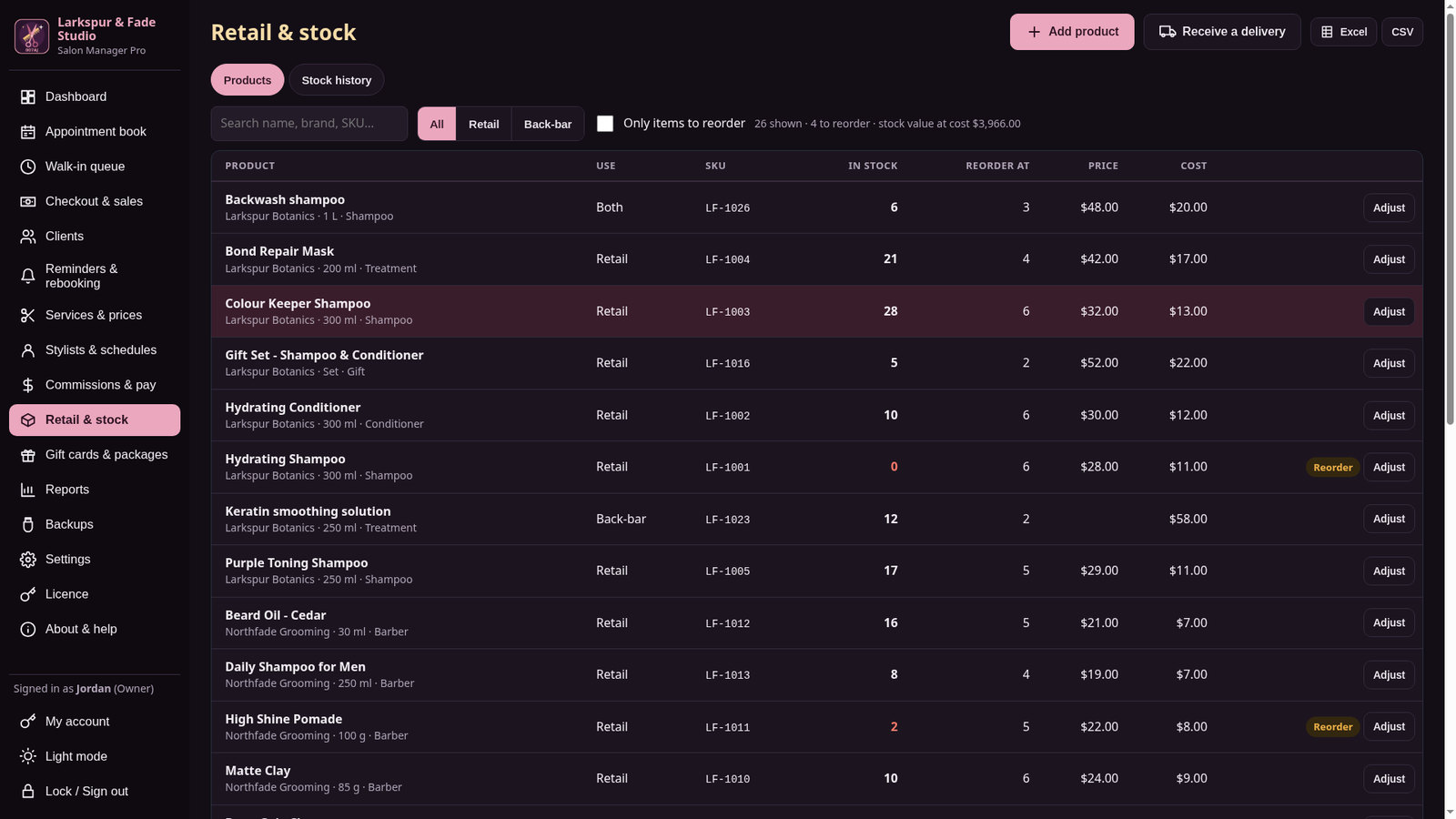
Retail and back-bar stock. Stock on hand, reorder levels and what to order (sample salon).
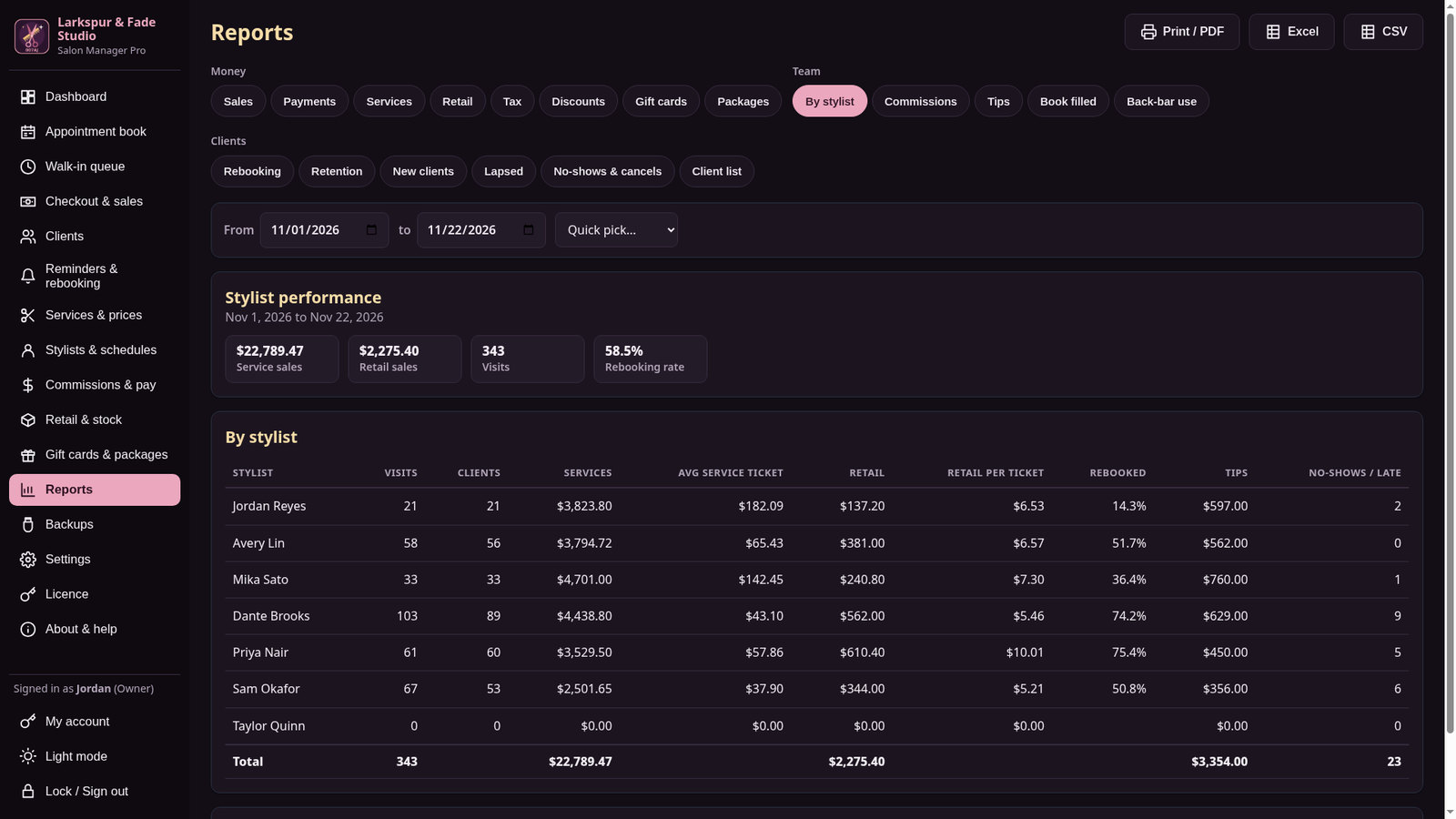
Reports. Sales, tickets, retail, rebooking and tips by stylist (sample salon).
Everyday quality
Owner, manager and stylist sign-ins
Sign in with a PIN or password. Stylists see only their own book, clients and earnings, with no checkout or reports, and client phone numbers and emails can be hidden from them. A Switch user and lock button, an optional inactivity lock, and an owner audit log of who changed what. Only the owner can enter or remove a licence key.
Backups built in
Automatic daily backups and a backup every time the program closes (the last 30 are kept), Backup now, Backup to USB or a folder, a second backup folder that gets a copy of every backup, and an owner-only restore with a preview.
Easy on the eyes
Dark mode (plum with rose and gold) and light mode, a larger text option and keyboard shortcuts.
Try it on a sample salon first
“Larkspur & Fade Studio” is made up: a hair salon and barbershop with six bookable stylists on four levels (commission, tiered commission and a chair renter), 791 clients, 22 services, about four months of appointments and sales with tips, 247 colour formulas, gift cards, packages and retail stock. Explore everything, then choose Start fresh for your real salon.
Simple to install
Installs for your Windows user with no administrator password, and uninstalls from Windows Settings like any other app.
Who it is for — and who it is not for
Who it is for
Hair salons, barbershops, nail, brow and lash studios, small spas, and independent stylists with an assistant or a few chairs to rent. It fits best with one location, up to about a dozen stylists and a few thousand clients, and one front-desk PC, when you are using a paper appointment book, formula cards or spreadsheets today, or are tired of paying monthly for salon software.
Who it is not for
It is not a card processor and does not take automatic bank debits. It is not an online booking website, a client phone app, a text or email sender, an e-signature service or payroll software. It runs on one PC and does not share data over a network between PCs or sync to the cloud. It is not for Mac, Linux, Chromebook, phones or tablets.
Requirements
Windows 10 or 11, 64-bit, one PC (no network sharing between PCs), about 400 MB of free space, and a screen of 1366 × 768 or bigger (1024 × 700 works). Optional: a printer (full page or an 80 mm receipt printer).
How you receive it
- Download it free from the Microsoft Store and use everything for 14 days, then buy a licence key on this page.
- Or buy the licence key on this page and download the signed Windows installer straight away. The key is emailed to you and shown on your receipt page.
Support
Email admin@007aj.dev. eBay buyers, please message us through eBay.
A record-keeping tool
Salon, Beauty & Barber Manager Pro keeps your salon’s records and paperwork. Colour formulas, allergies, patch tests and consent forms are what you enter; it does not give medical or allergy advice. Consent wording is yours to write and check; it is not legal advice. Taxes are worked out from the rates you set; it is not tax, accounting or payroll advice. It does not take card payments, send texts or emails, run online booking or collect e-signatures.
Questions
Is this a subscription?
No. You pay once for a licence key. There are no monthly fees and no online account.
What happens after the 14-day trial?
Your records stay readable. You can still sign in, view and search everything, print or save PDFs of every document, run and export every report, export lists and make backups. Adding and changing records waits until the owner enters a licence key.
Can my stylists see everything?
No. Stylist sign-ins see only their own book, clients and earnings, with no checkout and no reports. Client phone numbers and emails can be hidden from them. Only the owner can enter or remove a licence key.
Can it take card payments or send reminders?
No. You record payments you already took (cash, cheque, card on your own terminal, bank transfer, gift card or points). There is no card processing, no online booking and no client app. Reminder and rebooking lists are copied or printed by you; nothing is sent automatically.
Does it work on more than one computer?
It runs on one PC and keeps its data on that PC. It does not share data over a network or sync to the cloud. Backups can go to a USB drive or a second folder.
How do I enter a licence key?
Open Salon, Beauty & Barber Manager Pro and sign in as the owner. Click Licence in the left menu, paste the whole key (it starts with SAL1-) and click Activate. No internet is needed. If you move to a new computer, restore your backup there and enter the same key.
What computers does it run on?
Windows 10 or Windows 11, 64-bit, on one PC. It is not for Mac, Linux, Chromebook, phones or tablets.
Can I look around before adding my own data?
Yes. Choose “Explore the demo” on first start to load a made-up hair salon and barbershop with stylists, clients, appointments, formulas, sales and stock, then choose Start fresh for your real salon.
Where do I get help?
Email admin@007aj.dev.
Pay once. Works offline. Built for hair salons, barbershops and beauty studios.
Salon, Beauty & Barber Manager Pro by 007AJ is a Windows 10 and Windows 11 program that keeps your salon’s records on your own computer. Version 1.0.0. No subscription, no online account, and no internet needed. A 14-day trial, then a one-time licence key.
Support: email admin@007aj.dev
Salon, Beauty & Barber Manager Pro is published by 007AJ (007aj.dev).
Not affiliated with Microsoft. Windows is a trademark of Microsoft Corporation.