
Run Your Martial Arts School or Gym on Your Own Computer: Members, Belts, Check-In and Dues, With No Subscription
Gym & Martial Arts Membership Manager Pro by 007AJ is an offline Windows 10 and Windows 11 desktop program for martial arts schools, dojos and small gyms. Sign members up, record waivers, check them in at the front desk or a self check-in kiosk, track belts and stripes, run gradings, bill monthly dues with family and other discounts, and see who has stopped coming. Members, families, classes, attendance, ranks, dues, payments, leads and the pro shop stay together in one place, on your own computer. It is not a card processor, an online booking website, a member phone app or payroll software.
You pay once. There is no subscription, no monthly fees, no online account, and no internet needed. The installer is digitally signed by the publisher, Anthony Bertucci, so Windows shows a verified publisher.
Try every feature free for 14 days from first run. After the trial, you can still sign in, view and search everything, print or save PDFs of every document (member cards, waiver forms, certificates, grading sheets, rosters, timetables, invoices, receipts and statements), run and export every report, export lists and make backups. Adding or changing records, import, restore and Start fresh are turned off until you enter a one-time licence key, offline, on the Licence page (the owner sign-in does this). Your records are never locked away.
Instant download for Windows 10 and Windows 11. You get the signed Windows installer.
The promise
Pay once. No subscription. No internet needed. A 14-day trial, then a one-time licence key.
Pay once
You pay once for the program. There is no subscription and no monthly fees. The Microsoft Store download is free, with a 14-day trial; a one-time licence key is bought on this page.
A 14-day trial, then a licence key
Everything in the program works for 14 days from first run. After that, you can still view, search, print, save PDFs, run reports and make backups. Adding or changing records waits until a licence key is entered. The owner enters the key offline on the Licence page. No internet is needed to activate it.
No internet needed
The program works offline. No online account is required. Your records stay on your own computer, and nothing is sent anywhere.
Signed installer
The installer is digitally signed by the publisher, Anthony Bertucci, so Windows shows a verified publisher.
Main features
Members, waivers, check-in, classes, belts, gradings, dues, leads, the pro shop and reports — on one computer
Members
Photo, date of birth, a guardian for children, emergency contact, medical notes that instructors can see, tags, how they found you, alert notes, files and a full history for every member.
Waivers and consent
Write your own waiver wording and keep every version. Print the form, record who signed and when, and attach a scan. Members on an older version are asked to sign again.
Families
Group members into households with one contact. Family and sibling discounts are applied for you (for example 10% off the second member and 15% off the third), with one payment across the family and a family statement.
Check-in at the desk or a kiosk
Search by name or scan a member card with a USB barcode scanner, and the nearest class for the member’s age is picked. Alerts warn about no membership, a missing waiver, overdue dues, an age outside the class and class packs that are nearly used. Kiosk mode lets members check themselves in with no menus or money on screen; problems go to the front desk, and leaving the kiosk needs a staff PIN.
Member cards
Credit-card-size cards with photo, rank and a scannable barcode. Print one card or a sheet of ten.
Classes and schedule
A weekly timetable with colours, rooms, capacity, ages and levels. Class rosters with tick-in and medical notes, printable sign-in sheets, cancel a single day for a holiday, and instructors with background-check and first-aid expiry reminders.
Belts and ranks
Any number of styles, each with its own belt ladder (one- or two-colour belts), stripes earned by classes, and minimum time in rank, minimum classes and minimum age for each rank, plus test fees. Start from common ladders. Ready to promote shows who qualifies and what everyone else still needs.
Gradings
Plan a grading, add the students who are ready, print the examiner’s sheet and mark Pass, Not yet or Absent with scores. Then promote everyone who passed in one step, with numbered certificates and test fees added to their accounts. Every promotion is kept in the member’s history.
Membership plans
Monthly, weekly, quarterly and yearly memberships, class packs, drop-ins and free trials, with sign-up fees and minimum terms. Holds and freezes push the next bill back, with an optional hold fee.
Dues and billing
Bill on each member’s join day, or everyone on the same day with prorating for mid-month starts. One dues run bills everything that is due and never bills the same period twice. Invoices, receipts, statements, an overdue list, a grace period, late fees and void with a reason. You record payments you already took by cash, cheque, your own card terminal or bank transfer. The program does not process cards or debit bank accounts.
Discounts and promo codes
Family and sibling, student, military, first responder and any other discounts, as a percentage or a fixed amount. Promo codes with end dates and use limits. Choose whether discounts add up or only the biggest one counts.
Leads and trials
Record enquiries with their interest, source, trial class date, follow-ups and a contact log, then turn a lead into a member in one click.
Pro shop
Uniforms, belts, gloves and gear with sizes, stock and reorder levels. Sell to a member’s account or to a walk-in, with low-stock alerts.
Nineteen reports
Class attendance, attendance by member, not seen lately, retention and churn, member list, birthdays, waivers, leads and trials, members by rank, promotions, ready to promote, revenue, dues, overdue aging, payments, sales tax, pro shop, discounts given and members by plan. Every report prints, saves as PDF and exports to Excel or CSV.
Import and export
Bring members in from a CSV file using the template, with a preview and family grouping before anything changes. Export lists to CSV.
A look inside
Screenshots from the built-in sample school, with made-up names
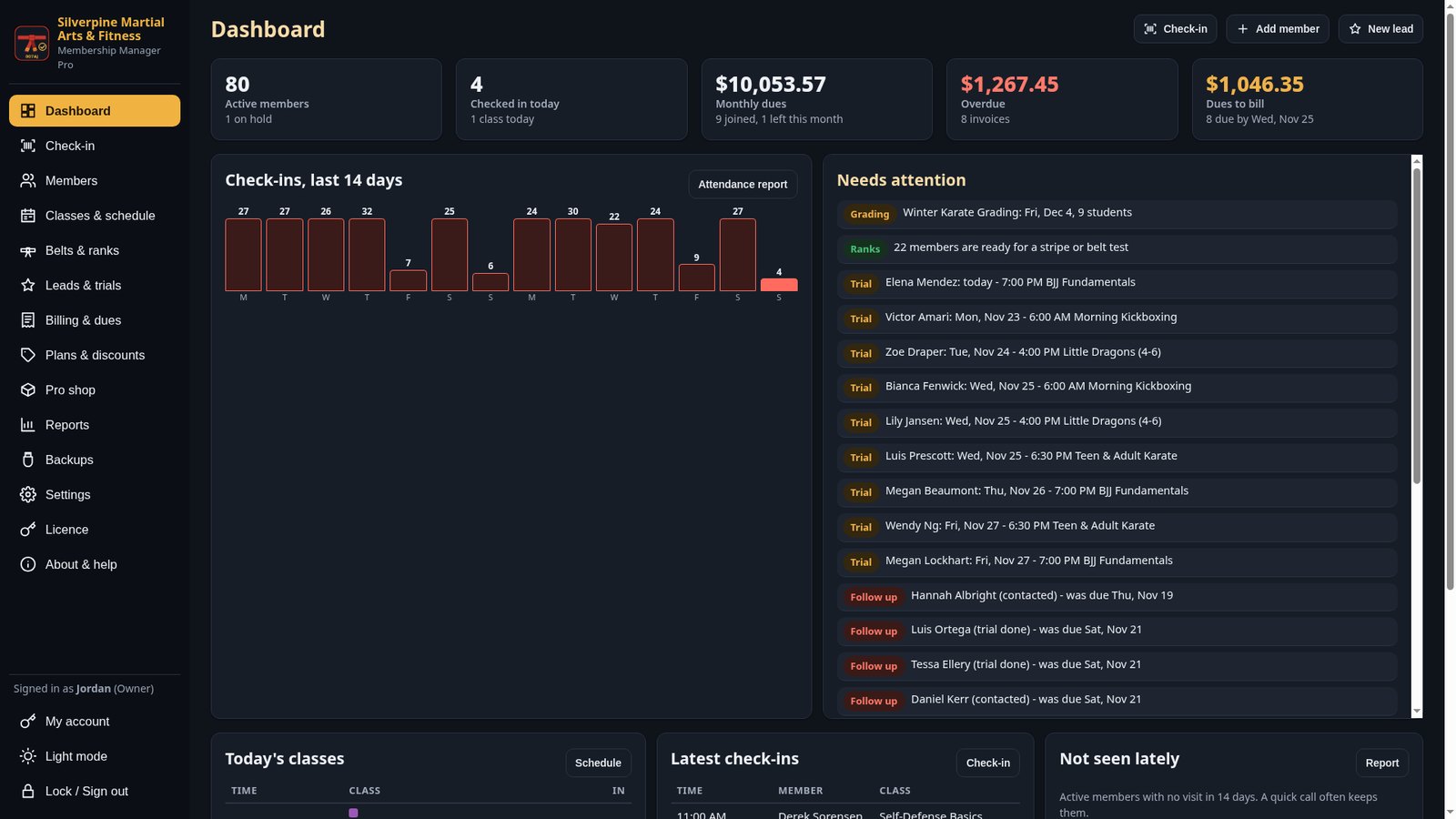
Dashboard. Active members, check-ins, dues, overdue invoices, and the gradings, trials and follow-ups that need attention (sample school).
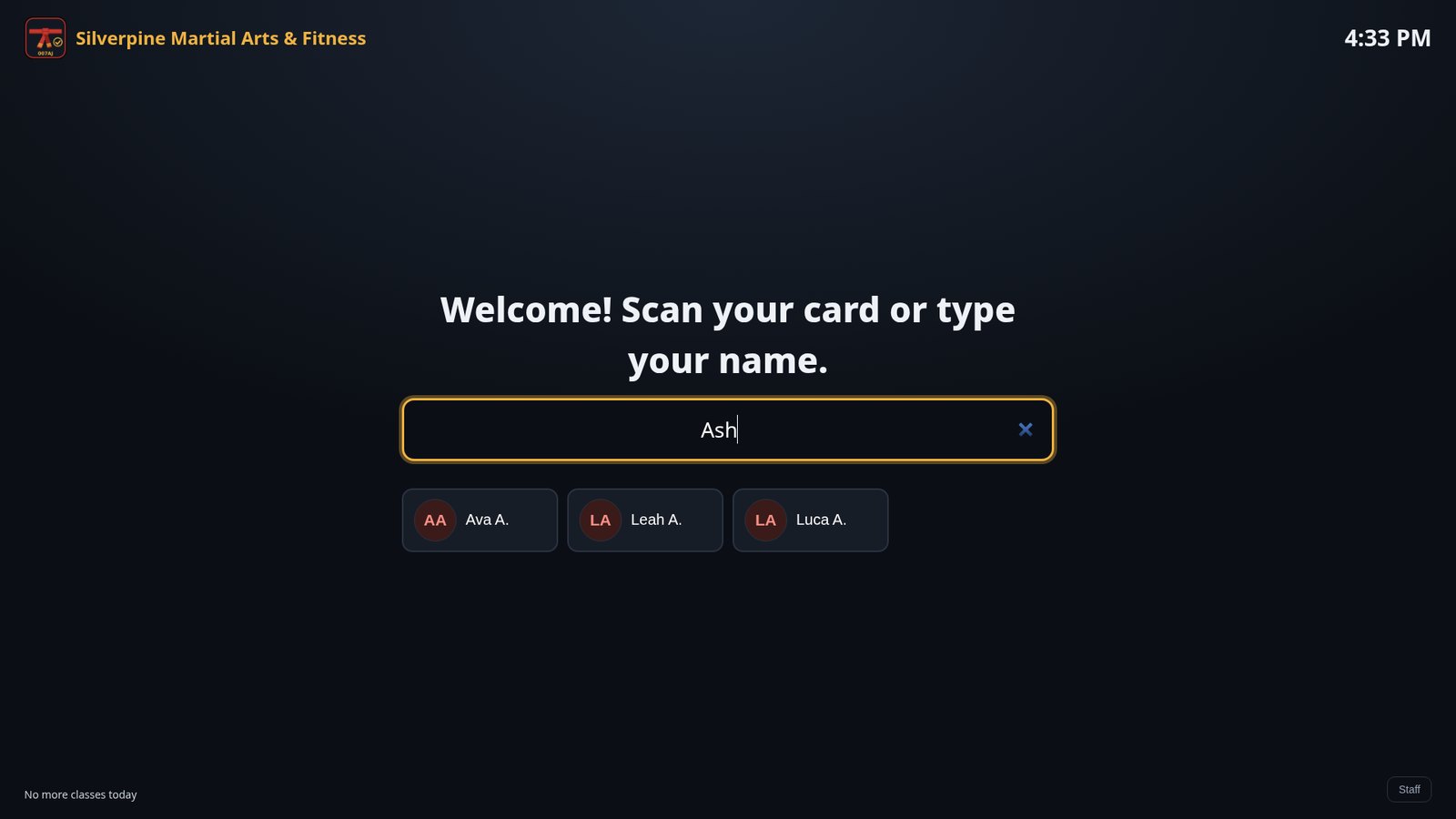
Kiosk check-in. Members scan their card or type their name to check themselves in, with no menus or money on screen (sample school).
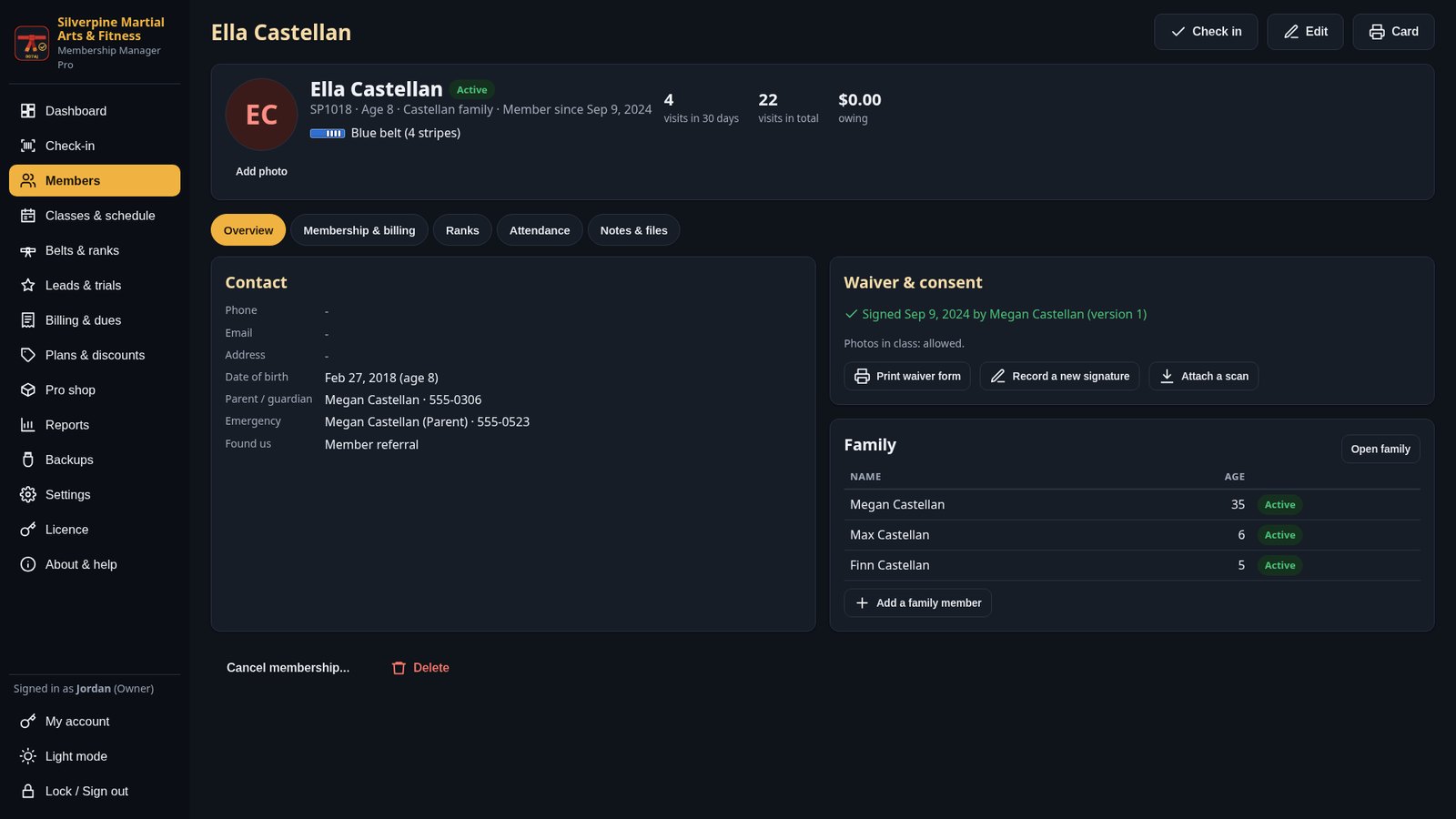
Member profile. Contact details, guardian, emergency contact, waiver, family, rank and attendance in one place (sample school).
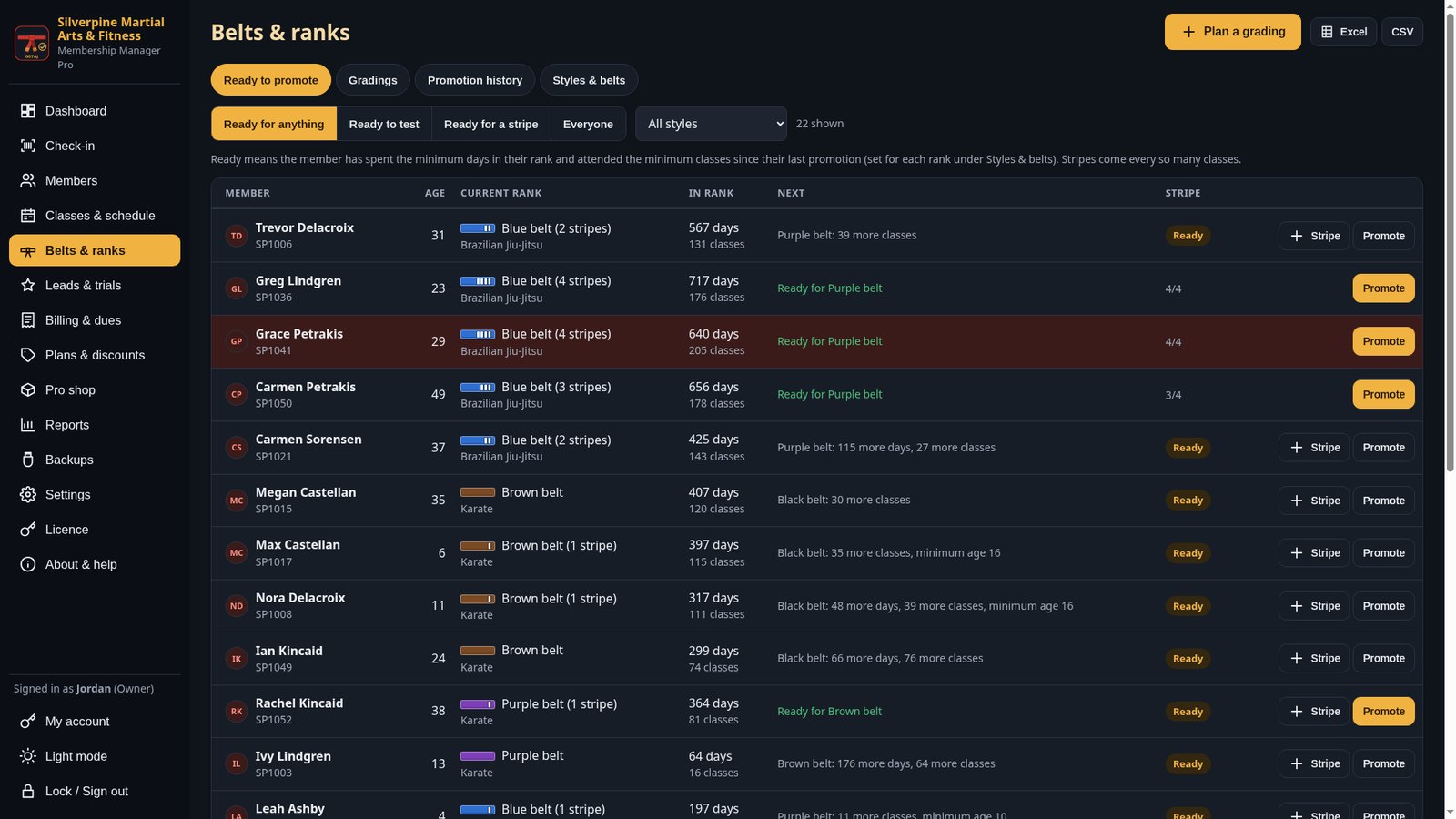
Belts & ranks. Who is ready for a stripe or the next belt, and what everyone else still needs (sample school).
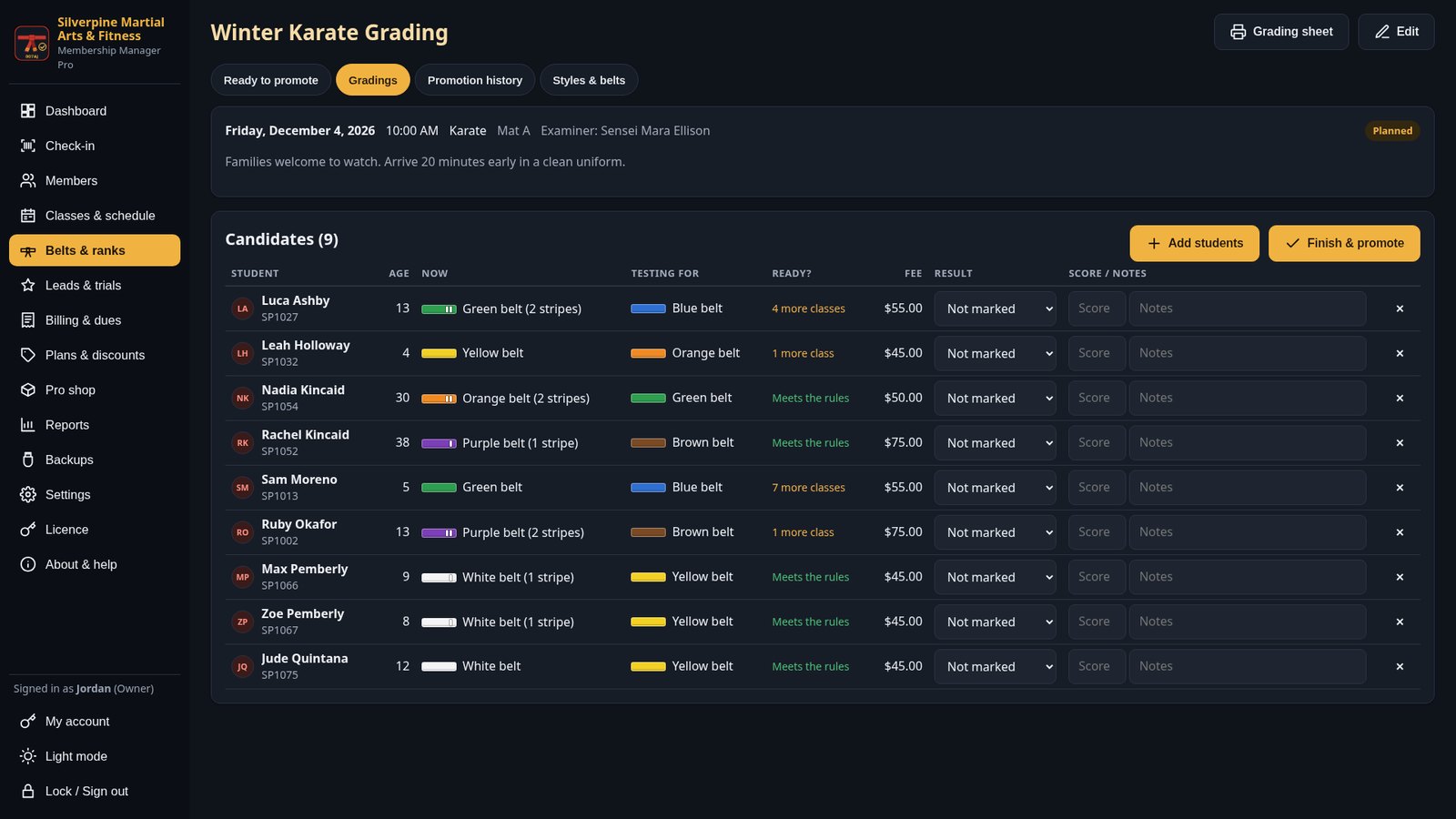
Grading. Candidates, readiness, results and one-step promotion with certificates (sample school).
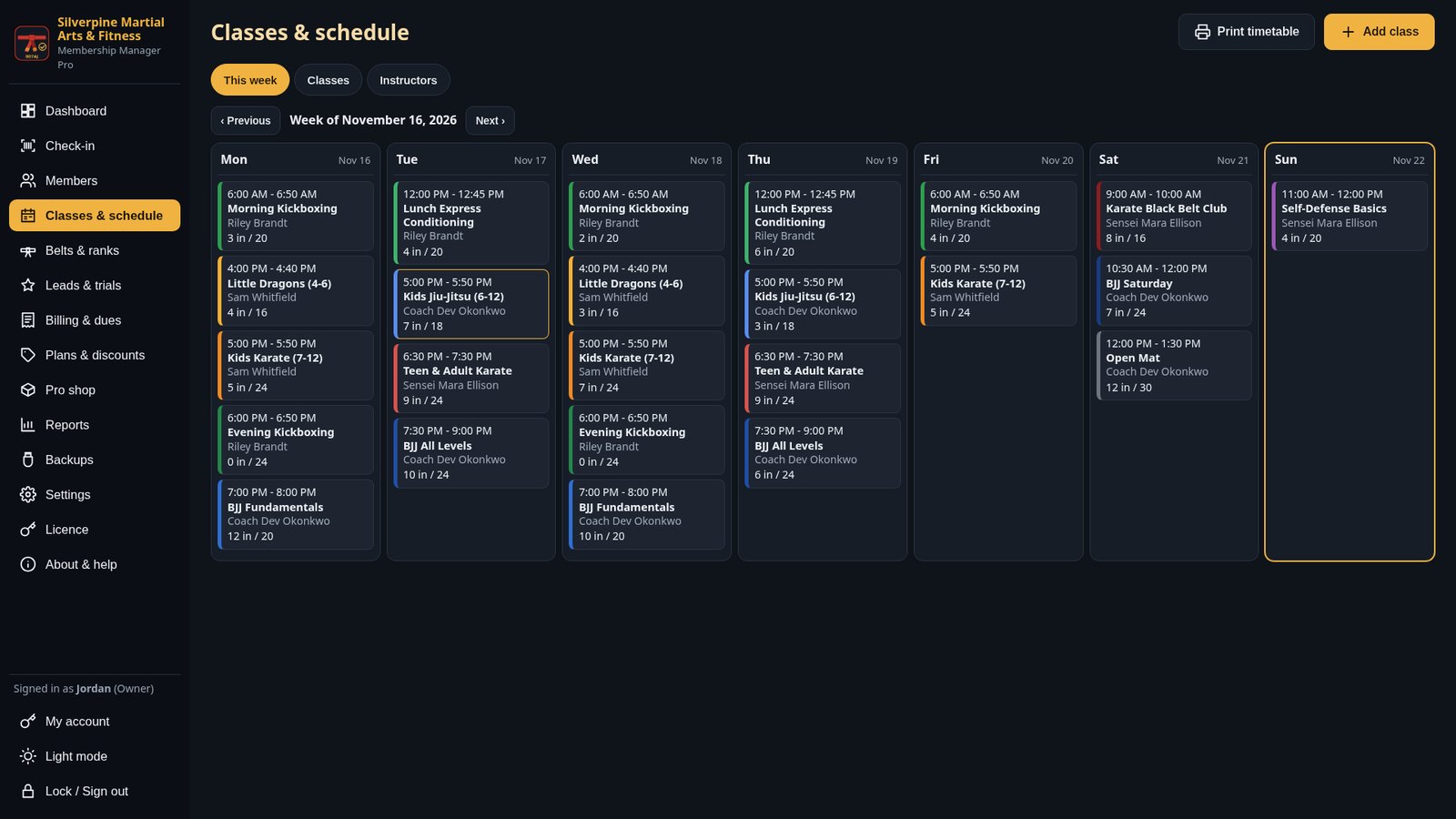
Class schedule. The week’s timetable, with how many came to each class (sample school).
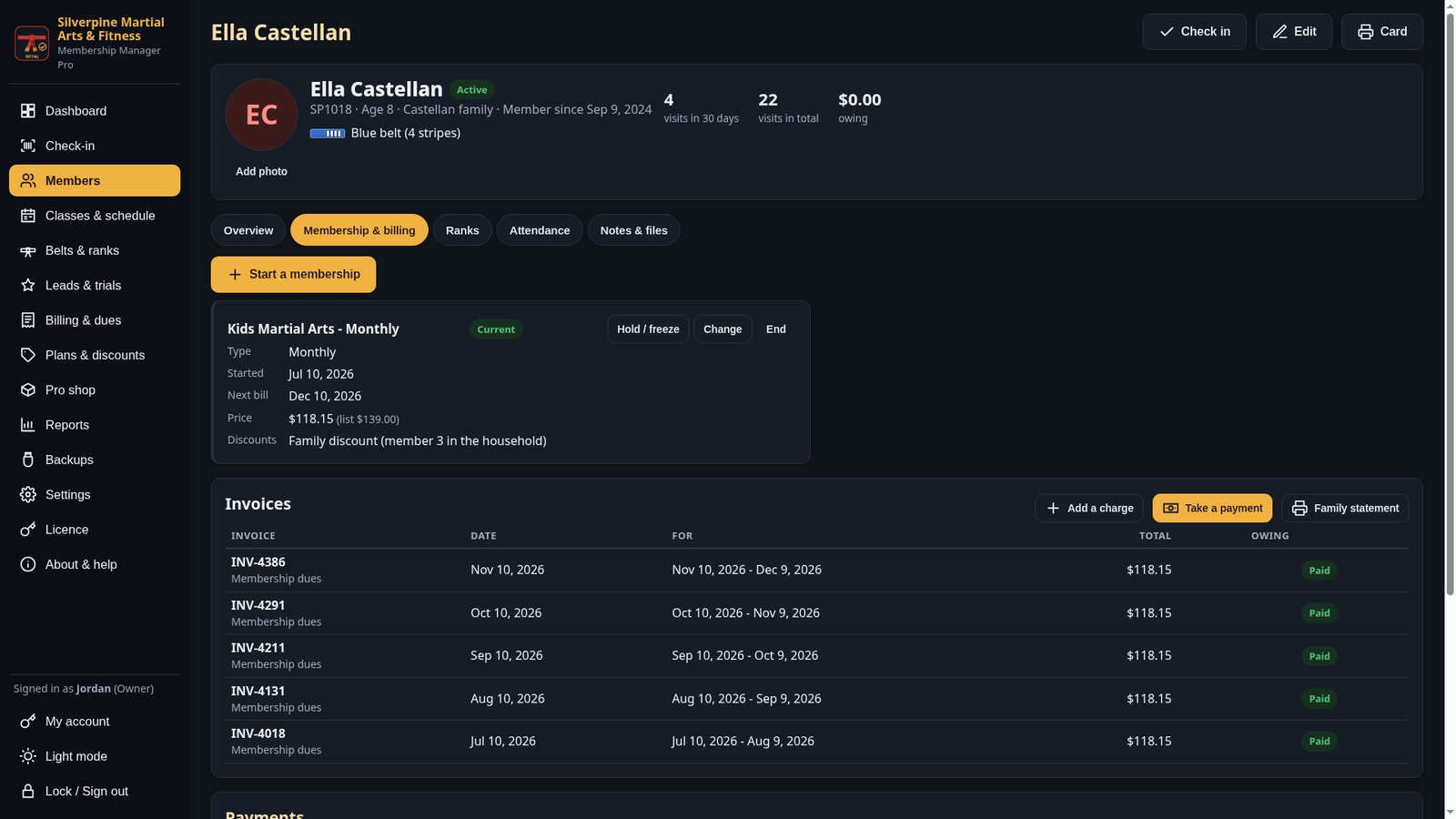
Membership & billing. A member’s monthly plan with the family discount, the next bill date and paid dues invoices (sample school).
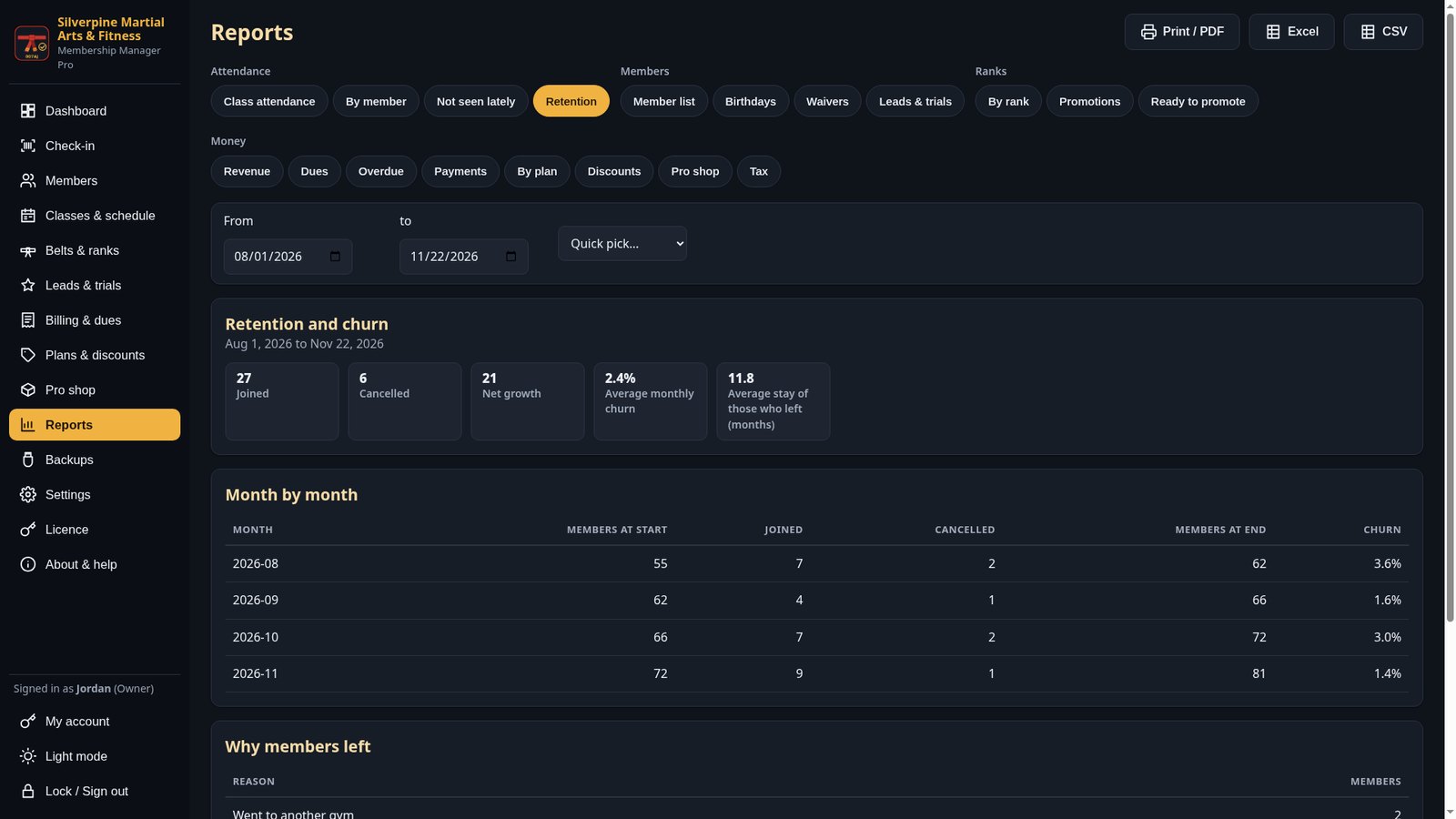
Retention report. Members joining, leaving and staying, month by month (sample school).
Everyday quality
Owner, manager and front-desk sign-ins
Sign in with a PIN or password. Front-desk staff never see money: no prices, dues, balances, invoices or payments. A Switch user and lock button, an optional inactivity lock, and an owner audit log of who changed what.
Backups built in
Automatic daily backups and a backup every time the program closes (the last 30 are kept), Backup now, Backup to USB or a folder, a second backup folder that gets a copy of every backup, and an owner-only restore with a preview.
Easy on the eyes
Dark mode (navy with red and gold) and light mode, a larger text option and keyboard shortcuts.
Try it on a sample school first
“Silverpine Martial Arts & Fitness” is made up, with 92 members in 16 families, 13 weekly classes including kids’ classes, karate and Brazilian jiu-jitsu belt ladders, about four months of attendance and billing history, a coming grading and 26 leads. Explore everything, then choose Start fresh for your real school.
Simple to install
Installs for your Windows user with no administrator password, and uninstalls from Windows Settings like any other app.
Who it is for — and who it is not for
Who it is for
Karate, taekwondo, judo, Brazilian jiu-jitsu, MMA, boxing and kickboxing schools, dojos and dojangs, plus small fitness, yoga and dance studios that run classes and monthly memberships. It fits best with one location, up to a few hundred members and one front-desk PC (with an optional second screen for the kiosk), when you are using paper sign-in sheets, attendance cards or spreadsheets today, or are tired of paying monthly for gym software.
Who it is not for
It is not a card processor and does not take automatic bank debits. It is not an online booking website, a member phone app, an e-signature service, payroll software or door access-control hardware. It runs on one PC and does not share data over a network between PCs or sync to the cloud. It is not for Mac, Linux, Chromebook, phones or tablets.
Requirements
Windows 10 or 11, 64-bit, one PC (no network sharing between PCs), about 400 MB of free space, and a screen of 1366 × 768 or bigger (1024 × 700 works). Optional: a printer, card stock for member cards, and a USB barcode scanner (keyboard type).
How you receive it
- Download it free from the Microsoft Store and use everything for 14 days, then buy a licence key on this page.
- Or buy the licence key on this page and download the signed Windows installer straight away. The key is emailed to you and shown on your receipt page.
Support
Email admin@007aj.dev. eBay buyers, please message us through eBay.
A record-keeping tool
Gym & Martial Arts Membership Manager Pro keeps your school’s records and paperwork. Medical notes and emergency contacts are what you enter; it does not give medical or injury advice. Waiver wording is yours to write and check; it is not legal advice. Taxes are worked out from the rates you set; it is not tax or accounting advice. It does not take card payments, debit bank accounts, run online booking or collect e-signatures.
Questions
Is this a subscription?
No. You pay once for a licence key. There are no monthly fees and no online account.
What happens after the 14-day trial?
Your records stay readable. You can still sign in, view and search everything, print or save PDFs of every document, run and export every report, export lists and make backups. Adding and changing records waits until the owner enters a licence key.
Can my front-desk staff see money?
No. Front-desk sign-ins can check members in and see classes and rosters, but no prices, dues, balances, invoices or payments. Kiosk mode shows no menus or money at all.
Can it take payments or bill cards automatically?
No. You record payments you already took (cash, cheque, card on your own terminal, or bank transfer). There is no card processing, no automatic bank debit, no online booking and no member app. Waivers print for signing on paper, and you can attach a scan.
Do I need a barcode scanner?
No. Members can be checked in by name at the desk or the kiosk. A USB barcode scanner (keyboard type) is optional and reads the barcode on the printed member cards.
Does it work on more than one computer?
It runs on one PC and keeps its data on that PC. It does not share data over a network or sync to the cloud. Backups can go to a USB drive or a second folder.
How do I enter a licence key?
Open Gym & Martial Arts Membership Manager Pro and sign in as the owner. Click Licence in the left menu, paste the whole key (it starts with GYM1-) and click Activate. No internet is needed. If you move to a new computer, restore your backup there and enter the same key.
What computers does it run on?
Windows 10 or Windows 11, 64-bit, on one PC. It is not for Mac, Linux, Chromebook, phones or tablets.
Can I look around before adding my own data?
Yes. Choose “Explore the demo” on first start to load a made-up martial arts school with members, families, classes, belt ladders, billing history and a coming grading, then choose Start fresh for your real school.
Where do I get help?
Email admin@007aj.dev.
Pay once. Works offline. Built for martial arts schools, dojos and small gyms.
Gym & Martial Arts Membership Manager Pro by 007AJ is a Windows 10 and Windows 11 program that keeps your school’s records on your own computer. Version 1.0.0. No subscription, no online account, and no internet needed. A 14-day trial, then a one-time licence key.
Support: email admin@007aj.dev
Gym & Martial Arts Membership Manager Pro is published by 007AJ (007aj.dev).
Not affiliated with Microsoft. Windows is a trademark of Microsoft Corporation.